







Question: In LABVIEW D5.7 Using parallel Case structures, create a VI that calculates how many days are left until your next birthday (excluding leap days). The
In LABVIEW
D5.7 Using parallel Case structures, create a VI that calculates how many days are left until your next birthday (excluding leap days). The inputs to the VI are the current month (ranging from 1 to 12), current date (ranging from 1 to 31), and the month and date of your birthday. The output of the VI is the number of days until your next birthday.
D5.8 Calculate the binary representation of a number from 128 to 127 using eight-bit twos complement integers. Be sure to check in the VI that the input number is in range and clear all data if the number is not within range. Create a front panel that has 8 LED indicators and a vertical slider control that can accept integer inputs between 128 and 127. Display a digital indicator for the slider, and make sure that the LEDs are evenly spaced and aligned at the bottom. To check your solution, if the slider is set to the number 1, all eight LEDs should be on. As another test of your solution, check the number 127. In this case, LEDs 0, 1, 2, 3, 4, 5, and 6 should be on and LED 7 should be off (where LED 7 is the most-significant bit).
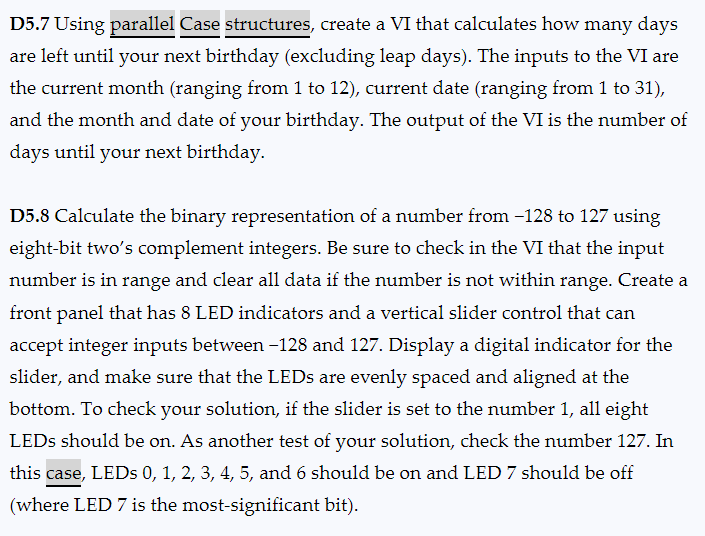
D5.7 Using parallel Case structures, create a VI that calculates how many days are left until your next birthday (excluding leap days). The inputs to the VI are the current month (ranging from 1 to 12), current date (ranging from 1 to 31), and the month and date of your birthday. The output of the VI is the number of days until your next birthday. D5.8 Calculate the binary representation of a number from -128 to 127 using eight-bit two's complement integers. Be sure to check in the VI that the input number is in range and clear all data if the number is not within range. Create a front panel that has 8 LED indicators and a vertical slider control that can accept integer inputs between -128 and 127 . Display a digital indicator for the slider, and make sure that the LEDs are evenly spaced and aligned at the bottom. To check your solution, if the slider is set to the number 1 , all eight LEDs should be on. As another test of your solution, check the number 127. In this case, LEDs 0,1,2,3,4,5, and 6 should be on and LED 7 should be off (where LED 7 is the most-significant bit)
Step by Step Solution
There are 3 Steps involved in it
Heres a summary and breakdown of the two exercises shown in your image both of which are LabVIEW pro... View full answer

Get step-by-step solutions from verified subject matter experts
 Study Help