







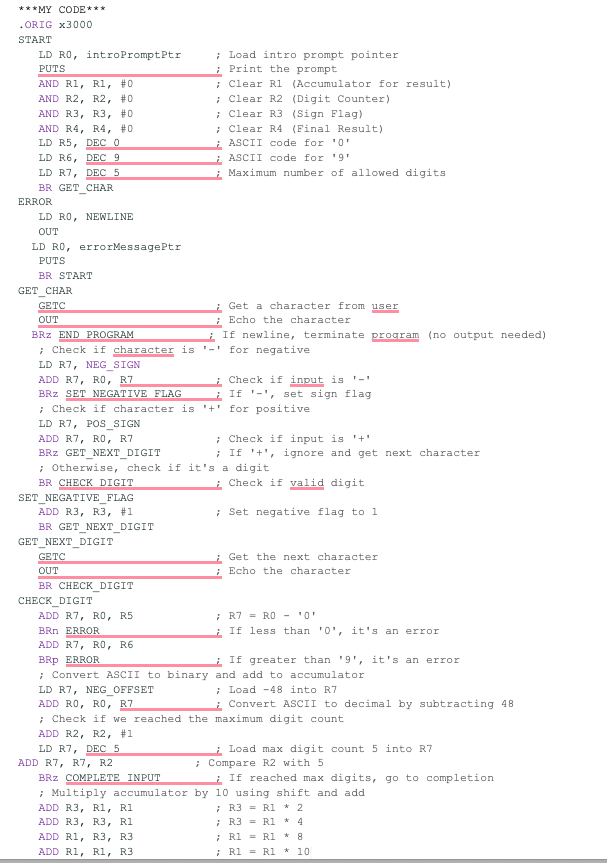
Question: In LC - 3 , I have included my code in the images attached. I cannot pass the tests attached. * * * Starter Code
In LC I have included my code in the images attached. I cannot pass the tests attached.
Starter Code with Instructions
;THE BINARY REPRESENTATION OF THE USERENTERED DECIMAL NUMBER MUST BE STORED IN R
ORIG x
;
; Instructions
;
; output intro prompt
; Set up flags, counters, accumulators as needed
; Get first character, test for
digitnondigit
; is very first character
if so just quit no message
; is it if so ignore it go get digits
; is it if so set neg flag, go get digits
; is it if so it is not a digit op error message, start over
; is it if so it is not a digit op error message, start over
; if none of the above, first character is first numeric digit convert it to number & store in target register!
; Now get remaining digits from user in a loop max testing each to see if it is a digit, and build up number in accumulator
; remember to end with a newline!
HALT
;
; Program Data
;
introPromptPtrFILL xB
errorMessagePtr FILL xB
END
;
; Remote data
;
ORIG xB ; intro prompt
STRINGZ "Input a positive or negative decimal number max digits followed by ENTER
END
ORIG xB ; error message
STRINGZ "ERROR: invalid input
;
; END of PROGRAM
;
END
;
; PURPOSE of PROGRAM
;
; Convert a sequence of up to userentered ascii numeric digits into a bit two's complement binary representation of the number.
; if the input sequence is less than digits, it will be userterminated with a newline ENTER
; Otherwise, the program will emit its own newline after input digits.
; The program must end with a single newline, entered either by the user digits or by the program digits
; Input validation is performed on the individual characters as they are input, but not on the magnitude of the number.
Test ve Number without Sign
Test Failed: Failed: Program register output differs from the solution register output.
Test digit ve Number with Sign
Test Failed: Failed: Program register output differs from the solution register output.
Test ve Number
Test Failed: Failed: Program register output differs from the solution register output.
Test digit ve Number
Test Failed: Failed: Program register output differs from the solution register output.
Test invalid initial character, ve number wsign
Test Failed: Failed: Program register output differs from the solution register output.
Test invalid internal character, ve number
Test Failed: Failed: Program register output differs from the solution register output.
Test Double Sign, ve number wsign
Test Failed: Failed: Program register output differs from the solution register output.
Test no entry
Step by Step Solution
There are 3 Steps involved in it
1 Expert Approved Answer
Step: 1 Unlock

Question Has Been Solved by an Expert!
Get step-by-step solutions from verified subject matter experts
Step: 2 Unlock
Step: 3 Unlock
 Study Help