







Question: IN MATLAB GRADER: A) Where indicated below, write a script that calls the function nest() to evaluate P(2) , where P(x) is defined in Theoretical
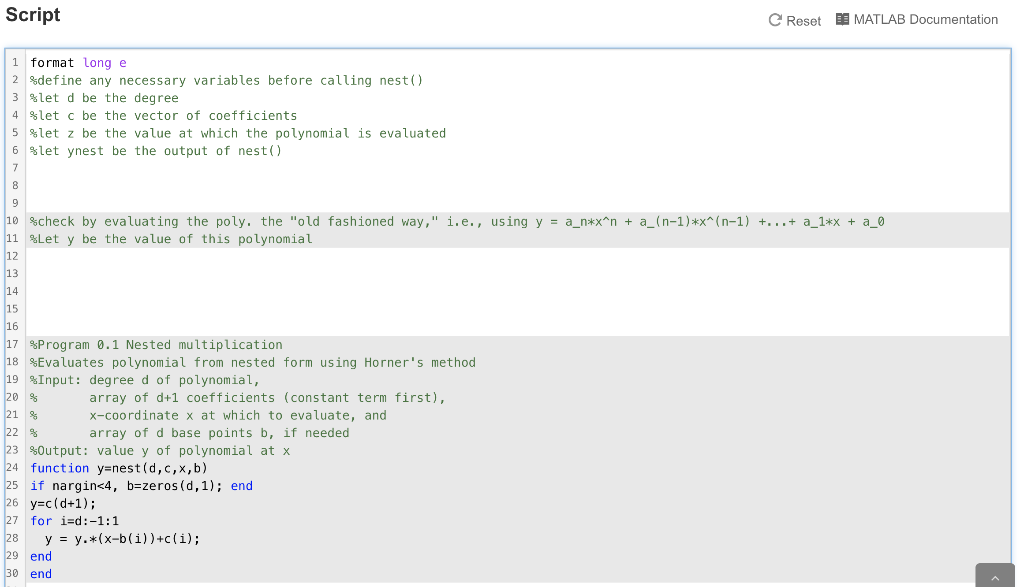 IN MATLAB GRADER:
A)
Where indicated below, write a script that calls the function nest() to evaluate P(2) , where P(x) is defined in Theoretical Problem 1:
p(x)= 7x^24 - x^20 + 4x^16 - x^8 + 3x^4 - 2
Use your results from Theoretical Problem 1 to minimize the number of computations. Note that using nest() may require a slightly different number of flops (floating-point operations, i.e., arithmetic operations) from your result in Problem 1, but use as few flops as possible when applying nest(). You do not have to pass the 4th argument to the function (the base points) just the first 3 arguments. The function nest() is provided at the bottom of the file; you will be calling this function as appropriate in the script that you write above this function. Note that a function can be written in the same script file from which it is called, or it can be placed in another m-file in the same folder as the script m-file which calls it.
B) why does the running sum eventually stop changing? What phenomenon is occurring here that we discussed in class?
1)
%define any necessary variables before calling nest()
%let d be the degree
%let c be the vector of coefficients
%let z be the value at which the polynomial is evaluated
%let ynest be the output of nest()
2)
%check by evaluating the poly. the "old fashioned way," i.e., using y = a_n*x^n + a_(n-1)*x^(n-1) +...+ a_1*x + a_0
%Let y be the value of this polynomial
3)
%Program 0.1 Nested multiplication
%Evaluates polynomial from nested form using Horner's method
%Input: degree d of polynomial,
% array of d+1 coefficients (constant term first),
% x-coordinate x at which to evaluate, and
% array of d base points b, if needed
%Output: value y of polynomial at x
function y=nest(d,c,x,b)
if nargin
y=c(d+1);
for i=d:-1:1
y = y.*(x-b(i))+c(i);
end
end
Script e Reset DE MATLAB Documentation i format long e 2 define any necessary variables before calling nest() 3 slet d be the degree 4 slet c be the vector of coefficients 5 %let z be the value at which the polynomial is evaluated 6 let ynest be the output of nest() 10 Scheck by evaluating the poly. the "old fashioned way," i.e., using y = a_n*X^n + a_(n-1)*x^(n-1) +...+ a_1*x + a_0 11 Let y be the value of this polynomial 17 Program 0.1 Nested multiplication 18 Evaluates polynomial from nested form using Horner's method 19 %Input: degree d of polynomial, array of d+1 coefficients (constant term first), 21 X-Coordinate x at which to evaluate, and 22 % array of d base points b, if needed 23 Output: value y of polynomial at x function y=nest(d,c,x,b) 25 if nargin
Step by Step Solution
There are 3 Steps involved in it

Get step-by-step solutions from verified subject matter experts
 Study Help