







Question: In matlab, please help me solve WriteasinglefunctionmfilethatsolvestheproblemandnameitLastNameProblem3.Writeyour results for parts (1) to (3) to A8.dat, A9.dat and A10.dat. Write your column vector results for parts
In matlab, please help me solve
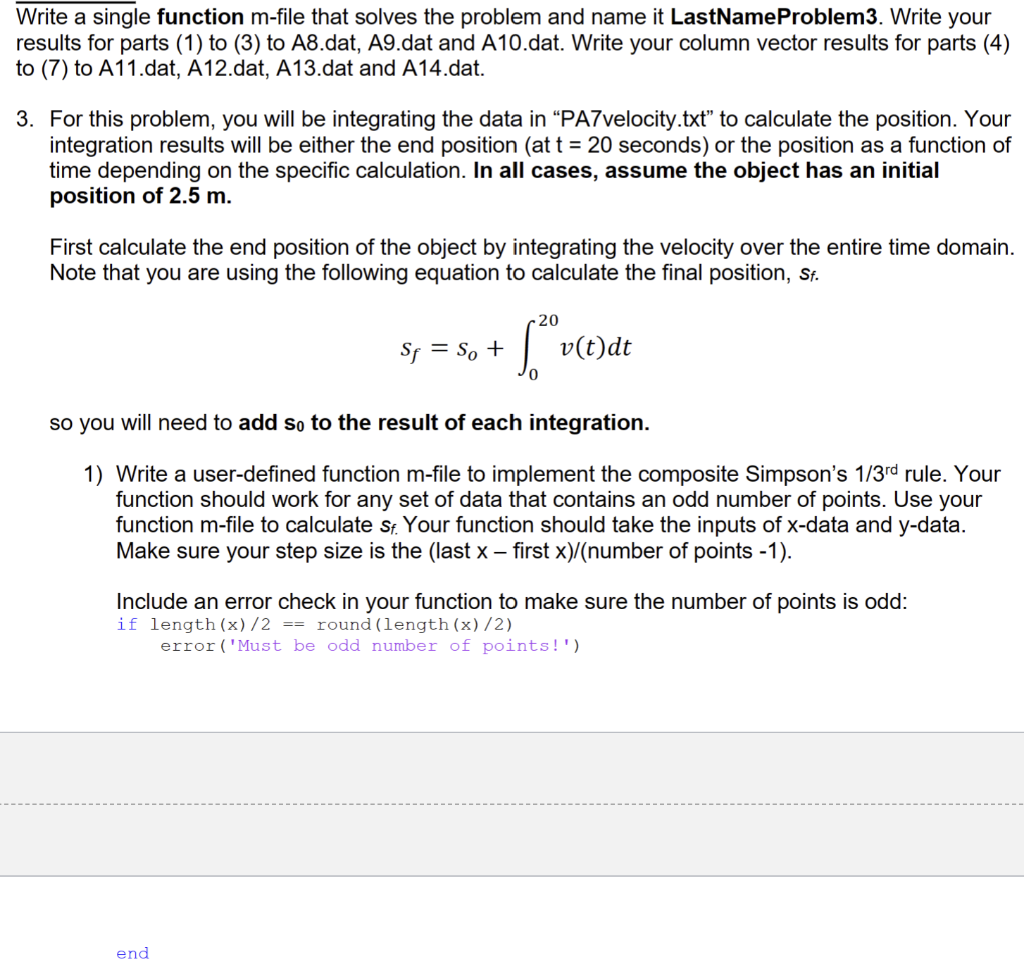
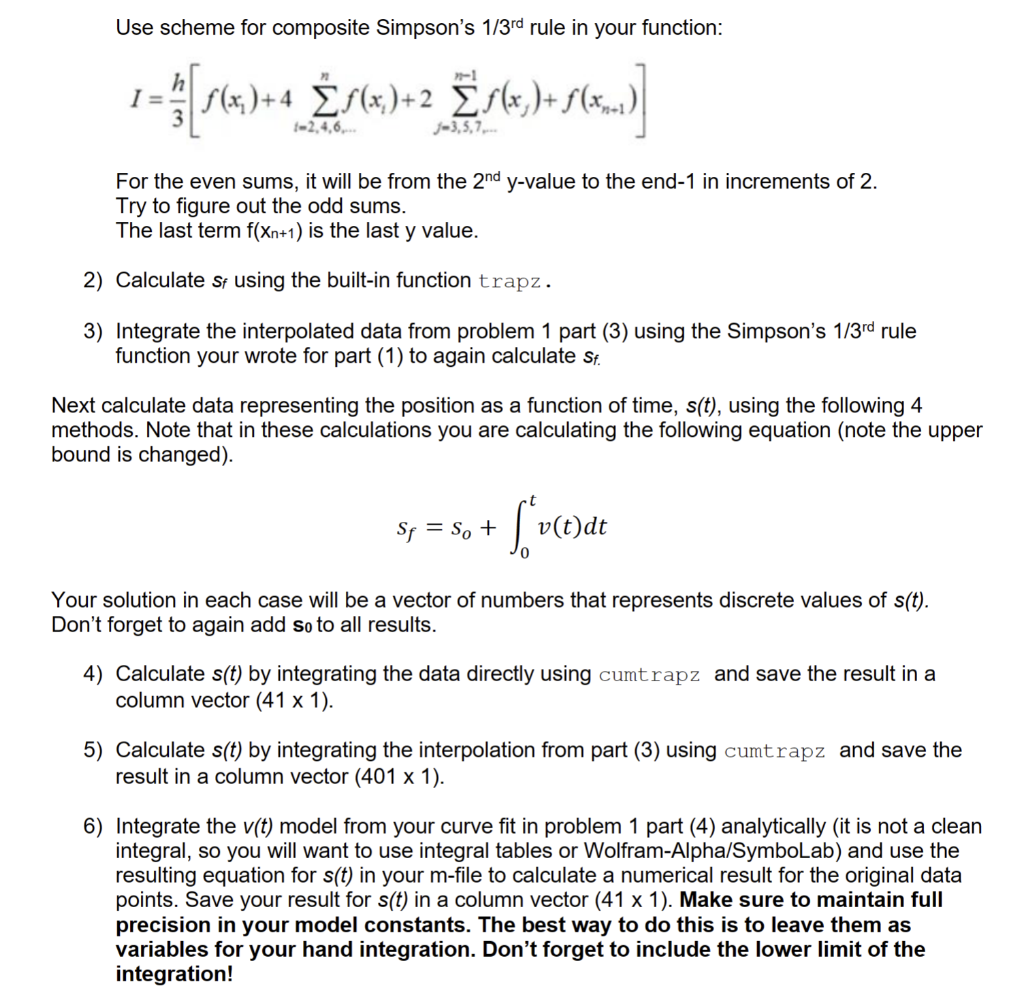
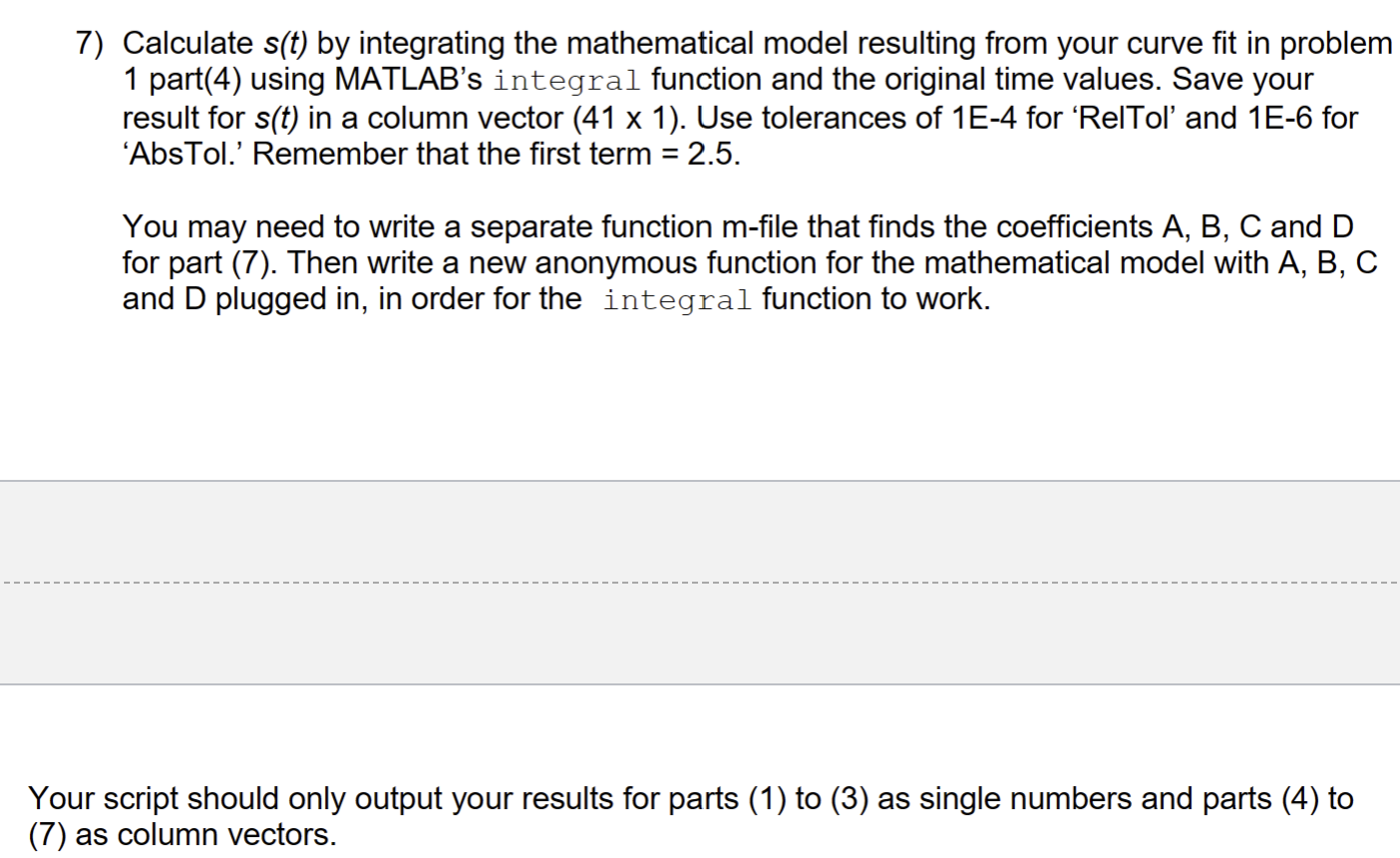
WriteasinglefunctionmfilethatsolvestheproblemandnameitLastNameProblem3.Writeyour results for parts (1) to (3) to A8.dat, A9.dat and A10.dat. Write your column vector results for parts (4) to (7) to A11.dat, A12.dat, A13.dat and A14.dat. 3. For this problem, you will be integrating the data in "PA7velocity.txt" to calculate the position. Your integration results will be either the end position (at t=20 seconds) or the position as a function of time depending on the specific calculation. In all cases, assume the object has an initial position of 2.5m. First calculate the end position of the object by integrating the velocity over the entire time domain. Note that you are using the following equation to calculate the final position, sf. sf=so+020v(t)dt so you will need to add s0 to the result of each integration. 1) Write a user-defined function m-file to implement the composite Simpson's 1/3rd rule. Your function should work for any set of data that contains an odd number of points. Use your function m-file to calculate sf. Your function should take the inputs of x-data and y-data. Make sure your step size is the (last x first x)/( number of points 1). Include an error check in your function to make sure the number of points is odd: if length (x)/2== round ( length (x)/2) error('Must be odd number of points!') Use scheme for composite Simpson's 1/3rd rule in your function: I=3h[f(x1)+4i=2,4,6,nf(xi)+2j=3,5,7n1f(xj)+f(xn+1)] For the even sums, it will be from the 2ndy-value to the end-1 in increments of 2 . Try to figure out the odd sums. The last term f(xn+1) is the last y value. 2) Calculate sf using the built-in function trapz. 3) Integrate the interpolated data from problem 1 part (3) using the Simpson's 1/3rd rule function your wrote for part (1) to again calculate sf. Next calculate data representing the position as a function of time, s(t), using the following 4 methods. Note that in these calculations you are calculating the following equation (note the upper bound is changed). sf=so+0tv(t)dt Your solution in each case will be a vector of numbers that represents discrete values of s(t). Don't forget to again add s0 to all results. 4) Calculate s(t) by integrating the data directly using cumtrapz and save the result in a column vector (411). 5) Calculate s(t) by integrating the interpolation from part (3) using cumtrapz and save the result in a column vector (4011). 6) Integrate the v(t) model from your curve fit in problem 1 part (4) analytically (it is not a clean integral, so you will want to use integral tables or Wolfram-Alpha/SymboLab) and use the resulting equation for s(t) in your m-file to calculate a numerical result for the original data points. Save your result for s(t) in a column vector (411). Make sure to maintain full precision in your model constants. The best way to do this is to leave them as variables for your hand integration. Don't forget to include the lower limit of the integration! 7) Calculate s(t) by integrating the mathematical model resulting from your curve fit in problem 1 part(4) using MATLAB's integral function and the original time values. Save your result for s(t) in a column vector (411). Use tolerances of 1E4 for 'RelTol' and 1E6 for 'AbsTol.' Remember that the first term =2.5. You may need to write a separate function m-file that finds the coefficients A,B,C and D for part (7). Then write a new anonymous function for the mathematical model with A, B, C and D plugged in, in order for the integral function to work. Your script should only output your results for parts (1) to (3) as single numbers and parts (4) to (7) as column vectors
Step by Step Solution
There are 3 Steps involved in it

Get step-by-step solutions from verified subject matter experts
 Study Help