







Question: in matlab please help with this quick function please help with the transition function 90' 91.X.R .. .. .. . . . 2 Turing Machine
in matlab please help with this quick function
please help with the transition function
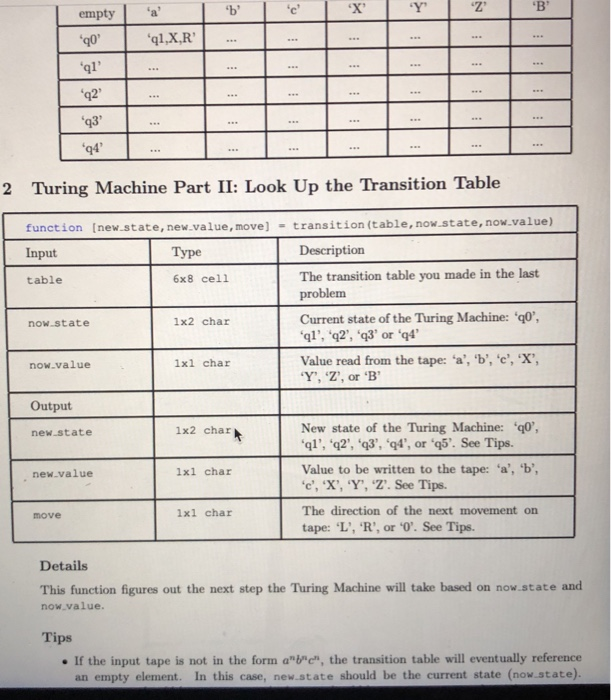
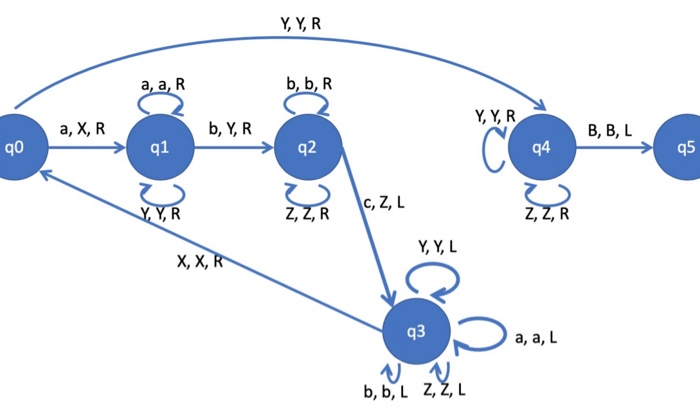
90' 91.X.R .. .. .. . . . 2 Turing Machine Part II: Look Up the Transition Table function (new.state, new.value, move) - transition (table, now.state, now.value) Input Type Description table 6x8 cell now-state 1x2 char The transition table you made in the last problem Current state of the Turing Machine: *q0', 'q1', '22', 'q3' or '94 Value read from the tape: 'a', 'b', 'e', 'X', 'Y', 'Z', or 'B now.value 1xl char Output new.state 1x2 char New state of the Turing Machine: "q0', 'q1', '22', '43', '4', or "q5'. See Tips Value to be written to the tape: 'a', 'b', 'c', 'X', 'Y', 'Z'. See Tips. new.value 1xl char move 1xl char The direction of the next movement on tape: 'L', 'R', or "O'. See Tips. Details This function figures out the next step the Turing Machine will take based on now.state and now.value Tips If the input tape is not in the form a""", the transition table will eventually reference an empty element. In this case, new.state should be the current state (now.state). Y, Y, R a, a, R b, b, R 2 Y, YR a, XR b, YR BBL qo 91 q2 94 q5 o 7 ZR C, Z, L Y, Y, L X, X,R q3 Ja,a, l b, b, L Z, ZAL 90' 91.X.R .. .. .. . . . 2 Turing Machine Part II: Look Up the Transition Table function (new.state, new.value, move) - transition (table, now.state, now.value) Input Type Description table 6x8 cell now-state 1x2 char The transition table you made in the last problem Current state of the Turing Machine: *q0', 'q1', '22', 'q3' or '94 Value read from the tape: 'a', 'b', 'e', 'X', 'Y', 'Z', or 'B now.value 1xl char Output new.state 1x2 char New state of the Turing Machine: "q0', 'q1', '22', '43', '4', or "q5'. See Tips Value to be written to the tape: 'a', 'b', 'c', 'X', 'Y', 'Z'. See Tips. new.value 1xl char move 1xl char The direction of the next movement on tape: 'L', 'R', or "O'. See Tips. Details This function figures out the next step the Turing Machine will take based on now.state and now.value Tips If the input tape is not in the form a""", the transition table will eventually reference an empty element. In this case, new.state should be the current state (now.state). Y, Y, R a, a, R b, b, R 2 Y, YR a, XR b, YR BBL qo 91 q2 94 q5 o 7 ZR C, Z, L Y, Y, L X, X,R q3 Ja,a, l b, b, L Z, ZAL
Step by Step Solution
There are 3 Steps involved in it

Get step-by-step solutions from verified subject matter experts
 Study Help