







Question: In Microsoft Visual Studio (C#): How to Enter correct password to view a secret picture Add a PictureBox control to a form and use the
In Microsoft Visual Studio (C#): How to Enter correct password to view a secret picture
Add a PictureBox control to a form and use the Image property of the control to import a picture of your choice. Set the controls Visible property to false. Add a textbox for a user to enter a password and a button to submit the password. Your program should declare a class level variable named secretPassword with a password of your choice and allow a user to try at most three times to enter the correct password to view the secret picture. If the user enters a correct password your program changes the Visible property to true to show the picture. Otherwise, after three failed tries the Submit button is disabled. The pseudo-code below is one way to do this problem and you may have other solution:
Increase counter
If correct password is entered
Reveal the picture
Else
If counter less than 3
Display a message and ask use to try again
Else
Display a message and disable to button
Example:
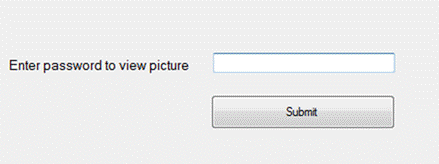
nter password to view picture Submit
Step by Step Solution
There are 3 Steps involved in it

Get step-by-step solutions from verified subject matter experts
 Study Help