







Question: in python create the above program. if the elevation is less than or equal to 0, color the pixel 25% blue (and 0% red and
in python create the above program.
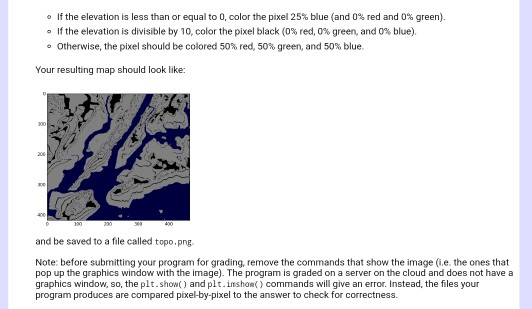
if the elevation is less than or equal to 0, color the pixel 25% blue (and 0% red and 0% green). If the elevation is divisible by 10, color the pixel black (0% red, 0% green, and 0% blue). Otherwise, the pixel should be colored 50% red, 50% green, and 50% blue. Your resulting map should look like: and be saved to a file called topo.png. Note: before submitting your program for grading, remove the commands that show the image (i.e. the ones that pop up the graphics window with the image). The program is graded on a server on the cloud and does not have a graphics window, so, the plt.show) and plt. imsho) commands will give an error. Instead, the files your program produces are compared pixel-by-pixel to the answer to check for correctness. if the elevation is less than or equal to 0, color the pixel 25% blue (and 0% red and 0% green). If the elevation is divisible by 10, color the pixel black (0% red, 0% green, and 0% blue). Otherwise, the pixel should be colored 50% red, 50% green, and 50% blue. Your resulting map should look like: and be saved to a file called topo.png. Note: before submitting your program for grading, remove the commands that show the image (i.e. the ones that pop up the graphics window with the image). The program is graded on a server on the cloud and does not have a graphics window, so, the plt.show) and plt. imsho) commands will give an error. Instead, the files your program produces are compared pixel-by-pixel to the answer to check for correctness
Step by Step Solution
There are 3 Steps involved in it

Get step-by-step solutions from verified subject matter experts
 Study Help