







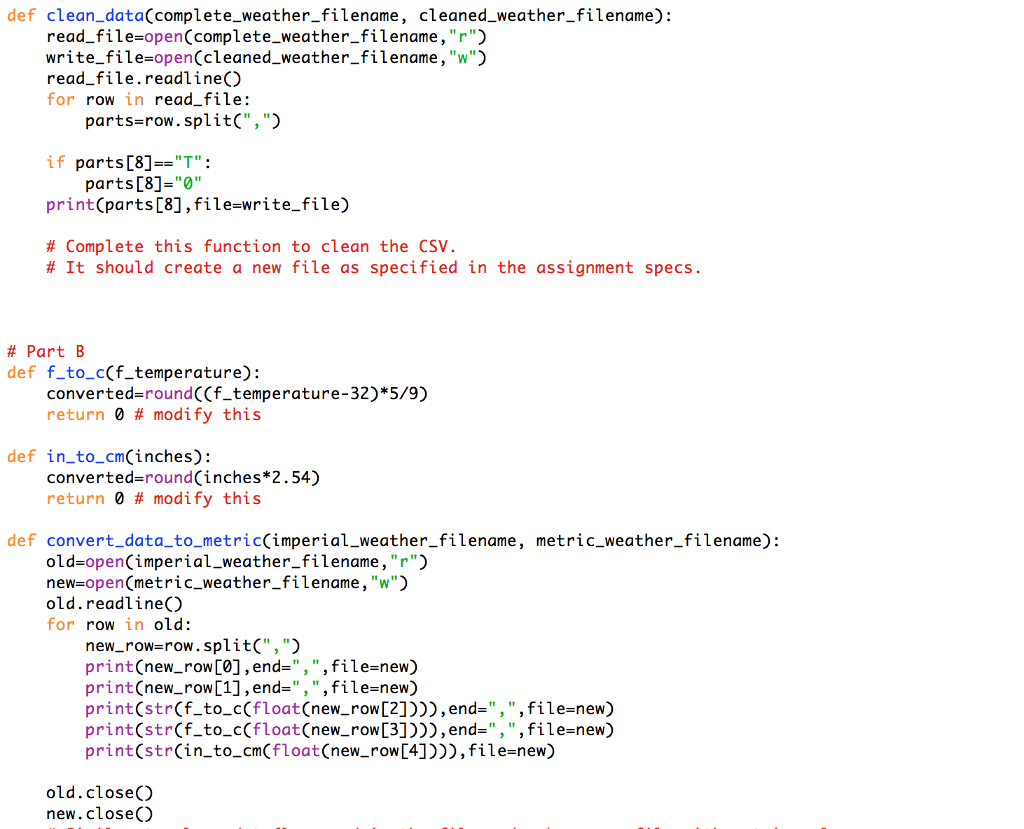
Question: In python here is what I got so far for part A and part B...I need help with part C and D Part C Working
In python here is what I got so far for part A and part B...I need help with part C and D
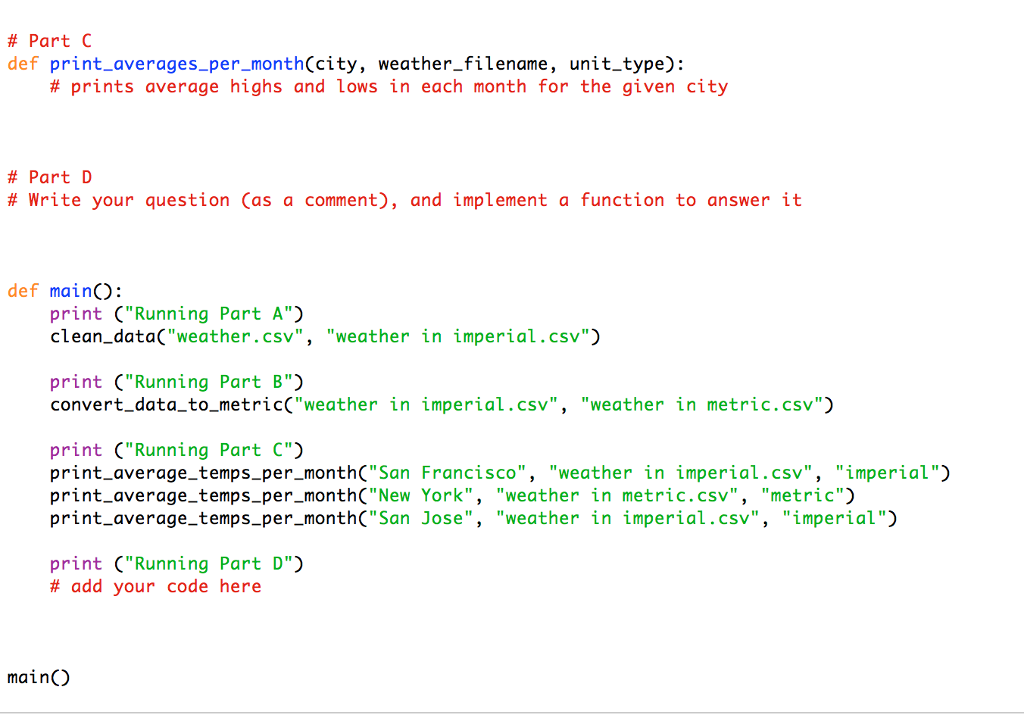
Part C Working with the data: Now that we have a clean and usable data file, we can start making calculations with it! Complete the implementation of the function:print_averages_per_month(city, weather_filename, unit_type)
This function should print out the average high temperature and the average low temperature for each month for the city passed in. For each month, the average should include the data over all of the years in the weather file given. Notes:
The second parameter, weather_filename, is a name of a file containing cleaned weather. That is, this file was either created by the function clean_data (implemented in part A), or byconvert_data_to_metric (implemented in part B)
You may assume that the unit_type parameter will be either "imperial" or "metric", and that it will match the units of the data in weather_filename.
Your code must work with all files storing the data in this format, containing data of any timeframe.
For example, if we call:
print_averages_per_month("San Francisco", "imperial weather.csv", "imperial")
It should print out in the following format (the actual data will obviously be different):
Average temperatures for San Francisco: January: 64F High, 52F Low February: 62F High, 49F Low March: 66F High, 55F Low
. . .
Hints:
The date format in our files is Month/Day/Year. Use the split method to separate the different fields
of the date.
Since you have to calculate 24 averages (high and low for each one of the 12 months), instead of
holding 24 sum variables, you can use two lists: one for the sums of the highs, and one for the sums of the lows. For example if high_sums is the list that holds the sums of the high temperatures, then high_sums[0] will be the sum of the high temperatures for January, high_sums[1] will be the sum of the high temperatures for February and so on.
To make the printing easier, you may need an extra list with month names.
Part D Working with the data, contd: Think of a question that could be interesting to investigate, using this data. Write a function that queries the data file to answer this question. Add a few lines of code in the main to interact with the user and call your function.
For example, if you choose to compare the average rainfall of two given cities, you'd write something like:
# Q: Given two cities, which has higher average rainfall?
def higher_rainfall(city1, city2, weather_filename) # city1 and city2 are names of two cities # return which is the one that has higher average rainfall
def clean_data(complete_weather_filename, cleaned_weather_filename): read_file open(complete_weather_filename,"r") write_file-open(cleaned_weather_filename, "w" read file.readline) for row in read file: parts-row.split("," if parts [8]"T" print(parts[8],file-write_file) # Complete this function to clean the CSV. parts [8]-"" # It should create a new file as specified in the assignment specs # Part B def f to_c(f_temperature): converted-round((f_temperature-32)*5/9) return 0 # modify this def in to cmCinches): converted-round(inches*2.54) return 0 # modify this def convert_data_to_metric(imperial_weather_filename, metric_weather_filename): old-open(imperial_weather_filename,"r") new-open(metric_weather_filename, "w") old.readlineC for row in old: new_row-row.split(",") print(new_row[0],end-",",file-new) print(new-row [1] , end=" , " , file-new) print(str(f_to_c(float(new_row[2]))), end-",",file-new) print(str(f_to_c(float(new_row[3]))), end-",",file-new) print(str(in_to_cm(float(new_row[4]))),file-new) old.closeO new.close() def clean_data(complete_weather_filename, cleaned_weather_filename): read_file open(complete_weather_filename,"r") write_file-open(cleaned_weather_filename, "w" read file.readline) for row in read file: parts-row.split("," if parts [8]"T" print(parts[8],file-write_file) # Complete this function to clean the CSV. parts [8]-"" # It should create a new file as specified in the assignment specs # Part B def f to_c(f_temperature): converted-round((f_temperature-32)*5/9) return 0 # modify this def in to cmCinches): converted-round(inches*2.54) return 0 # modify this def convert_data_to_metric(imperial_weather_filename, metric_weather_filename): old-open(imperial_weather_filename,"r") new-open(metric_weather_filename, "w") old.readlineC for row in old: new_row-row.split(",") print(new_row[0],end-",",file-new) print(new-row [1] , end=" , " , file-new) print(str(f_to_c(float(new_row[2]))), end-",",file-new) print(str(f_to_c(float(new_row[3]))), end-",",file-new) print(str(in_to_cm(float(new_row[4]))),file-new) old.closeO new.close()
Step by Step Solution
There are 3 Steps involved in it

Get step-by-step solutions from verified subject matter experts
 Study Help