







Question: IN PYTHON. PLZZ CAREFULLY ANSWER ALL QUESTIONS. I WILL LIKE. The pandas DataFrame In [15]: # create a DataFrame from the two series objects clt_temp
IN PYTHON. PLZZ CAREFULLY ANSWER ALL QUESTIONS. I WILL LIKE.
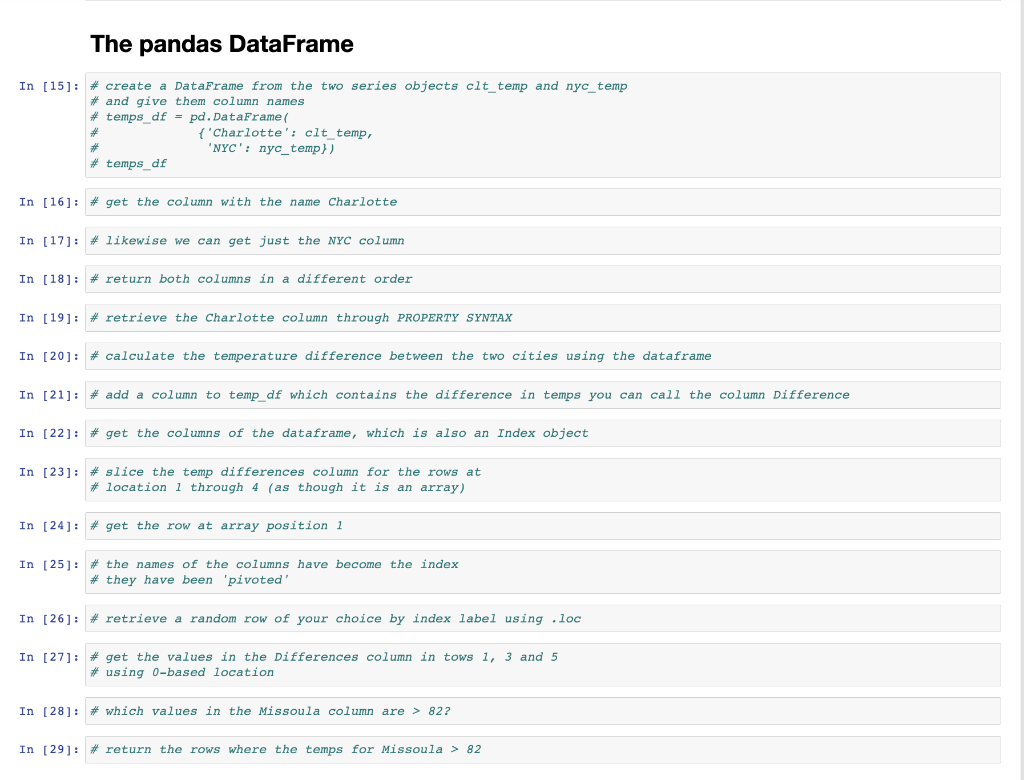
The pandas DataFrame In [15]: \# create a DataFrame from the two series objects clt_temp and nyc_temp * and give them column names \# temps_df = pd.DataFramel \# temps_df In [16]: \# get the column with the name charlotte In [17]: \# likewise we can get just the NYC column In [18]: \# return both columns in a different order In [19]: \# retrieve the Charlotte column through PROPERTY SYNTAX In [20]: \# calculate the temperature difference between the two cities using the dataframe In [21]: \# add a column to temp_df which contains the difference in temps you can call the column Difference In [22]: \# get the columns of the dataframe, which is also an Index object In [23]: \# slice the temp differences column for the rows at \# location 1 through 4 (as though it is an array) In [24]: \# get the row at array position 1 In [25]: \# the names of the columns have become the index \# they have been 'pivoted' In [26]: \# retrieve a random row of your choice by index label using . loc In [27]: \# get the values in the Differences column in tows 1, 3 and 5 * using O-based location In [28]: \# which values in the Missoula column are >82 ? In [29]: \# return the rows where the temps for Missoula >82
Step by Step Solution
There are 3 Steps involved in it

Get step-by-step solutions from verified subject matter experts
 Study Help