







Question: In Python using Pandas Data frame only: How can we iterate through rows of a column and divide previous row by following row throughout the
In Python using Pandas Data frame only:
How can we iterate through rows of a column and divide previous row by following row throughout the table:
eg: Focusing on columns close and AdjClose
close on dec 28,2018 (113.03) divided by close on dec 27,2018 (113.78) = 0.99340833
Adj close on dec 28,2018 (101.3) divided by close on dec 27,2018 (101.80) = 0.99341847
Then substract the result from Close from the result of Adj close (result to be stored in a new column)
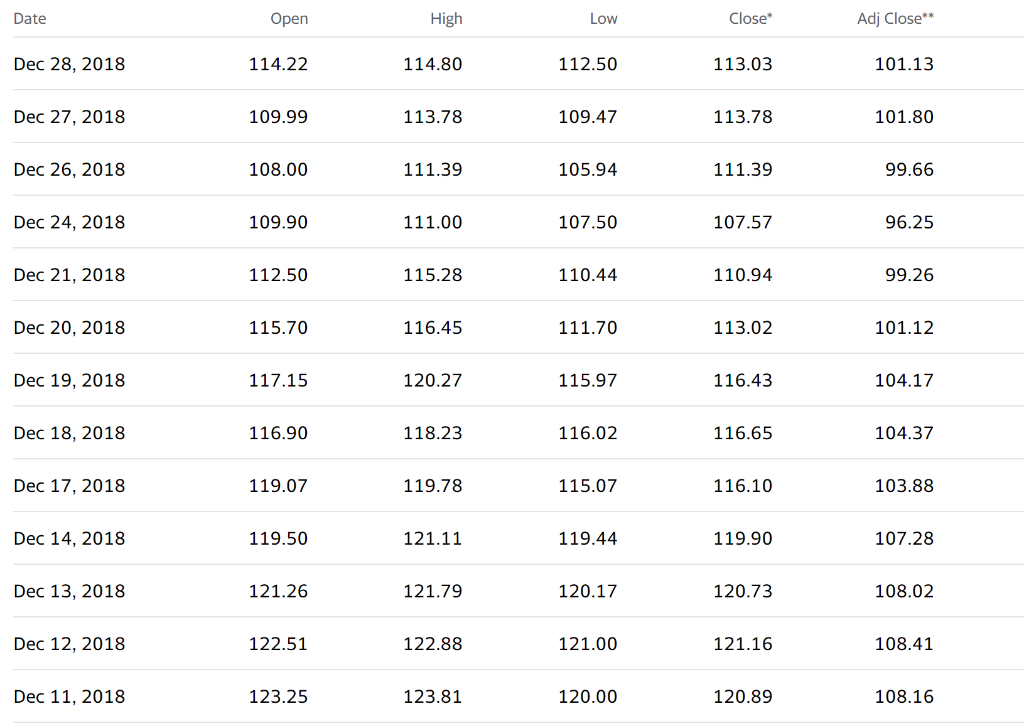
Date Open High Low Close* Adj Close** Dec 28, 2018 114.22 114.80 112.50 113.03 101.13 Dec 27, 2018 109.99 113.78 109.47 113.78 101.80 Dec 26, 2018 108.00 111.39 105.94 111.39 99.66 Dec 24, 2018 109.90 111.00 107.50 107.57 96.25 Dec 21, 2018 112.50 115.28 110.44 110.94 99.26 Dec 20, 2018 115.70 116.45 111.70 113.02 101.12 Dec 19, 2018 117.15 120.27 115.97 116.43 104.17 Dec 18, 2018 116.90 118.23 116.02 116.65 104.37 Dec 17, 2018 119.07 119.78 115.07 116.10 103.88 Dec 14, 2018 119.50 121.11 119.44 119.90 107.28 Dec 13, 2018 121.26 121.79 120.17 120.73 108.02 Dec 12, 2018 122.51 122.88 121.00 121.16 108.41 Dec 11, 2018 123.25 123.81 120.00 120.89 108.16
Step by Step Solution
There are 3 Steps involved in it

Get step-by-step solutions from verified subject matter experts
 Study Help