







Question: In python, with a for loop inside a for loop A. First Programming Task [14 points] Before attempting this task, review Reading Assignments examples about
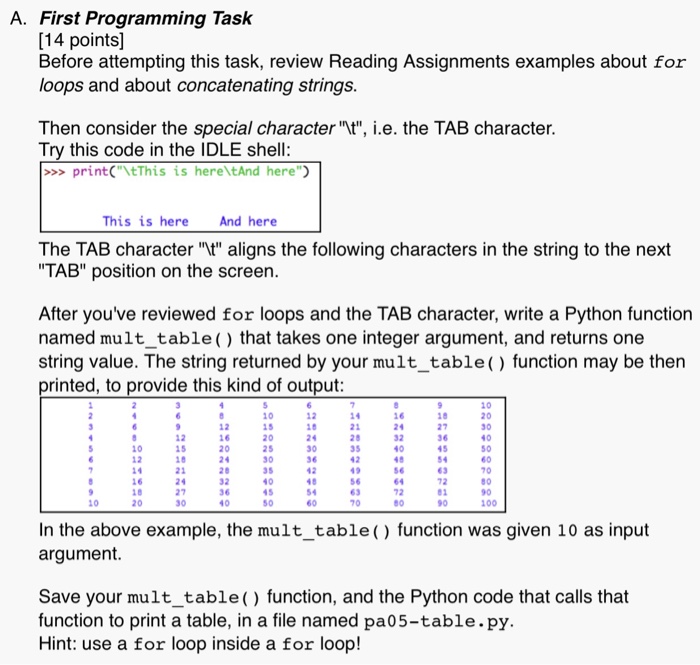
A. First Programming Task [14 points] Before attempting this task, review Reading Assignments examples about for loops and about concatenating strings Then consider the special character t", i.e. the TAB character Try this code in the IDLE shell: >>print"tThis is here tAnd here" This is here And here The TAB character "t" aligns the following characters in the string to the next TAB" position on the screen After you've reviewed for loops and the TAB character, write a Python function named mult_table) that takes one integer argument, and returns one string value. The string returned by your mult_table() function may be then printed, to provide this kind of output 10 12 10 10 15 20 25 30 35 40 45 50 8 27 36 45 54 63 72 01 90 14 21 20 35 16 12 16 20 24 20 32 36 30 40 50 12 1 5 28 21 24 27 30 10 12 40 80 63 72 60 100 In the above example, the mult_table() function was given 10 as input argument Save your mult_table () function, and the Python code that calls that function to print a table, in a file named pa05-table.py. Hint: use a for loop inside a for loop
Step by Step Solution
There are 3 Steps involved in it

Get step-by-step solutions from verified subject matter experts
 Study Help