







Question: In SQL Create a view called faculty_view that shows the pid,fname as First Name, lname as Last Name, dept as Department and email_addr as Email
-
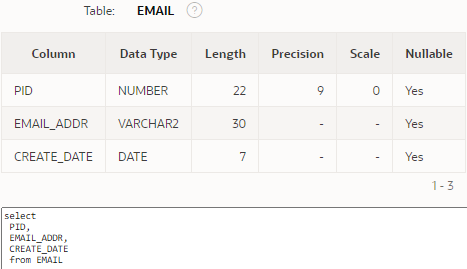
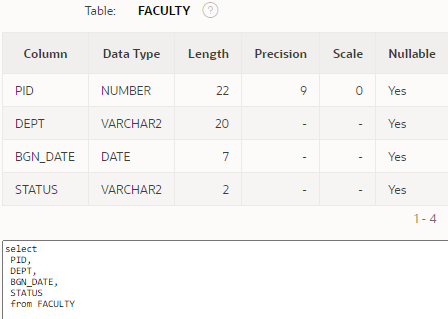
In SQL Create a view called faculty_view that shows the pid,fname as First Name, lname as Last Name, dept as Department and email_addr as Email Address from the PERSON, FACULTY and EMAIL tables.
-
-
-
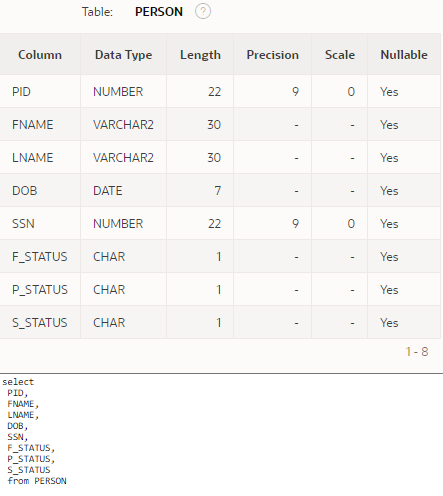
Table: EMAIL Column Data Type Length Precision Scale Nullable PID NUMBER 22 9 0 Yes EMAIL_ADDR VARCHAR2 30 Yes CREATE_DATE DATE 7 Yes 1-3 select PID, EMAIL_ADDR, CREATE_DATE from EMAIL Table: FACULTY Column Data Type Length Precision Scale Nullable PID NUMBER 22 9 0 Yes DEPT VARCHAR2 20 Yes BGN_DATE DATE 7 Yes STATUS VARCHAR2 2 Yes 1-4 select PID, DEPT, BGN_DATE, STATUS from FACULTY Table: PERSON Column Data Type Length Precision Scale Nullable PID NUMBER 22 9 0 Yes ENAME VARCHAR2 30 Yes LNAME VARCHAR2 30 Yes DOB DATE 7 Yes SSN NUMBER 22 9 0 Yes F_STATUS CHAR 1 Yes P_STATUS CHAR 1 Yes S_STATUS CHAR 1 - Yes 1-8 select PID, FNAME LNAME DOB, SSN, F_STATUS, P_STATUS, S_STATUS from PERSON
Step by Step Solution
There are 3 Steps involved in it

Get step-by-step solutions from verified subject matter experts
 Study Help