







Question: In SQL, Using MAMP It says it thoughout each part. It is SQL. 3. Write one statement to alter the table Booking to add a
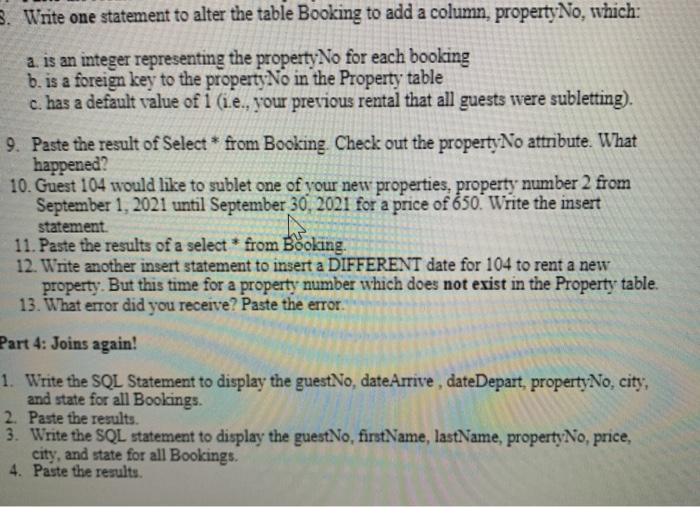
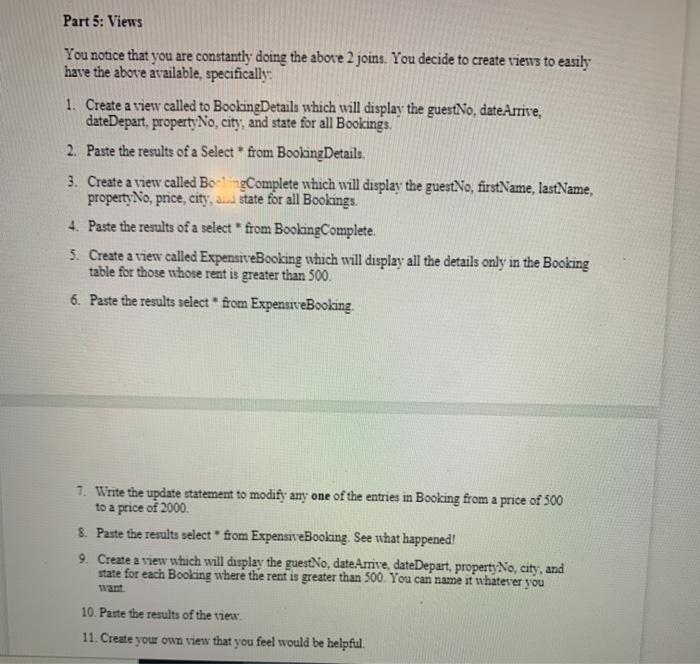
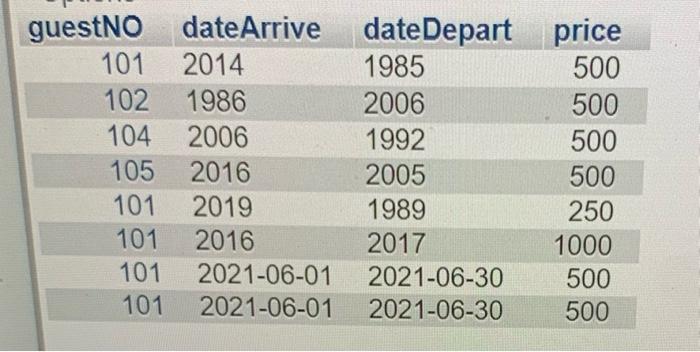
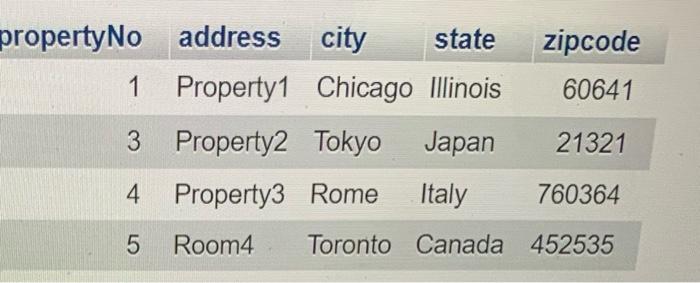
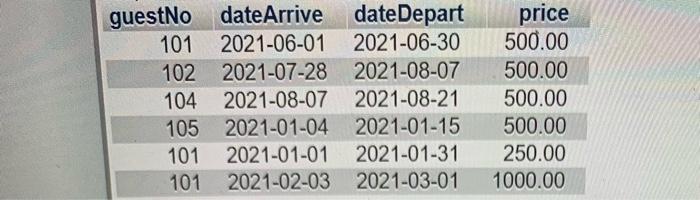
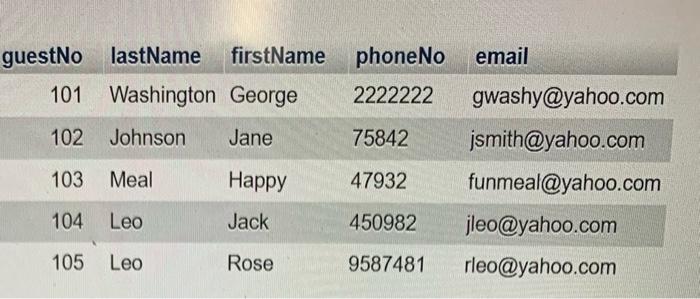
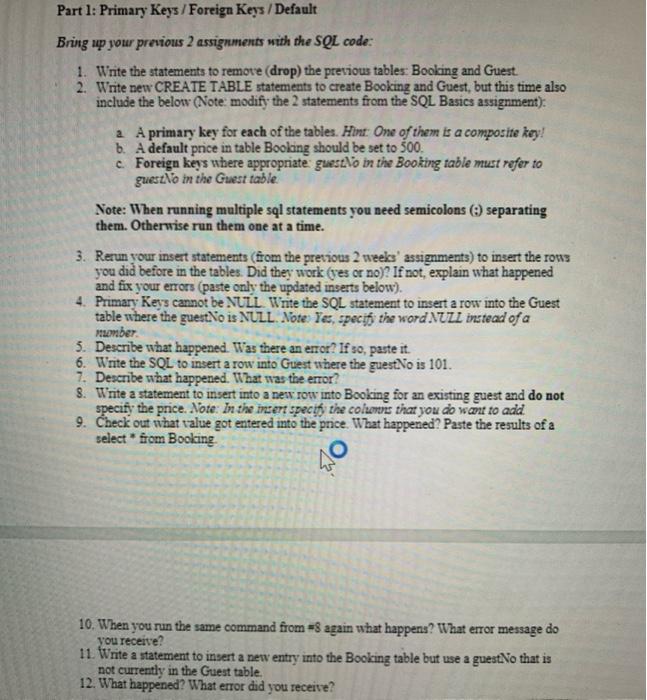
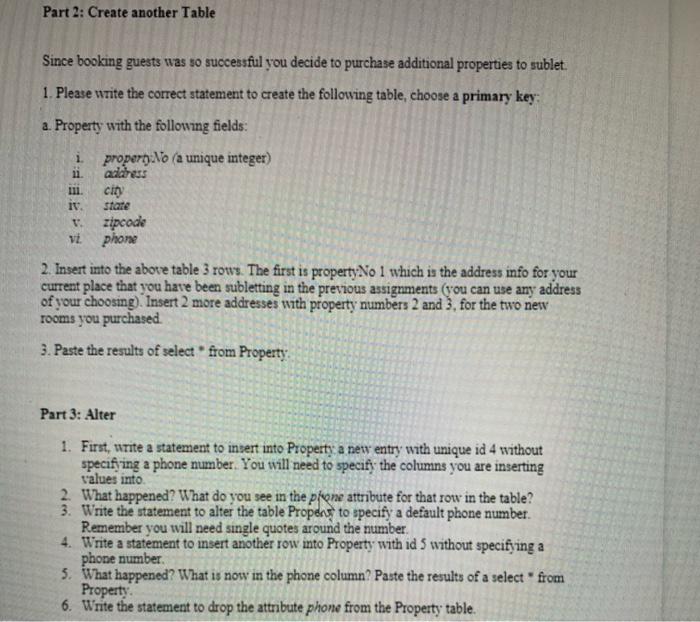
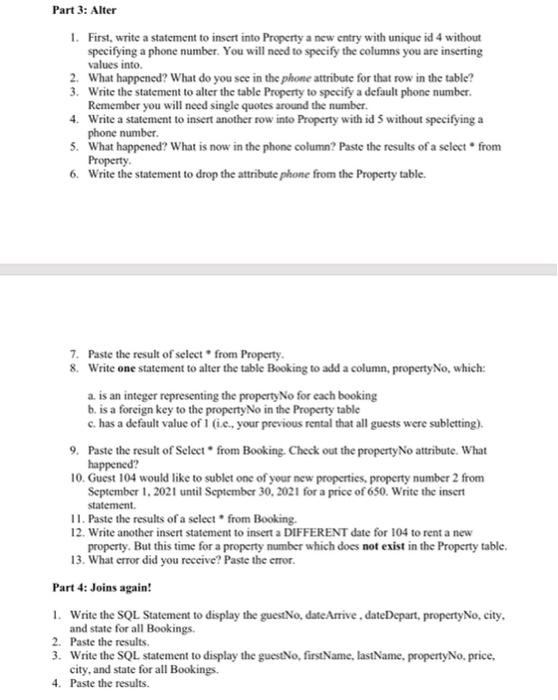
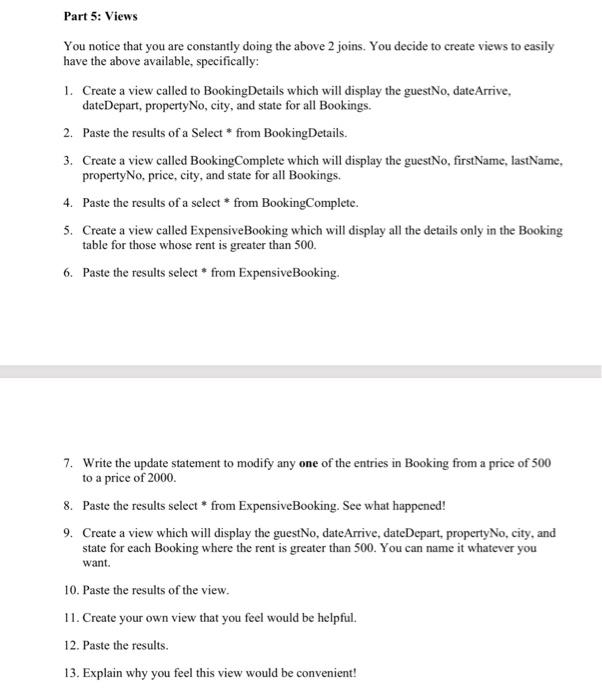
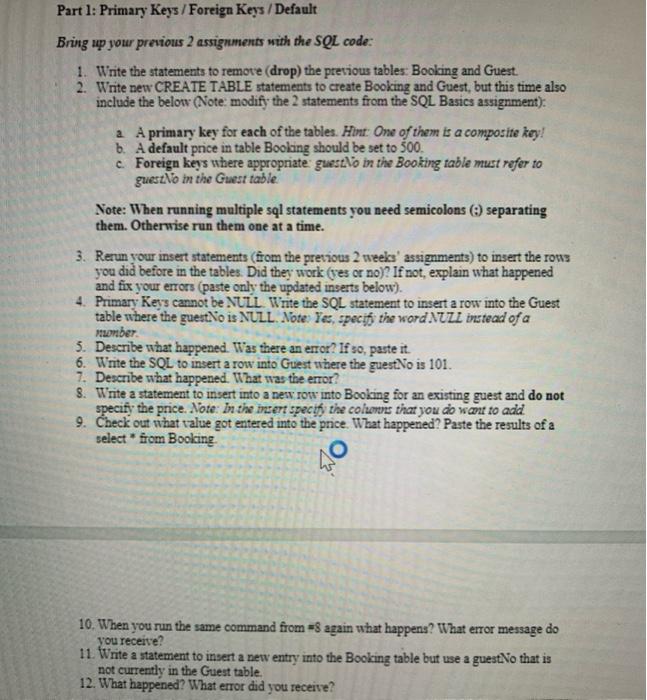
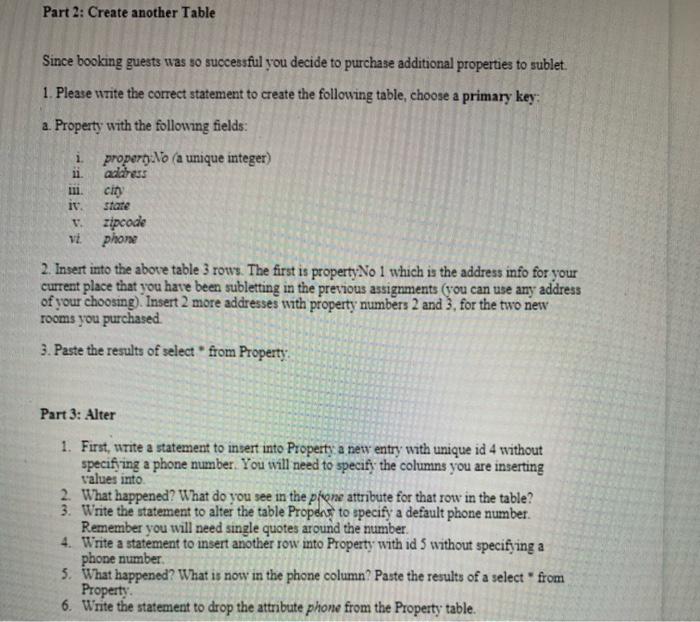
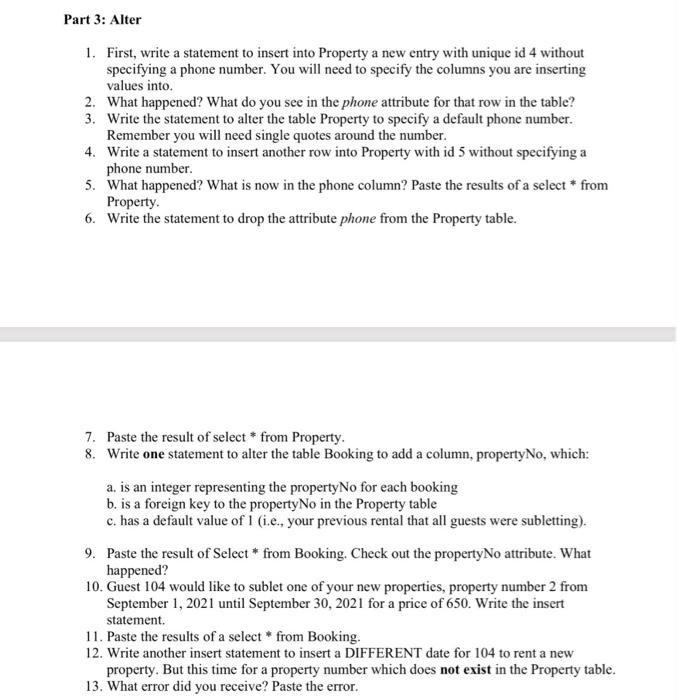
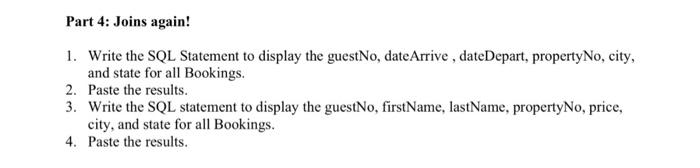
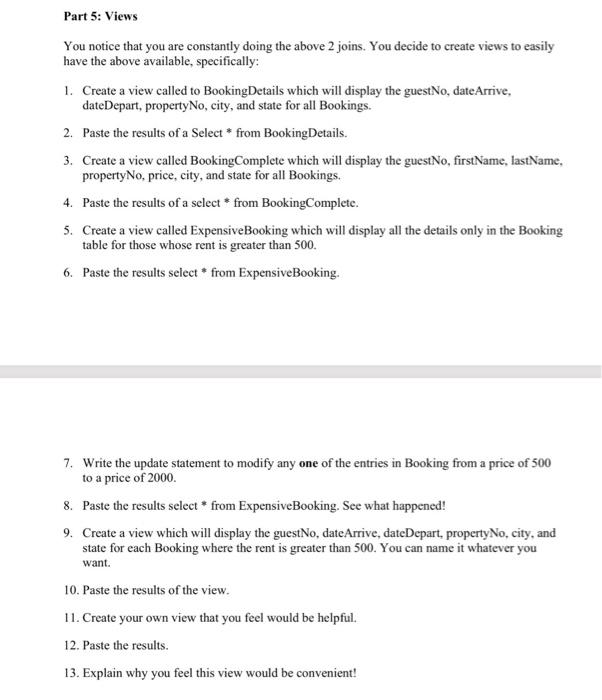
3. Write one statement to alter the table Booking to add a column, property No, which: a is an integer representing the property No for each booking b. is a foreign key to the property No in the Property table c. has a default value of i (.e., your previous rental that all guests were subletting). 9. Paste the result of Select * from Booking. Check out the property No attribute. What happened? 10. Guest 104 would like to sublet one of your new properties, property number 2 from September 1, 2021 until September 30, 2021 for a price of 650. Write the insert statement 11. Paste the results of a select * from Booking. 12. Write another insert statement to insert a DIFFERENT date for 104 to rent a new property. But this time for a property number which does not exist in the Property table. 13. What error did you receive? Paste the error Part 4: Joins again! 1. Write the SQL Statement to display the guestNo, dateArrive, date Depart, property No, city, and state for all Bookings. 2. Paste the results. 3. Write the SQL statement to display the guestNo, firstName, lastName, property No, price, city, and state for all Bookings 4. Paste the results. Part 5: Views You notice that you are constantly doing the above 2 joins. You decide to create viesve to easily have the above available, specifically: 1. Create a view called to BookingDetails which will display the guestNo, dateArrive, dateDepart, propertyNo, city, and state for all Bookings 2. Paste the results of a Select * from Booking Details. 3. Create a view called Bo'ngComplete which will display the guestNo, firstName, lastName, property No, price, city, and state for all Bookings. 4. Paste the results of a select * from Booking Complete. 5. Create a view called ExpensiveBooking which will display all the details only in the Booking table for those whose rent is greater than 500. 6. Paste the results select from ExpensiveBooking. 7. Write the update statement to modify any one of the entries in Booking from a price of 500 to a price of 2000. 8. Paste the results select * from ExpensiveBooking. See what happened! 9. Create a view which will display the guestNo, dateAmve, date Depart, property No, city, and state for each Booking where the rent is greater than 500. You can name it whatever you 10. Paste the results of the view 11. Create your own view that you feel would be helpful. guestNo dateArrive date Depart date Depart price 101 2014 1985 500 102 1986 2006 500 104 2006 1992 500 105 2016 2005 500 101 2019 1989 250 101 2016 2017 1000 101 2021-06-01 2021-06-30 500 101 2021-06-01 2021-06-30 500 zipcode 60641 propertyNo address city state 1 Property1 Chicago Illinois 3 Property2 Tokyo Japan 4 Property3 Rome Italy 21321 760364 5 Room4 Toronto Canada 452535 guestNo date Arrive date Depart 101 2021-06-01 2021-06-30 102 2021-07-28 2021-08-07 104 2021-08-07 2021-08-21 105 2021-01-04 2021-01-15 101 2021-01-01 2021-01-31 101 2021-02-03 2021-03-01 price 500.00 500.00 500.00 500.00 250.00 1000.00 phoneNo email guestNo lastName firstName 101 Washington George 2222222 102 Johnson Jane 75842 103 Meal Happy 47932 gwashy@yahoo.com jsmith@yahoo.com funmeal@yahoo.com jleo@yahoo.com rleo@yahoo.com 104 Leo Jack 450982 105 Leo Rose 9587481 Part 1: Primary Keys / Foreign Keys / Default Bring up your previous 2 assignments with the SQL code: 1. Write the statements to remove drop) the previous tables: Booking and Guest 2. Write new CREATE TABLE statements to create Booking and Guest, but this time also include the below (Note: modify the 2 statements from the SQL Basics assignment): 2 A primary key for each of the tables. Hint: One of them is a composite key! b. A default price in table Booking should be set to 500 c Foreign keys where appropriate guesto in the Booking table must refer to guestNo in the Guest table Note: When running multiple sal statements you need semicolons separating them. Otherwise run them one at a time. 3. Rerun your insert statements (from the previous 2 weeks' assignments) to insert the rows you did before in the tables. Did they work (yes or no)? If not, explain what happened and fix your errors (paste only the updated inserts below). 4. Primary Keys cannot be NULL Write the SQL statement to insert a row into the Guest table where the guestNo is NULL. Note: Yes, specif the word NULL instead of a member 5. Describe what happened. Was there an error? If so, paste it. 6. Write the SQL to insert a row into Guest where the guestNo is 101. 7. Describe what happened. What was the error? 8. Write a statement to insert into a new row into Booking for an existing guest and do not specify the price. Note: In the insert specify the columes that you do wcu to add 9. Check out what value got entered into the price. What happened? Paste the results of a select * from Booking 40 10. When you run the same command from = again what happens? What error message do you receive? 11. Write a statement to insert a new entry into the Booking table but use a guest:No that is not currently in the Guest table, 12. What happened? What error did you receive? Part 2: Create another Table Since booking guests was so successful you decide to purchase additional properties to sublet. 1. Please write the correct statement to create the following table, choose a primary key: a. Property with the following fields: propero. No a unique integer) address 1 11 111. iv. cio state VE zipcode phone 2. Insert into the above table 3 rows. The first is property No I which is the address info for your current place that you have been subletting in the previous assignments (you can use any address of your choosing). Insert 2 more addresses with property numbers 2 and 3, for the two new rooms you purchased 3. Paste the results of select from Property Part 3: Alter 1. First, write a statement to insert into Property a new entry with unique id 4 without specifying a phone number. You will need to specify the columns you are inserting values into 2. What happened? What do you see in the prone attribute for that row in the table? 3. Write the statement to alter the table Propens to specify a default phone number. Remember you will need single quotes around the number. 4. Write a statement to insert another row into Property with id 5 without specifying a phone number 5. What happened? What is now in the phone column? Paste the results of a select from Property 6. Write the statement to drop the attribute phone from the Property table. Part 3: Alter 1. First, write a statement to insert into Property a new entry with unique id 4 without specifying a phone number. You will need to specify the columns you are inserting values into 2. What happened? What do you see in the phone attribute for that row in the table? 3. Write the statement to alter the table Property to specify a default phone number. Remember you will need single quotes around the number. 4. Write a statement to insert another row into Property with id 5 without specifying a phone number 5. What happened? What is now in the phone column? Paste the results of a select from Property 6. Write the statement to drop the attribute phone from the Property table. 7. Paste the result of select from Property 8. Write one statement to alter the table Booking to add a column, property No, which: a is an integer representing the property No for each booking b. is a foreign key to the property No in the Property table c. has a default value of i (ie, your previous rental that all guests were subletting). 9. Paste the result of Select * from Booking. Check out the property No attribute. What happened? 10. Guest 104 would like to sublet one of your new properties. property number 2 from September 1, 2021 until September 30, 2021 for a price of 650. Write the insert statement 11. Paste the results of a select * from Booking. 12. Write another insert statement to insert a DIFFERENT date for 104 to rent a new property. But this time for a property number which does not exist in the Property table. 13. What error did you receive? Paste the error. Part 4: Joins again! 1. Write the SQL Statement to display the guestNo, dateArrive, dateDepart, propertyNo, city, and state for all Bookings. 2. Paste the results 3. Write the SQL statement to display the guestNo, firstName.lastName, property No, price. city, and state for all Bookings. 4. Paste the results. Part 5: Views You notice that you are constantly doing the above 2 joins. You decide to create views to easily have the above available, specifically: 1. Create a view called to BookingDetails which will display the guestNo, date Arrive, date Depart, property No, city, and state for all Bookings. 2. Paste the results of a Select * from BookingDetails. 3. Create a view called Booking Complete which will display the guestNo, firstName, lastName, property No, price, city, and state for all Bookings. 4. Paste the results of a select * from Booking Complete. 5. Create a view called ExpensiveBooking which will display all the details only in the Booking table for those whose rent is greater than 500. 6. Paste the results select * from ExpensiveBooking. 7. Write the update statement to modify any one of the entries in Booking from a price of 500 to a price of 2000 8. Paste the results select * from ExpensiveBooking. See what happened! 9. Create a view which will display the guestNo, dateArrive, dateDepart. property No, city, and state for each Booking where the rent is greater than 500. You can name it whatever you want. 10. Paste the results of the view. 11. Create your own view that you feel would be helpful. 12. Paste the results. 13. Explain why you feel this view would be convenient! Part 1: Primary Keys / Foreign Keys / Default Bring up your previous 2 assignments with the SQL code: 1. Write the statements to remove (drop) the previous tables: Booking and Guest 2. Write new CREATE TABLE statements to create Booking and Guest, but this time also include the below (Note: modify the 2 statements from the SQL Basics assignment): a A primary key for each of the tables. Hint: One of them is a composite key! b. A default price in table Booking should be set to 500. c Foreign keys where appropriate guestho in the Booking table must refer to gues.No in the Guest table Note: When running multiple sal statements you need semicolons separating them. Otherwise run them one at a time. 3. Rerun your insert statements (from the previous 2 weeks' assignments) to insert the rows you did before in the tables. Did they work (res or no)? If not, explain what happened and fix your errors (paste only the updated inserts below). 4. Primary Keys cannot be NULL Write the SQL statement to insert a row into the Guest table where the guest No is NULL. Note: Yes, specif the word NULL instead of a sorber 5. Describe what happened. Was there an error? If so, paste it. 6. Write the SQL to insert a row into Guest where the guestNo is 101. 7. Describe what happened. What was the error? 8. Write a statement to insert into a ness row into Booking for an existing guest and do not specify the price. Note: In the insert specify the colors that you do want to add 9. Check out what value got entered into the price. What happened? Paste the results of a select * from Booking 40 10. When you run the same command from = again what happens? What error message do you receive? 11. Write a statement to insert a new entry into the Booking table but use a guestNo that is not currently in the Guest table, 12. What happened? What error did you receive? Part 2: Create another Table Since booking guests was so successful you decide to purchase additional properties to sublet. 1. Please write the correct statement to create the following table, choose a primary key: a. Property with the following fields: propery No (a unique integer) address 1 11. cin it. VE stare zipcode phone 2. Insert into the above table 3 rows. The first is property No 1 which is the address info for your current place that you have been subletting in the previous assignments (you can use any address of your choosing). Insert 2 more addresses with property numbers 2 and 3, for the two new rooms you purchased 3. Paste the results of select from Property Part 3: Alter 1. First, write a statement to insert into Property a new entry with unique id 4 without specifying a phone number. You will need to specify the columns you are inserting values into 2. What happened? What do you see in the pione attribute for that row in the table? 3. Write the statement to alter the table Propers to specify a default phone number. Remember you will need single quotes around the number. 4. Write a statement to insert another row into Property with id 5 without specifying a phone number 5. What happened? What is now in the phone column? Paste the results of a select from Property 6. Write the statement to drop the attribute phone from the Property table. Part 3: Alter 1. First, write a statement to insert into Property a new entry with unique id 4 without specifying a phone number. You will need to specify the columns you are inserting values into 2. What happened? What do you see in the phone attribute for that row in the table? 3. Write the statement to alter the table Property to specify a default phone number. Remember you will need single quotes around the number. 4. Write a statement to insert another row into Property with id 5 without specifying a phone number 5. What happened? What is now in the phone column? Paste the results of a select * from Property. 6. Write the statement to drop the attribute phone from the Property table. Paste the result of select * from Property. 8. Write one statement to alter the table Booking to add a column, property No, which: a. is an integer representing the property No for each booking b. is a foreign key to the property No in the Property table c. has a default value of 1 (i.e., your previous rental that all guests were subletting). 9. Paste the result of Select * from Booking. Check out the property No attribute. What happened? 10. Guest 104 would like to sublet one of your new properties, property number 2 from September 1, 2021 until September 30, 2021 for a price of 650. Write the insert statement 11. Paste the results of a select * from Booking. 12. Write another insert statement to insert a DIFFERENT date for 104 to rent a new property. But this time for a property number which does not exist in the Property table. 13. What error did you receive? Paste the error. Part 4: Joins again! 1. Write the SQL Statement to display the guestNo, date Arrive , date Depart, property No, city, and state for all Bookings. 2. Paste the results. 3. Write the SQL statement to display the guestNo, firstName, lastName, propertyNo, price, city, and state for all Bookings. 4. Paste the results. Part 5: Views You notice that you are constantly doing the above 2 joins. You decide to create views to easily have the above available, specifically: 1. Create a view called to BookingDetails which will display the guestNo, date Arrive, date Depart, property No, city, and state for all Bookings. 2. Paste the results of a Select * from BookingDetails. 3. Create a view called BookingComplete which will display the guestNo, firstName, lastName, property No, price, city, and state for all Bookings. 4. Paste the results of a select * from Booking Complete. 5. Create a view called ExpensiveBooking which will display all the details only in the Booking table for those whose rent is greater than 500. 6. Paste the results select * from ExpensiveBooking. 7. Write the update statement to modify any one of the entries in Booking from a price of 500 to a price of 2000. 8. Paste the results select * from ExpensiveBooking. See what happened! 9. Create a view which will display the guestNo, date Arrive, dateDepart. property No, city, and state for each Booking where the rent is greater than 500. You can name it whatever you want. 10. Paste the results of the view. 11. Create your own view that you feel would be helpful. 12. Paste the results. 13. Explain why you feel this view would be convenient
Step by Step Solution
There are 3 Steps involved in it

Get step-by-step solutions from verified subject matter experts
 Study Help