







Question: In the Chapter 1 1 Applying Tableau, you compared the relative age of two companies assets. In this case you continue in your role as
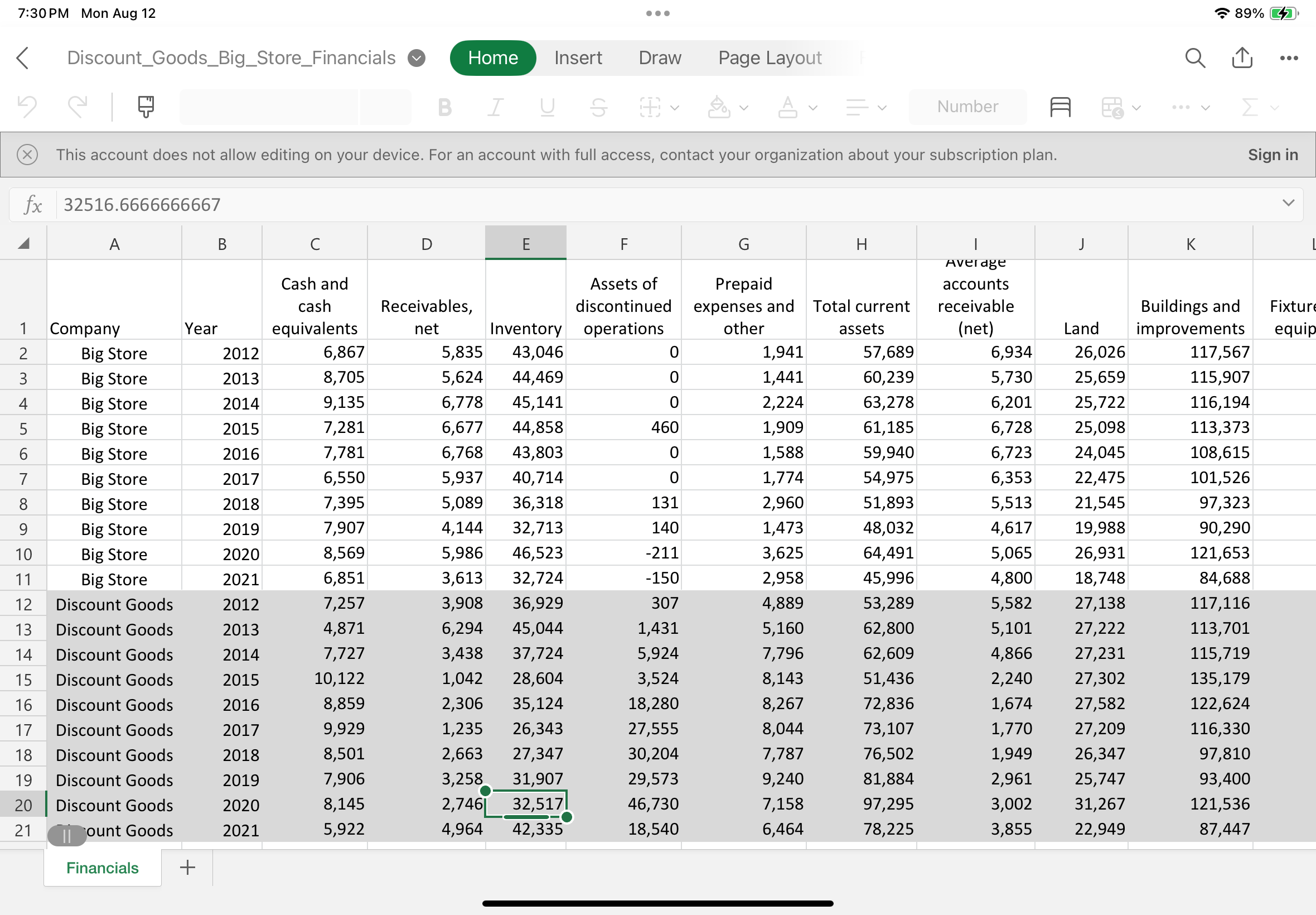
In the Chapter Applying Tableau, you compared the relative age of two companies assets. In this case you continue in your role as an analyst conducting research into the relative merits of investing in one or both of these companies. This time assess the extent to which the companies invest in equity securities on a longterm basis. To do so you should evaluate the percentage of noncurrent assets invested in equity securities The investments in equity to noncurrent assets formula is total equity investments total noncurrent assets. Tableau Instructions: For this case, you will create a calculation and produce a bar chart of the percentage of noncurrent assets invested in equity securities ratio to allow you to compare and contrast the two companies investments. Use the following steps to create the charts youll need for this case: Download the Excel file DiscountGoodsBigStoreFinancials. Open Tableau and connect to the Excel file. Click on the Sheet tab at the bottom of the canvas and drag Company and Year to the Rows shelf. Change Year to discrete by rightclicking and selecting discrete From the same menu, select Filter click None And click only and Drag the "Investments in Equity Securities" and "Total Noncurrent Assets" under Measure Names to the Rows shelf. Change each to discrete. Rightclick on the dropdown menu of each of the accounts and uncheck "Show Header" so they are not visible in the field. Under the Analysis tab, select Create Calculated Field. Create a measure named "Investments in Equity to Noncurrent Assets" by dragging "Total Investments in Equity Securities" from the Rows shelf to the Calculation Editor window, typing a division sign for division, and then dragging "Total Noncurrent Assets" from the Rows shelf beside it Make sure the calculation is valid and click OK Drag the newly created "Investments in Equity to Noncurrent Assets" from Measure Names to the Rows shelf. Click on the "Show Me tab in the upper right corner and select "sidebyside bars." You should now see the investments in equity securities for the four years; for each company. Add labels to the bars by clicking on "Label" under the Marks card and clicking the box "Show mark labels." Right click next to "AGG Investments in and select Format. Click on the dropdown arrow of "Fields" at the top of the format box and select AGG Investments in Equity to Noncurrent Assets" Format the number to a percentage with two decimal places. Change the title of the sheet to be "Investments in Equity to Noncurrent Assets Bar Chart" by doubleclicking the tab at the bottom of the page and typing the new title. Save your work. Required: Based upon your output, answer the following questions: What is the percentage of noncurrent assets invested in equity securities for Big Store and for Discount Goods in Note: Round your answers to decimal place. When comparing the percentage of noncurrent assets invested in equity securities ratios over the most recent fouryear period, is Discount Goods equity investment a generally increasing, b roughly the same, or c generally decreasing from year to year? In general, which company invests the higher amount in equity securities as a percentage of its noncurrent asset during the most recent fouryear period? This account does not allow editing on your device. For an account with full access, contact your organization about your subscription plan.
Sign in
tableABCDEFGHI,JKCompany,Year,tableCash andcashequivalentstableReceivablesnetInventory,tableAssets ofdiscontinuedoperationstablePrepaidexpenses andothertableTotal currentassetstableaccountsreceivablenetLand,tableBuildings andimprovementsBig Store,Big Store,Big Store,Big Store,Big Store,Big Store,Big Store,Big Store,Big Store,Big Store,Discount Goods,Discount Goods,Discount Goods,Discount Goods,
Step by Step Solution
There are 3 Steps involved in it
1 Expert Approved Answer
Step: 1 Unlock

Question Has Been Solved by an Expert!
Get step-by-step solutions from verified subject matter experts
Step: 2 Unlock
Step: 3 Unlock
 Study Help