





Question: In the following Excel Solver sensitivity report, some values are missing as shown below. Determine the values of ONLY those missing items which are shaded

In the following Excel Solver sensitivity report, some values are missing as shown below.

Determine the values of ONLY those missing items which are shaded in grey AND labeled by a circled number and a question mark. Please fill in correct values in the space provided below:

1. 2. 3. 4. 5. 6.
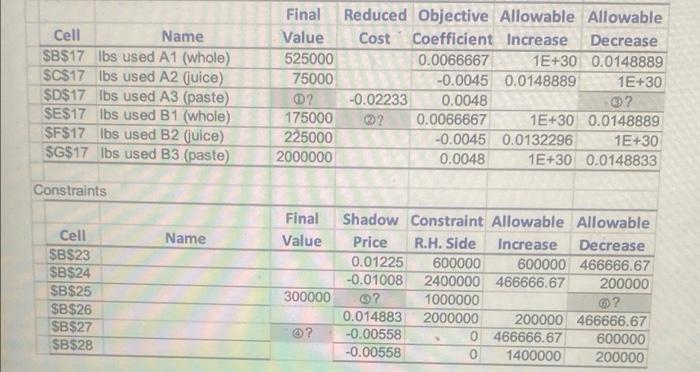
In the following Excel Solver sensitivity report,
Cell Name $B$17 lbs used A1 (whole) $C$17 lbs used A2 (juice) $D$17lbs used A3 (paste) $E$17 lbs used B1 (whole) $F$17 lbs used B2 (uice) $G$17 lbs used B3 (paste) Final Reduced Objective Allowable Allowable Value Cost Coefficient Increase Decrease 525000 0.0066667 1E+30 0.0148889 75000 -0.0045 0.0148889 1E+30 02 -0.02233 0.0048 ? 175000 0.0066667 1E+30 0.0148889 225000 -0.0045 0.0132296 1E+30 2000000 0.0048 1E+30 0.0148833 ? Constraints Final Value Name Cell $B$23 SB$24 $B$25 $B$26 $B$27 $B$28 Shadow Constraint Allowable Allowable Price R.H. Side Increase Decrease 0.01225 600000 600000 466666.67 -0.01008 2400000 466666.67 200000 1000000 ? 0.014883 2000000 200000 466666.67 -0.00558 0 466666.67 600000 -0.00558 0 1400000 200000 300000 ? @

Step by Step Solution

There are 3 Steps involved in it

1 Expert Approved Answer
Step: 1 Unlock blur-text-image

Question Has Been Solved by an Expert!

Get step-by-step solutions from verified subject matter experts

Step: 2 Unlock
Step: 3 Unlock

Students Have Also Explored These Related General Management Questions!