







Question: . In the following program, the text field displays the text typed into it, but when we press the button submit, nothing happens. You

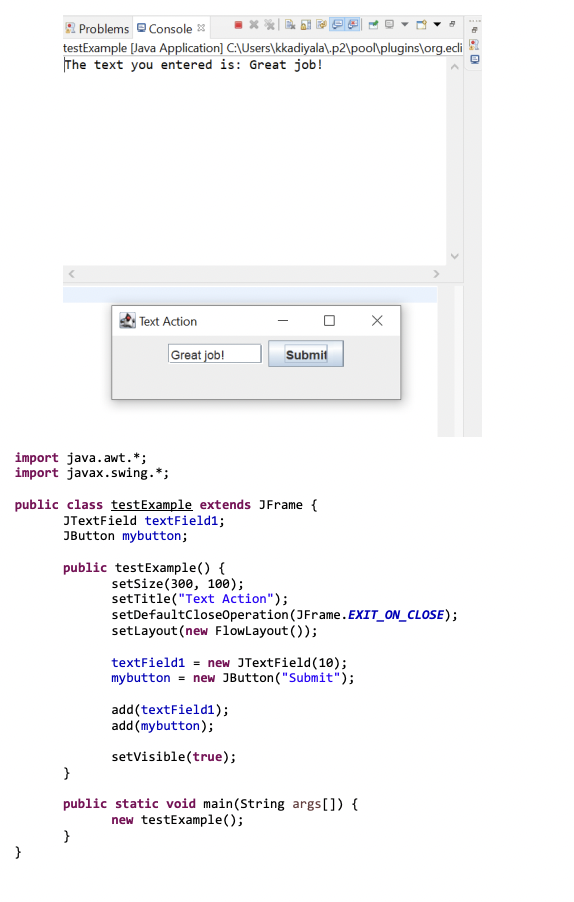
. In the following program, the text field displays the text typed into it, but when we press the button submit, nothing happens. You should change the given program such that when you enter a text in the text field and press enter, that text is printed out to screen as shown below: Problems Console ** testExample [Java Application] C:\Users\kkadiyala\.p2\pool\plugins\org.ecli The text you entered is: Great job! Text Action Great job! Submit import java.awt.*; import javax.swing.*; public class test Example extends JFrame { JTextField textField1; JButton mybutton; public testExample() { setSize(300, 100); setTitle("Text Action"); setDefaultCloseOperation (JFrame.EXIT_ON_CLOSE); setLayout(new FlowLayout()); textField1 = new JTextField(10); mybutton = new JButton("Submit"); add(textField1); add(mybutton); } setVisible(true); public static void main(String args[]) { new testExample(); } }
Step by Step Solution
There are 3 Steps involved in it

Get step-by-step solutions from verified subject matter experts
 Study Help