







Question: In the Lab Lab 3: Creating Schedules Problem: piano practice and You want to create a Web page and an external style sheet that lists
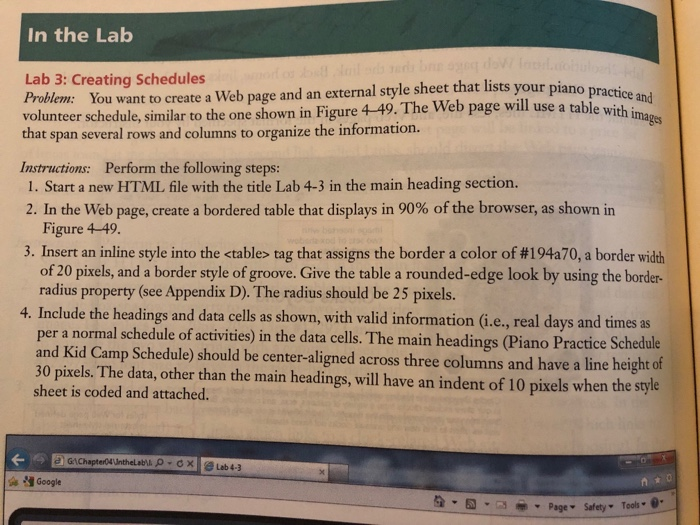
In the Lab Lab 3: Creating Schedules Problem: piano practice and You want to create a Web page and an external style sheet that lists your 4-49. The Web page will use a table with volunteer schedule,similar to the one shown in Figure 4 49. The Web page wil use a table with ig that span several rows and columns to organize the information. Instructions: Perform the following steps: 1. Start a new HTML file with the title Lab 4-3 in the main heading section. 2. In the Web page, create a bordered table that displays in 90% of the browser, as shown in Figure 4-49 3. Insert an inline style into the
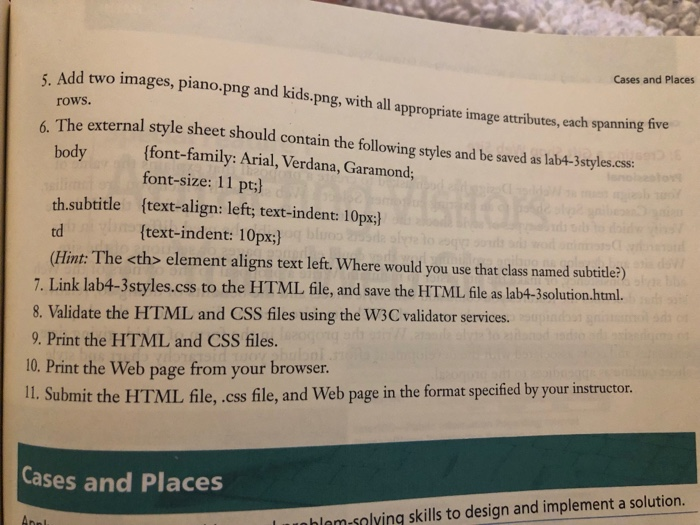
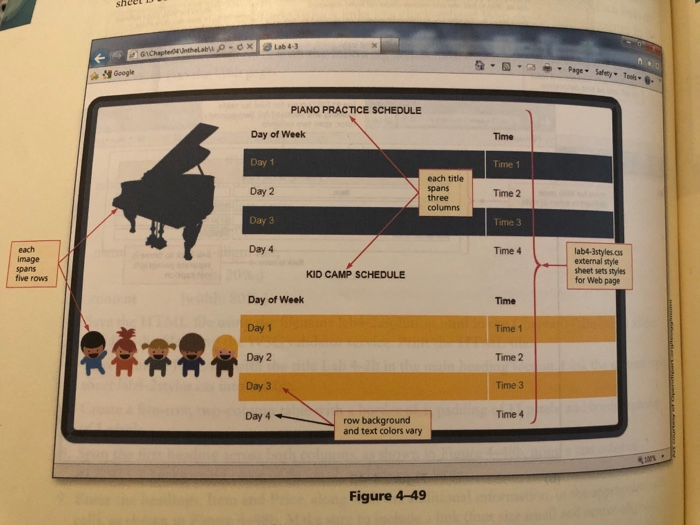
element aligns text left. Where would you use that class named subtitle?) text-indent: 10px;) 7. Link lab4-3styles.css to the HITML file, and save the HTML ile as labt-3solution.html. 8. Validate the HTML and CSS files using the W3C validator services 9. Print the HTML and CSS files. 10. Print the Web page from your browser II Submit the HTML file, css file, and Web page in the format specified by your instructor. Cases and Places hlam-salying skills to design and implement a solution. sheel Google Tools PIANO PRACTICE SCHEDULE Day of Week Day 1 Day 2 Day 3 Day 4 Time Time 1 each title spans three columns Time 2 Time 3 each image spans five rows Time 4 lab4-Style.css external style sheet sets styles for Web page KID CAMP SCHEDULE Day of Week Day 1 Day 2 Day 3 Day 4 Time Time 1 Time 2 Time 3 Time 4 row background and text colors vary Figure 4-49 In the Lab Lab 3: Creating Schedules Problem: piano practice and You want to create a Web page and an external style sheet that lists your 4-49. The Web page will use a table with volunteer schedule,similar to the one shown in Figure 4 49. The Web page wil use a table with ig that span several rows and columns to organize the information. Instructions: Perform the following steps: 1. Start a new HTML file with the title Lab 4-3 in the main heading section. 2. In the Web page, create a bordered table that displays in 90% of the browser, as shown in Figure 4-49 3. Insert an inline style into the
|
|---|
Step by Step Solution
There are 3 Steps involved in it
1 Expert Approved Answer
Step: 1 Unlock

Question Has Been Solved by an Expert!
Get step-by-step solutions from verified subject matter experts
Step: 2 Unlock
Step: 3 Unlock
 Study Help