







Question: In the namespace library, review the code that creates the namespace and adds a namespace creator method. Then, use that method to add the following
In the namespace library, review the code that creates the namespace and adds a namespace creator method. Then, use that method to add the following namespaces:
time utility time.clock time.stopwatch
Move the padSingleDigit function and the $ function from the clock.js file to the library_utility.js file, and add them to the utility namespace.
Change the library_clock.js file so it uses the module pattern and adds the object it creates to the clock namespace.
NOTE: In this step and in step 5, youll need to adjust the objects so the callback function is passed to the start method and then stored so the function called by the timer can use it.
Change the library_stopwatch.js file so it uses the module pattern and adds the object it creates to the stopwatch namespace.
Change the code in the clock.js file to use the new namespaces and module objects. Since you no longer create the clock and stopwatch objects, remove that code and pass the callbacks to the start methods. Use aliases for the namespaces, and make sure you dont add anything to the global namespace.
library_namespace.js:
"use strict"; // create the namespace and nested namespace creator method var myapp = myapp || {}; myapp.addNamespace = function (namespace) { var currentName; var parent = this; var names = namespace.split("."); for (var i in names) { currentName = names[i]; parent[currentName] = parent[currentName] || {}; parent = parent[currentName]; } return this; }.bind(myapp); // add the namespaces the application will use
library_stopwatch.js:
"use strict"; var createStopwatch = function(displayTickCallbackFunction) { // private state var timer; var elapsed = { minutes:0, seconds:0, milliseconds:0 }; var tickStopwatch = function() { // increment milliseconds by amount of interval elapsed.milliseconds = elapsed.milliseconds + 10; // roll over milliseconds to seconds, seconds to minutes if (elapsed.milliseconds === 1000) { elapsed.seconds++; elapsed.milliseconds = 0; } if (elapsed.seconds === 60) { elapsed.minutes++; elapsed.seconds = 0; } // use callback to display new stopwatch time - pass it the elapsed time object if (displayTickCallbackFunction && typeof displayTickCallbackFunction === 'function') { displayTickCallbackFunction(elapsed); } }; // public methods return { start: function() { tickStopwatch(); timer = setInterval(tickStopwatch, 10); return this; }, stop: function() { clearInterval(timer); return this; }, reset: function(resetStopwatchCallbackFunction) { clearInterval(timer); elapsed = { minutes:0, seconds:0, milliseconds:0 }; // use callback to reset stopwatch display if (resetStopwatchCallbackFunction && typeof resetStopwatchCallbackFunction === 'function') { resetStopwatchCallbackFunction(); } return this; } }; };
library_utility.js:
"use strict";
library_clock.js:
"use strict";
var createClock = function(displayTimeCallbackFunction) {
// private state
var displayCurrentTime = function() {
var now = new Date();
// add own properties to instance of Date object
now.hours = now.getHours();
now.minutes = now.getMinutes();
now.seconds = now.getSeconds();
now.ampm = "AM"; // set default value
// correct hours and AM/PM value for display
if (now.hours > 12) { // convert from military time
now.hours = now.hours - 12;
now.ampm = "PM";
} else { // adjust 12 noon and 12 midnight
switch (now.hours) {
case 12: // noon
now.ampm = "PM";
break;
case 0: // midnight
now.hours = 12;
now.ampm = "AM";
}
}
// use callback function to display time - pass it the now variable
if (displayTimeCallbackFunction && typeof displayTimeCallbackFunction === 'function') {
displayTimeCallbackFunction(now);
}
};
// public methods
return {
start: function() {
displayCurrentTime();
setInterval(displayCurrentTime, 1000);
return this;
}
};
};
clock.js:
"use strict"; var $ = function(id) { return document.getElementById(id); }; var padSingleDigit = function(num) { return (num
index.html:
Digital clock with stopwatch
clock.css:
body { font-family: Arial, Helvetica, sans-serif; background-color: white; margin: 0 auto; width: 450px; border: 3px solid blue; padding: 0 2em 1em; } h1 { color: blue; } label { float: left; width: 11em; text-align: right; padding-bottom: .5em; } input { margin-right: 1em; margin-bottom: .5em; } fieldset { margin-bottom: 1em; } #date { margin-left: 2em; }
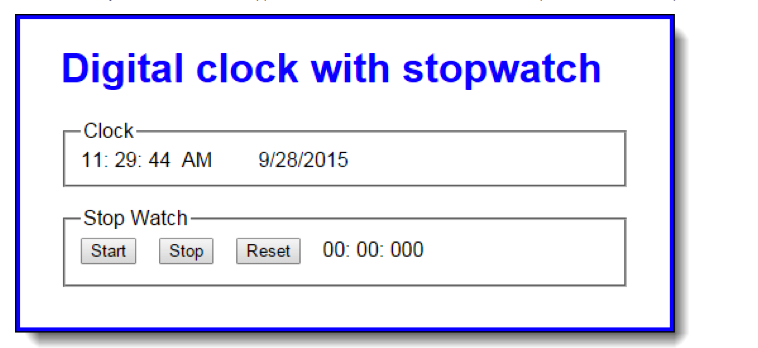
Digital clock with stopwatch Clock 11: 29: 44 AM 9/28/2015 Stop Watch Start Stop Reset 00: 00: 000
Step by Step Solution
There are 3 Steps involved in it

Get step-by-step solutions from verified subject matter experts
 Study Help