







Question: In this assignment, the previously completed project (CS4 Pay Calculator) will be enhanced to use If statements to valid the data entered, calculate overtime, and
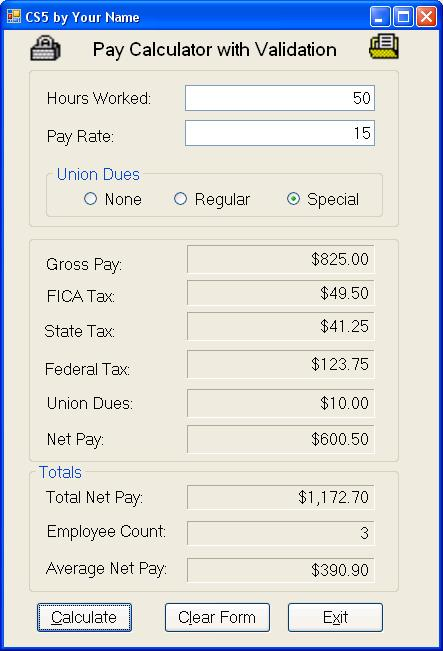
In this assignment, the previously completed project (CS4 Pay Calculator) will be enhanced to use If statements to valid the data entered, calculate overtime, and to determine the union dues based on the employee's membership. Radio Buttons will be used to allow the user to select their memberhship type. In addition, images will be added using Picture Boxes to enhance the appearance of the form.
Add a Group Box with the Radio Buttons inside.
Go to the Properties pane for each Radio Button and set the "Checked" property to "false" for each of them
The only class-level variables that should be used are cintEmployeeCount, cdecTotalNetpay, and the constants listed below. All other variables must be defined locally within their respective procedures. Use constant variables to store the following values: cdecFICA_RATE = 0.06M cdecFEDERAL_RATE = 0.15M cdecSTATE_RATE = 0.05M cdecNONE_UNION_DUES = 0.00M cdecREGULAR_UNION_DUES = 5.00M cdecSPECIAL_UNION_DUES = 10.00M
The user enters the number of hours worked and an hourly rate.
The Calculate button is used to perform the calculations and display the results.
Use any method you want (recommend to use a Try-Catch block) to handle missing or bad input data instead of allowing the program to abort with a run-time error.
Display a specific error message to the user if an exception is thrown.
After getting valid numeric data, use an if statement to check if the hours are between 1 and 50 inclusive. Display an error message if the value entered is outside the range.
Use a nested if to check if the rate is between 10 and 15 dollars inclusive. Display an error message if the value enter is outside the range.
If the hours and rate are within the range, process the data.
First calculate gross pay. Calculate overtime pay for the hours over 40 at 1.5 times the employee's payrate. In the actual code, add an M after 1.5 to make the data type decimal. The default data type for constants is double. The other option is to define a constant and use it in the calculation: const decimal cdecOVERTIME_RATE = 1.5M; You can choose your own variable names, but the formulas to use are: if (intHoursCheck which of the union membership radio buttons is selected to determine the amount to deduct. Recommended to use if-else statements to assign the correct amount stored in the constants to a local variable (decUnionDues).
Calculate the three tax amounts using the calculated gross pay and constants provided. decFica = decGross * cdecFICA_RATE; decFederal = decGross * cdecFEDERAL_RATE; decState = decGross * cdecSTATE_RATE;Then subtract the taxes and the union dues amount from gross pay to get the netpay. decNetpay = decGross - (decFica + decFederal + decState + decUnionDues);Count the number of employees processed, accumulate the net pay, calculate the average net pay, and then display the summary values. cdecTotalNetpay += decNetpay; cintEmployeeCount += 1; decAverageNetpay = cdecTotalNetpay / cintEmployeeCount;The output should be formatted as currency with two digits after the decimal point. The count should NOT display the decimal point (N0).
Use these cases to test your program:
Case # Worked Rate Union Type Netpay ------ ------ ---- ---------- ------ 1 30 10.00 None 222.00 2 40 12.00 Regular 350.20 3 50 15.00 Special 600.50 Totals after both cases: Total Netpay: 1172.70 Total Employee Count: 3 Average Netpay: 390.90The Clear Form button is used to clear the two input text boxes, all of the labels used to display the results of the calculations/summary totals, and deselect all of the radio buttons (setting their Chcked property to False) In addition, the employee count and total netpay accumulator must be reset to zero (cintEmployeeCount = 0; and cdecTotalNetpay = 0;).
The Exit button exits the program.
Grading Requirements (minor)
Set the Text of the form to the assignment number and your name (CS5 Your Name)..
The form objects (group boxes, labels, text boxes, and buttons) must all be formatted the same as the Interface Sample above.
Output must be formatted correctly (numerical, currency, etc.)
None of the radio buttons can be selected when the program is first activated
Include the two image icons (the ones you downloaded earlier) on the form
Grading Requirements (core)
The Calculate button must return correct values
The Clear Form button must completely clear all the values in the form, including resetting the running totals (employe count, total net pay) for the next calculation, as well as resetting the radio buttons so that none are selected.
The Exit button must exit the form
The radio buttons must accurately determine the amount of the Union Dues.
Error message must be generated when incorrect data input is entered: hours worked and pay rate must only be allowed to be entered as a decimal/floating point. Do not allow a runtime error to be triggered. Do not allow the calculation to proceed
Error message must be generated if the rate is outside the $10 - $15 range, or the hours outside the 1 - 50 range. Do not allow the calculation to proceed.
Error message must be generated if user doesn't select a radio button. Do not allow a runtime error to be triggered. Do not allow the calculation to proceed.
** This is the code I have from CS4, the previous assignment. Need help adding the above.
namespace CS4 { public partial class frmCS4 : Form { public frmCS4() { InitializeComponent(); }
private decimal decGross; private decimal decFica; private decimal decFederal; private decimal decState; private decimal decNetPay; decimal decAverageNetPay; private decimal decPayRate;
int cintEmployeeCount; int intHoursWorked; decimal cdecTotalNetPay; const decimal cdecFICA_RATE = 0.06M; const decimal cdecFEDERAL_RATE = 0.15M; const decimal cdecSTATE_RATE = 0.05M; const decimal cdecUNION_DUES = 10.00M;
private void btnCalculate_Click(object sender, EventArgs e) { try { intHoursWorked = int.Parse(txtHoursWorked.Text); try { decPayRate = decimal.Parse(txtPayRate.Text); decGross = intHoursWorked * decPayRate;
decFica = decGross * cdecFICA_RATE; decFederal = decGross * cdecFEDERAL_RATE; decState = decGross * cdecSTATE_RATE;
decNetPay = decGross - (decFica + decFederal + decState + cdecUNION_DUES);
cdecTotalNetPay += decNetPay; cintEmployeeCount += 1; decAverageNetPay = cdecTotalNetPay / cintEmployeeCount;
lblGrossPay.Text = decGross.ToString("C"); lblFICATax.Text = decFica.ToString("C"); lblFederalTax.Text = decFederal.ToString("C"); lblStateTax.Text = decState.ToString("C"); lblNetPay.Text = decNetPay.ToString("C"); lblAverageNetPay.Text = decAverageNetPay.ToString("C"); lblEmployeeCount.Text = cintEmployeeCount.ToString("N0"); lblTotalNetPay.Text = cdecTotalNetPay.ToString("C"); lblUnionDues.Text = cdecUNION_DUES.ToString("C"); } catch (FormatException err) { MessageBox.Show("Pay rate must be numeric. " + err.Message, "Data entry error", MessageBoxButtons.OK, MessageBoxIcon.Exclamation); txtPayRate.SelectAll(); txtPayRate.Focus(); } } catch (FormatException err) { MessageBox.Show("Hours worked must be numeric. " + err.Message, "Data entry error", MessageBoxButtons.OK, MessageBoxIcon.Exclamation); txtHoursWorked.SelectAll(); txtHoursWorked.Focus(); } catch (Exception err) { MessageBox.Show("Unexpected Error: " + err.Message); } }
private void btnClear_Click(object sender, EventArgs e) { txtHoursWorked.Clear(); txtPayRate.Clear(); lblGrossPay.Text = ""; lblFICATax.Text = ""; lblFederalTax.Text = ""; lblStateTax.Text = ""; lblUnionDues.Text = ""; lblNetPay.Text = ""; lblEmployeeCount.Text = ""; lblAverageNetPay.Text = ""; lblTotalNetPay.Text = "";
cdecTotalNetPay = 0; cintEmployeeCount = 0; decAverageNetPay = 0; txtHoursWorked.Focus();
}
private void btnExit_Click(object sender, EventArgs e) { this.Close(); } } }
CS5 by Your Name Pay Calculator with Validation Hours Worked 50 Pay Rate Union Dues O None Regular O Special Gross Pay FICA Tax: State Tax Federal Tax: Union Dues Net Pay: $825.00 $49.50 $41.25 $123.75 $10.00 $600.50 Totals $1,172.70 Total Net Pay: Employee Count Average Net Pay: $390.90 Calculate Clear Form
Step by Step Solution
There are 3 Steps involved in it

Get step-by-step solutions from verified subject matter experts
 Study Help