







Question: In this assignment you will need to use IntArrayBag.java 0: Read Chapter 3 from the textbook. Use Eclipse. Create a new project with the name,
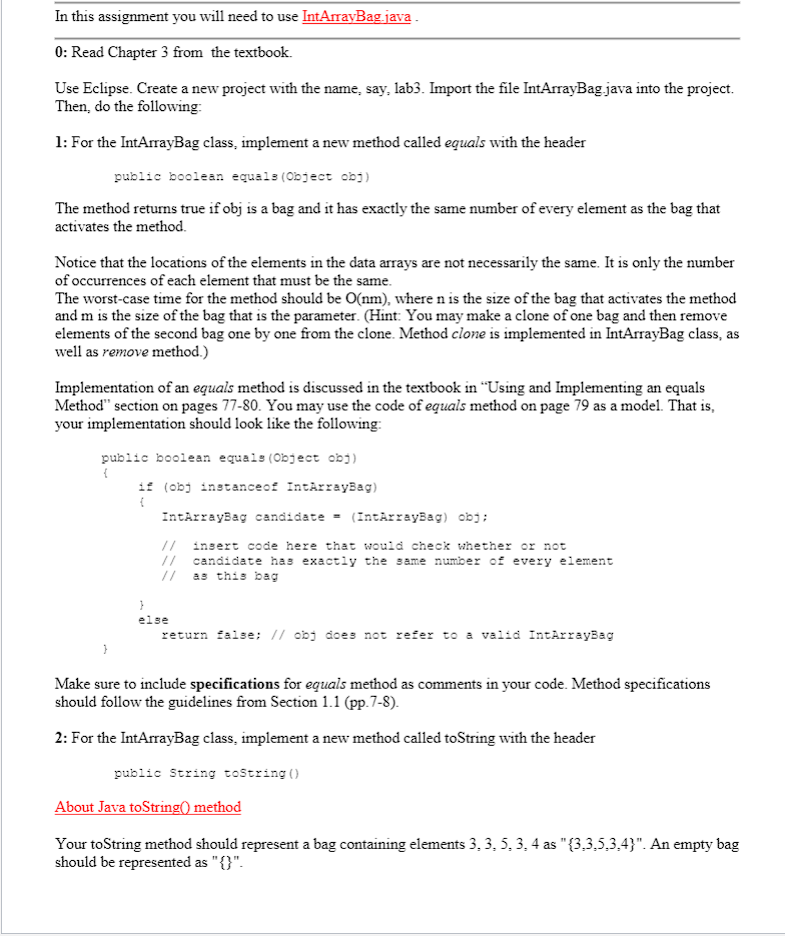
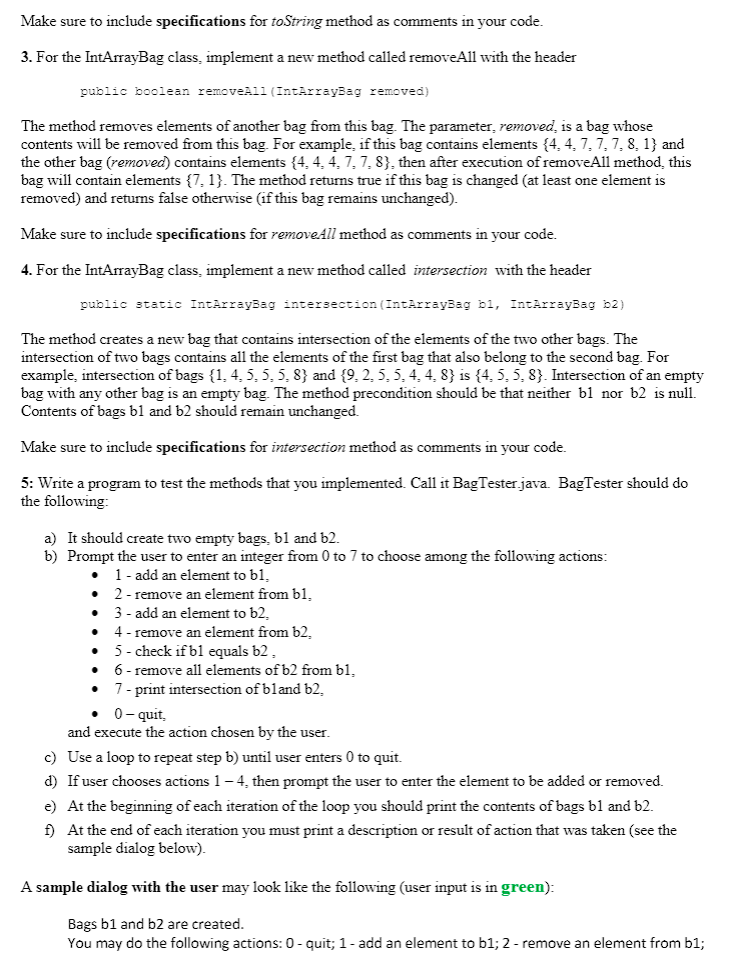
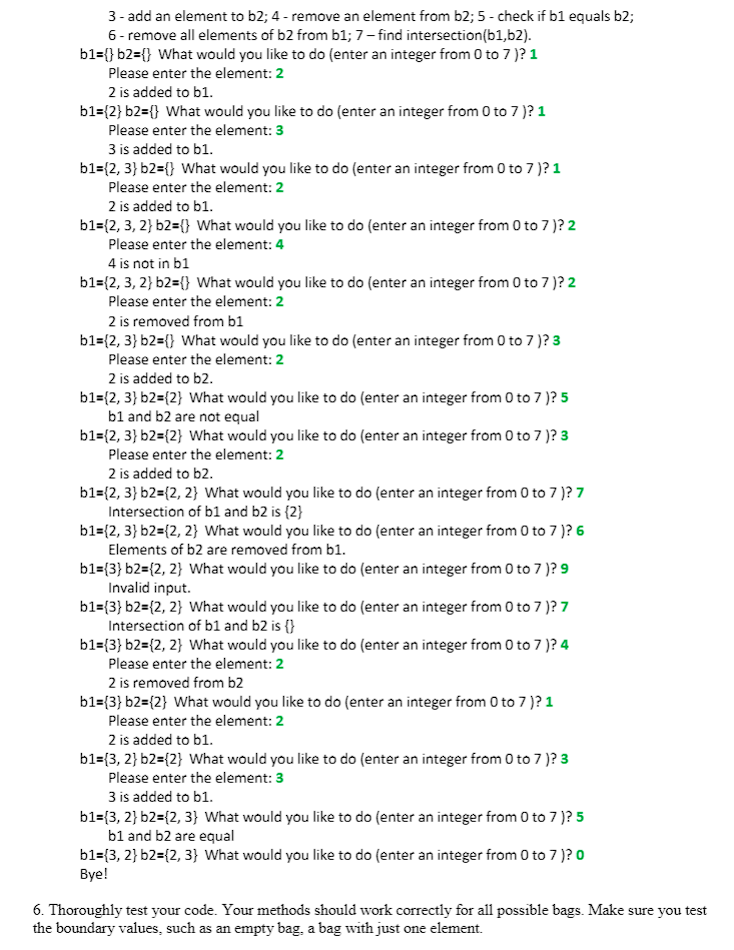
In this assignment you will need to use IntArrayBag.java 0: Read Chapter 3 from the textbook. Use Eclipse. Create a new project with the name, say, lab3. Import the file IntArrayBag.java into the project. Then, do the following: 1: For the IntArrayBag class, implement a new method called equals with the header public boolean equals(Object obs) The method returns true if obj is a bag and it has exactly the same number of every element as the bag that activates the method Notice that the locations of the elements in the data arrays are not necessarily the same. It is only the number of occurrences of each element that must be the same. The worst-case time for the method should be O(nm), where n is the size of the bag that activates the method and m is the size of the bag that is the parameter. (Hint: You may make a clone of one bag and then remove elements of the second bag one by one from the clone. Method clone is implemented in IntArrayBag class, as well as remove method.) Implementation of an equals method is discussed in the textbook in Using and Implementing an equals Method" section on pages 77-80. You may use the code of equals method on page 79 as a model. That is, your implementation should look like the following: public boolean equals (Object obj) { 18 (obj instanceof IntArrayBag) { IntArrayBag candidate (IntArrayBag) obs; // insert code here that would check whether or not 1 candidate has exactly the same number of every element // as this bag } else return false; // o does not refer to a valid IntArrayBag Make sure to include specifications for equals method as comments in your code. Method specifications should follow the guidelines from Section 1.1 (pp. 7-8). 2: For the IntArrayBag class, implement a new method called toString with the header public String toString() About Java toString() method Your toString method should represent a bag containing elements 3, 3, 5.3.4 as "(3.3.5.3.4)". An empty bag should be represented as "{}". Make sure to include specifications for toString method as comments in your code. 3. For the IntArrayBag class. implement a new method called removeAll with the header public boolean removell (InterrayBag removed) The method removes elements of another bag from this bag. The parameter, removed is a bag whose contents will be removed from this bag. For example, if this bag contains elements {4.4.7.7.7.8. 1} and the other bag (removed) contains elements {4,4,4,7,7,8), then after execution of removeAll method, this bag will contain elements {7. 1}. The method returns true if this bag is changed (at least one element is removed) and returns false otherwise (if this bag remains unchanged). Make sure to include specifications for remove All method as comments in your code. 4. For the IntArrayBag class, implement a new method called intersection with the header public static IntArrayBag intersection (IntArrayBag bi, IntArrayBag 62) The method creates a new bag that contains intersection of the elements of the two other bags. The intersection of two bags contains all the elements of the first bag that also belong to the second bag. For example, intersection of bags {1,4,5,5,5.8} and {9.2.5.5.4.4.8} is {4.5,5,8). Intersection of an empty bag with any other bag is an empty bag. The method precondition should be that neither bl nor b2 is null. Contents of bags bl and b2 should remain unchanged. Make sure to include specifications for intersection method as comments in your code. 5: Write a program to test the methods that you implemented. Call it Bag Tester.java. Bag Tester should do the following . a) It should create two empty bags. bl and b2. b) Prompt the user to enter an integer from 0 to 7 to choose among the following actions: 1 - add an element to bi. 2 - remove an element from bl. 3 - add an element to b2. 4 - remove an element from 62 5- check if bl equals b2 6 - remove all elements of b2 from bl, 7 - print intersection of bland 62, . . . . . 0-quit, and execute the action chosen by the user. c) Use a loop to repeat step b) until user enters 0 to quit. d) If user chooses actions 1-4. then prompt the user to enter the element to be added or removed. e) At the beginning of each iteration of the loop you should print the contents of bags b1 and 52. f) At the end of each iteration you must print a description or result of action that was taken (see the sample dialog below). A sample dialog with the user may look like the following user input is in green): Bags b1 and b2 are created. You may do the following actions: 0 - quit; 1- add an element to b1;2 - remove an element from b1; 3- add an element to b2; 4 - remove an element from b2; 5-check if b1 equals b2; 6- remove all elements of b2 from b1; 7 - find intersection(b1,b2). b1={} b2={} What would you like to do (enter an integer from 0 to 7)?1 Please enter the element: 2 2 is added to b1. b1={2}b2={} What would you like to do (enter an integer from 0 to 7)? 1 Please enter the element: 3 3 is added to b1. b1={2,3} b2={} What would you like to do (enter an integer from 0 to 7)?1 Please enter the element: 2 2 is added to b1. b1={2, 3, 2} b2={} What would you like to do (enter an integer from 0 to 7)?2 Please enter the element: 4 4 is not in b1 b1={2,3, 2} b2={} What would you like to do (enter an integer from 0 to 7)?2 Please enter the element: 2 2 is removed from b1 b1={2,3} b2={} What would you like to do (enter an integer from 0 to 7)?3 Please enter the element: 2 2 is added to b2. b1={2, 3} b2={2} What would you like to do (enter an integer from 0 to 7)? 5 b1 and 2 are not equal b1={2, 3} b2={2} What would you like to do (enter an integer from 0 to 7)? 3 Please enter the element: 2 2 is added to b2 b1={2,3} b2={2, 2} What would you like to do (enter an integer from 0 to 7)? 7 Intersection of b1 and b2 is {2} b1={2,3} b2={2, 2} What would you like to do (enter an integer from 0 to 7)? 6 Elements of b2 are removed from bl. b1={3} b2={2, 2} What would you like to do (enter an integer from 0 to 7)? 9 Invalid input. b1={3} b2={2, 2} What would you like to do (enter an integer from 0 to 7)? 7 Intersection of bi and b2 is {} b1={3} b2={2, 2} What would you like to do (enter an integer from 0 to 7)? 4 Please enter the element: 2 2 is removed from b2 b1={3} b2={2} What would you like to do (enter an integer from 0 to 7)?1 Please enter the element: 2 2 is added to b1. b1={3, 2} b2={2} What would you like to do (enter an integer from 0 to 7)?3 Please enter the element: 3 3 is added to b1. b1={3, 2} b2={2, 3} What would you like to do (enter an integer from 0 to 7)? 5 b1 and b2 are equal b1={3, 2} b2={2,3} What would you like to do (enter an integer from 0 to 7)? Bye! 6. Thoroughly test your code. Your methods should work correctly for all possible bags. Make sure you test the boundary values, such as an empty bag, a bag with just one element
Step by Step Solution
There are 3 Steps involved in it

Get step-by-step solutions from verified subject matter experts
 Study Help