







Question: In this assignment, you will observe how a digital counter circuit functions in Multisim and experiment with interactive components (switches). Instructions Open Multisim on your
In this assignment, you will observe how a digital counter circuit functions in Multisim and experiment with interactive components (switches).
Instructions
Open Multisim on your local PC
Download the file Digital CounterDownload Digital Counter
Follow the instructions on the design to see the circuit operating
From the 'Simulate' menu choose 'Run'
Press the 'Spacebar' to run or stop the counter.
Submission Requirements
Adjust the frequency of the 'V4' supply at the top to various frequencies and observe the operation of the counter
1 Hz
5 Hz
20 Hz
etc.
Manually click some of the switches to adjust your stop count. Choose a count of your choice.
Press the spacebar and start the counter.
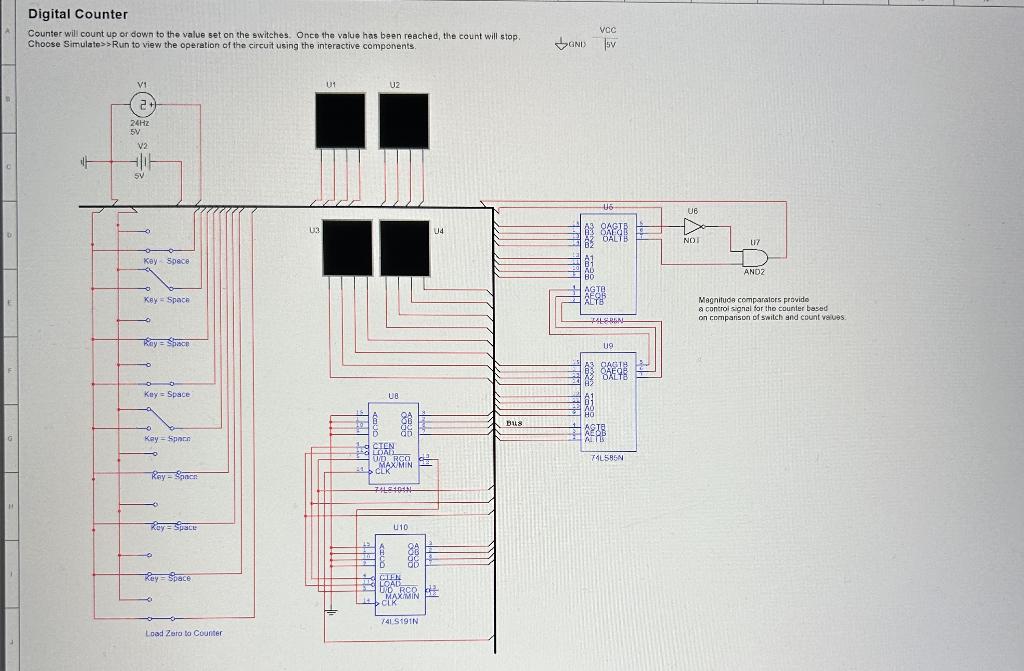
Digital Counter Counter will count up or down to the value set on the switches. Once the value has been reached, the count will stop. Choose Simulate > : Run to view the operation of the circuit using the interactive components
Step by Step Solution
There are 3 Steps involved in it

Get step-by-step solutions from verified subject matter experts
 Study Help