







Question: In this exercise, you ll create an external style sheet that you can use to format the Halloween Store home page that you created in
In this exercise, youll create an external style sheet that you
can use to format the Halloween Store home page that you created in
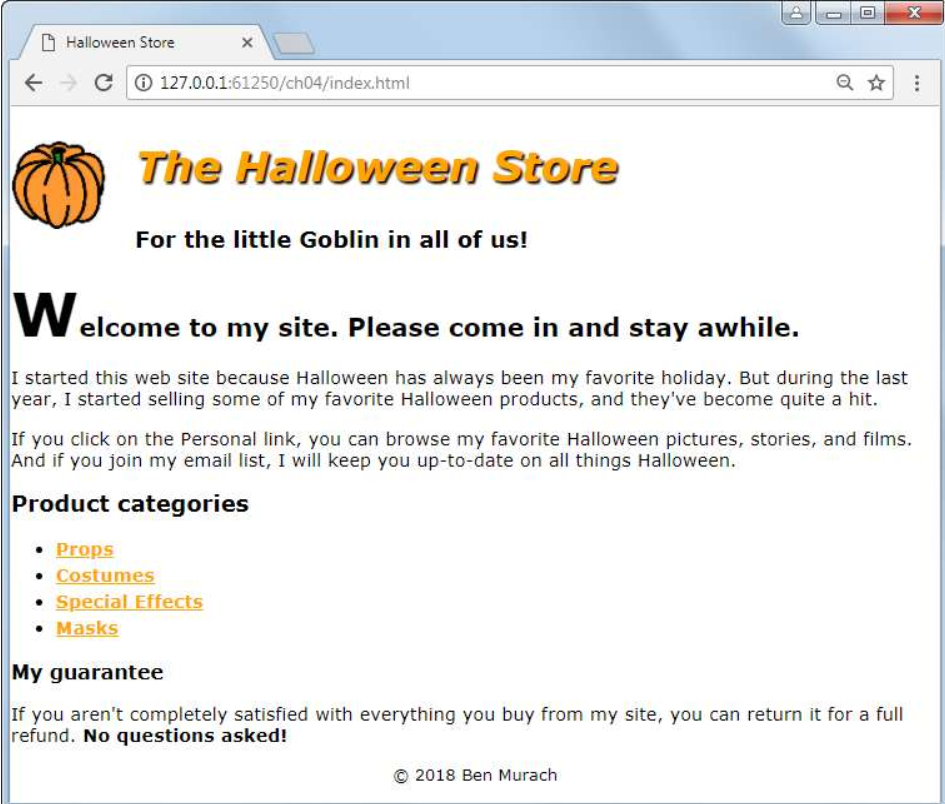
the previous exercise. When youre through, the page should look
similar to this:Specifications
Create the external style sheet for the home page from the main.css
file thats in the styles folder. This file is currently
blank.
Set the default font for the document to a sansserif font.
Adjust the font sizes for all of the headings. In addition, format
the first letter of the first heading in the main content so its
larger than the other letters in the heading.
In the header, float the image to the left and indent both
headings. In addition, change the color of the first heading to
orange, italicize it and add a black shadow.
Format the links so theyre displayed in boldfaced orange whether
or not theyve been visited. If a link has the focus or the mouse
is hovering over it though, it should be displayed in green.Format
the list to increase the space between the list items.
Reduce the font size for the footer and center it
Link the main style sheet that you just created as well as the
normalize style sheet thats in the styles folder to the home
page.Screenshot:
Step by Step Solution
There are 3 Steps involved in it
1 Expert Approved Answer
Step: 1 Unlock

Question Has Been Solved by an Expert!
Get step-by-step solutions from verified subject matter experts
Step: 2 Unlock
Step: 3 Unlock
 Study Help