







Question: In this exercise, you start with the declarations for two arrays, a names array and a scores array. Then, youll add an event handler that
In this exercise, you start with the declarations for two arrays, a names array and a scores array. Then, youll add an event handler that displays the names and scores in the text area of the interface.
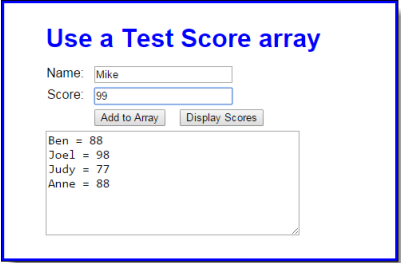
1. Open the HTML and JavaScript files in this folder: exercises_short\ch06\test_scores\ If you run the application, you can enter a name and score and then click the Add to Array button to add names and scores to the arrays, but you cant use the other button to display the scores.
2. Look at the JavaScript code to see that it starts with the declarations for two arrays that contain four elements each. The first is an array of names. The second is an array of scores. Note too that the JavaScript code includes the $ function, an onload event handler, and the addScore() function for adding a name and score to the arrays.
3. Add an event handler for the Display Scores button that displays the names and scores in the arrays, as shown above. You will also need to use the onload event handler to attach this function to the click event of the Display Scores button. After you test this with the starting array values that are shown above, add a name and score to the arrays and test the display again.
4. Modify the event handler for the Add to Array button so the data in the text area is cleared after a name and score are added to the arrays.
Current code:
index.html
Test Score Array Use a Test Score array
Styles.css
body { font-family: Arial, Helvetica, sans-serif; background-color: white; margin: 0 auto; padding: 10px 20px; width: 450px; border: 3px solid blue; } h1 { color: blue; margin-top: 0; margin-bottom: .5em; } h2 { color: blue; font-size: 120%; padding: 0; margin-bottom: .5em; } main { padding: 1em 2em; } label { float: left; width: 3em; text-align: right; } input { margin-left: 1em; margin-bottom: .5em; } p { margin: 0; } textarea { width: 20em; height: 8em; font-size: 120%; }test_scores.js
var names = ["Ben", "Joel", "Judy", "Anne"]; var scores = [88, 98, 77, 88]; var $ = function (id) { return document.getElementById(id); }; var addScore = function () { // get user entries var name = $("name").value; var score = parseInt( $("score").value ); // check entries for validity if (name == "" || isNaN(score) || score 100) { alert("You must enter a name and a valid score"); } else { names[names.length] = name; scores[scores.length] = score; $("name").value = ""; $("score").value = ""; } $("name").focus(); }; window.onload = function () { $("add").onclick = addScore; $("name").focus(); }; Use a Test Score array Name: Mike Score: 99 Add to Array Display Scores Ben88 Joel 98 Judy 77 Anne-88
Step by Step Solution
There are 3 Steps involved in it

Get step-by-step solutions from verified subject matter experts
 Study Help