







Question: In this exercise, you will complete a depreciation schedule for Cowboy Construction. You Will USU UU techniques from chapter 6 to enter fixed-asset data in
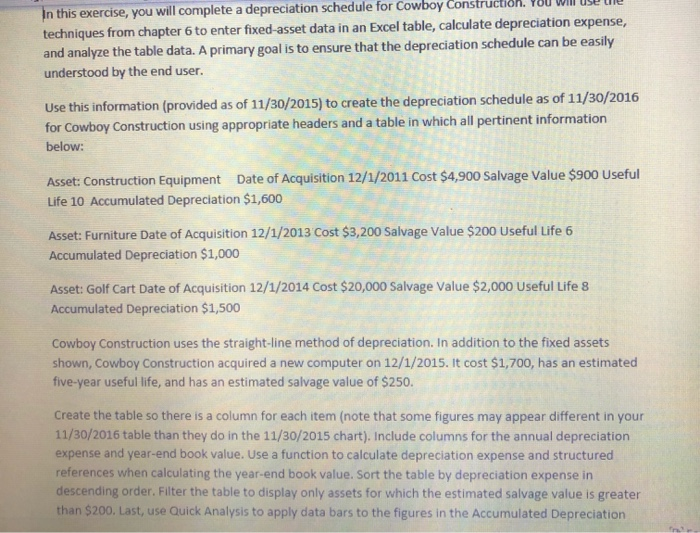
In this exercise, you will complete a depreciation schedule for Cowboy Construction. You Will USU UU techniques from chapter 6 to enter fixed-asset data in an Excel table, calculate depreciation expense, and analyze the table data. A primary goal is to ensure that the depreciation schedule can be easily understood by the end user. Use this information (provided as of 11/30/2015) to create the depreciation schedule as of 11/30/2016 for Cowboy Construction using appropriate headers and a table in which all pertinent information below: Asset: Construction Equipment Date of Acquisition 12/1/2011 Cost $4,900 Salvage Value $900 Useful Life 10 Accumulated Depreciation $1,600 Asset: Furniture Date of Acquisition 12/1/2013 Cost $3,200 Salvage Value $200 Useful Life 6 Accumulated Depreciation $1,000 Asset: Golf Cart Date of Acquisition 12/1/2014 Cost $20,000 Salvage Value $2,000 Useful Life 8 Accumulated Depreciation $1,500 Cowboy Construction uses the straight-line method of depreciation. In addition to the fixed assets shown, Cowboy Construction acquired a new computer on 12/1/2015. It cost $1,700, has an estimated five-year useful life, and has an estimated salvage value of $250. Create the table so there is a column for each item (note that some figures may appear different in your 11/30/2016 table than they do in the 11/30/2015 chart). Include columns for the annual depreciation expense and year-end book value. Use a function to calculate depreciation expense and structured references when calculating the year-end book value. Sort the table by depreciation expense in descending order. Filter the table to display only assets for which the estimated salvage value is greater than $200. Last, use Quick Analysis to apply data bars to the figures in the Accumulated Depreciation
Step by Step Solution
There are 3 Steps involved in it

Get step-by-step solutions from verified subject matter experts
 Study Help