







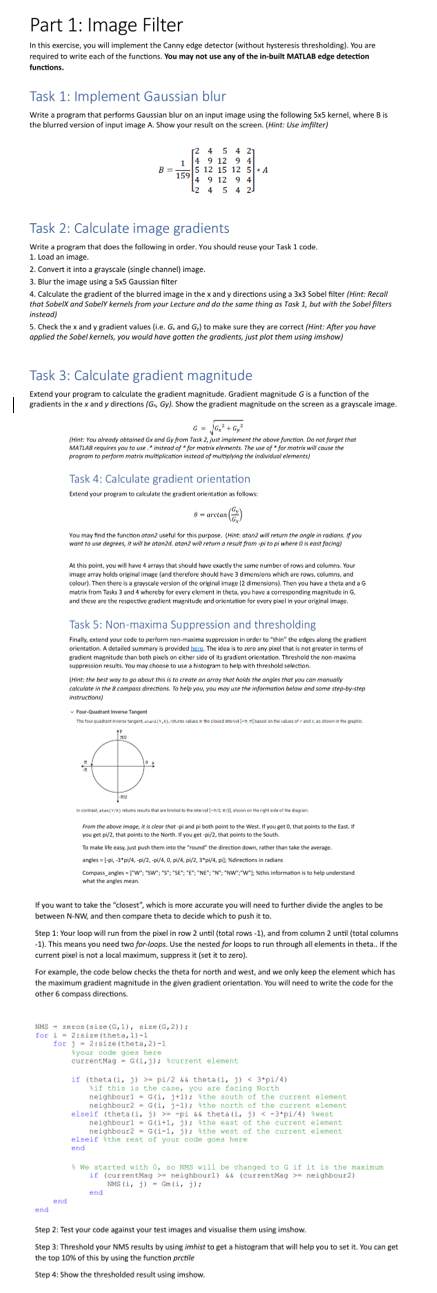
Question: In this exercise, you will implement the Canny edge detector ( without hysteresis thresholding ) . You are required to write each of the functions.
In this exercise, you will implement the Canny edge detector without hysteresis thresholding You are
required to write each of the functions. You may not use any of the inbuilt MATLAB edge detection
functions.
Task : Implement Gaussian blur
Write a program that performs Gaussian blur on an input image using the following kernel, where is
the blurred version of input image A Show your result on the screen. Hint: Use imfilter
Task : Calculate image gradients
Write a program that does the following in order. You should reuse your Task code.
Load an imsge.
Convert it into a grayscale single channel image.
Blur the image using a Gaussion filter
Calculate the gradient of the blurred image in the and directions using a Sobel filter Tlint: Recoll
that SobelX and SobelY kermels from your Lecture and do the same thing as Task but with the Sobel filters
insteadj
Check the and gradient values ie and to make sure ther are correct Hint: After you hove
apalied the Sobel kernels, you would have gorten the grodients, just plor them using inshow
Task : Calculate gradient magnitude
Extend your program to calculate the gradient magnitude. Gradient magritude is a function of the
gradients in the and directions Gy Show the gradient magnitude on the screen as a grayscale image
Task : Calculate gradient orientation
totend your proeram to cokculate the grasent oriereation as folom:
arctas
You may find the finction oton? useful for this purpose. &Get atand wil return the ongle in radions, If yoy
At this point, you will here arres that should hare coactly the same number ef rows and columen. Your
image arrar holds oripinal image and the cfore should have dimeroions mhich are rowh, columes, and
colourl. Then there is a Eapcale wersion of the oribinel imuge dmeroioral. Then wou have a thets and a
Task : Nonmaxima Suppression and thresholding
Finally eatend your code to perform nanmasima superesion in order to "bin" the edees along the gradiem
orietation. A detaled summery bo provided bere. The idee a wo cere any pisel that is eot greader in terms of
tent: the beir way to go aboor this is ro ereate on arroy sher holds the ongles mar pou cas monually
calculate in the compass direcniens. Jo hrlp you, you moy ase Dhe informanion below and seme strepbystep.
instrucnions
Fiow the sbove image is is olesr thor pi and pi both point to the West. If nou get that poists to the Gast if
Fov get p that points so the Nerth. you get pi that poirs to the Soath
To make ble casc, ivat push them iste the round the frection down, romer than tuke the average.
anglen : Nelrections in radars
what the ancles mes
If you want to take the "closest", which is more accurate you will need to further divide the angles to be
between and then compare theta to decide which to push it to
Step : Your loop will run from the pixel in row until total rows and from column until total columns
This means you need two forloops. Use the nested for loops to run through all elements in theta.. If the
current pixel is not a local maximum, suppress it set it to zero
For example, the code below checks the theta for north and west, and we only keep the element which has
the maximum gradient magnitude in the given gradient orientation. You will need to write the code for the
other composs directionsfor siretheta currentMaq G ; fourrent elenent f this the case, you are facing North elseif thetap thetap brest elseif tthe reat of your code goes here We otarted with so WM wi be changed to G if it is the naximum VourrentKag nesghbouri,end endStep : Test your code against your test images and visualise them using imshow:
Step : Threshold your NMS results by using imhist to get a histogram that will help you to set it You can get
the top of this by using the function prctile
Step : Show the thresholded result using inshow.
Step by Step Solution
There are 3 Steps involved in it
1 Expert Approved Answer
Step: 1 Unlock

Question Has Been Solved by an Expert!
Get step-by-step solutions from verified subject matter experts
Step: 2 Unlock
Step: 3 Unlock
 Study Help