







Question: In this exercise, you'll modify an Image Rollover application so it preloads the images that and displayed when the original images are rolled over. In
In this exercise, you'll modify an Image Rollover application so it preloads the images that and displayed
when the original images are rolled over. In addition, you'll create timers that cause the rollover images to
be displayed when the page is first loaded.
Fichinn Tmanes
Open the application in this folder:
chrollover
Run the application and move the mouse pointer over each of the two images to see that the original
image is replaced with another image when the mouse is in the image.
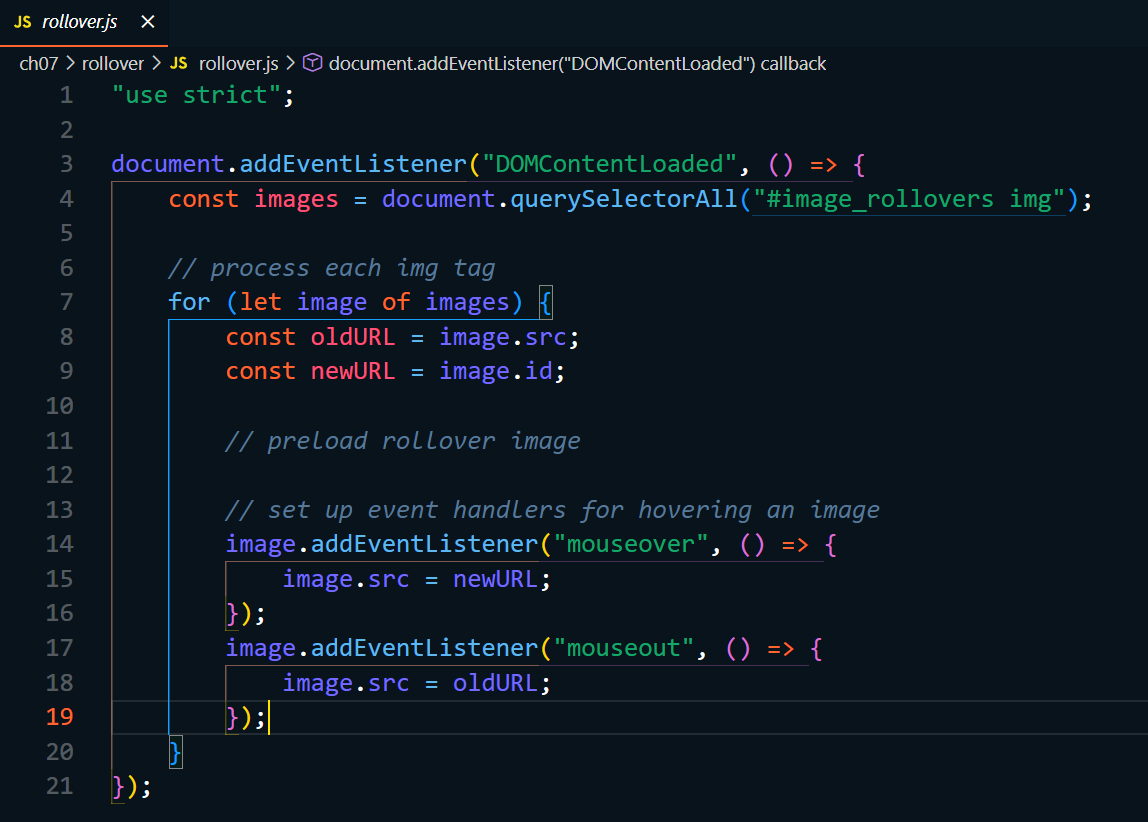
Add JavaScript code to preload the rollover images. These are the images that are specified by the id
attributes of the img elements.
Add a timer that causes the rollover images to be displayed one second after the page is loaded.
Add another timer that causes the original images to be displayed again two seconds after the page is
loaded.htmL
:Move your mouse over an image to change it and back out of the
image to restore the original image. :p:
imagebison.:
:ch rollover B rollover.cSs :
body
fontfamily: Verdana, Arial, Helvetica, sansserif;
fontsize: ;
backgroundcolor: white;
width: px;
margin: auto;
border: solid blue;
padding: ;
h
color: blue;
margin: ;
padding: ;
textalign: center;
margin: ;
padding: ;
textalign: center;
ul
paddingleft: ;
textalign: center;
li
display: inline;
Js rollover.js
ch rollover Js rollover.js document.addEventListenerDOMContentLoaded callback
"use strict";
document.addEventListenerDOMContentLoaded
const images document.querySelectorAll#imagerollovers img";
process each img tag
for let image of images
const oldURL image.src;
const newURL
image.id;
preload rollover image
set up event handlers for hovering an image
image.addEventListenermouseover
image.src newURL;
;
image.addEventListenermouseout
image.src oldURL;
;
;
Step by Step Solution
There are 3 Steps involved in it
1 Expert Approved Answer
Step: 1 Unlock

Question Has Been Solved by an Expert!
Get step-by-step solutions from verified subject matter experts
Step: 2 Unlock
Step: 3 Unlock
 Study Help