







Question: In this lab, we are going to write tests for a Comparable interface implementation. Here is what you want to do - Create a folder
In this lab, we are going to write tests for a Comparable interface implementation. Here is what you want to do - Create a folder called src. It stands for source, where we will place our source files. Inside src, create a folder called UnitTesting. This is meant to represent a package called UnitTesting. We want every class to belong to a package, as it helps when test classes and source classes are of the same package. Create an interface called Comparable.java inside here, copy the following inside of it -************************************
package Unit Testing;
public interface Comparable {
public int compareTo(T other);
}
Create a source class called CoOrds.java inside the UnitTesting package, copy the following inside of it -*****************************************************************************
package UnitTesting;
public class Co0rds implements Comparable
int x,y;
public Co0rds(){
x=y=0;
}
public int compareTo(Co0rds other) {
if(x!=other.x){
return x-other.x;
}else{
return y-other.y;
}
}}
Create another source class called Student.java also inside the UnitTesting package. Copy the following inside of it -****************
package UnitTesting;
public class Student implements Comparable
String name;
char grade;
public student (){
}
public int comparaTo(Student other) {
if (grade==other.grade){
if(name.charAt(0) ==other.name.charAt(0)){
return 0;
}else {
return name.charAt(0) - other.name.charAt(0);
}
}else {
return other.grade - grade;
}}}
Create a folder called test. This is where we will place our test files.
Inside test, create a folder called UnitTesting. This is meant to represent a package called UnitTesting.
Create two classes here called CoOrdsTest and StudentTest. You can copy your CalculatorTest contents from lab 5L here, and then modify it to contain tests for CoOrds and Student, respectively.
package Calculator;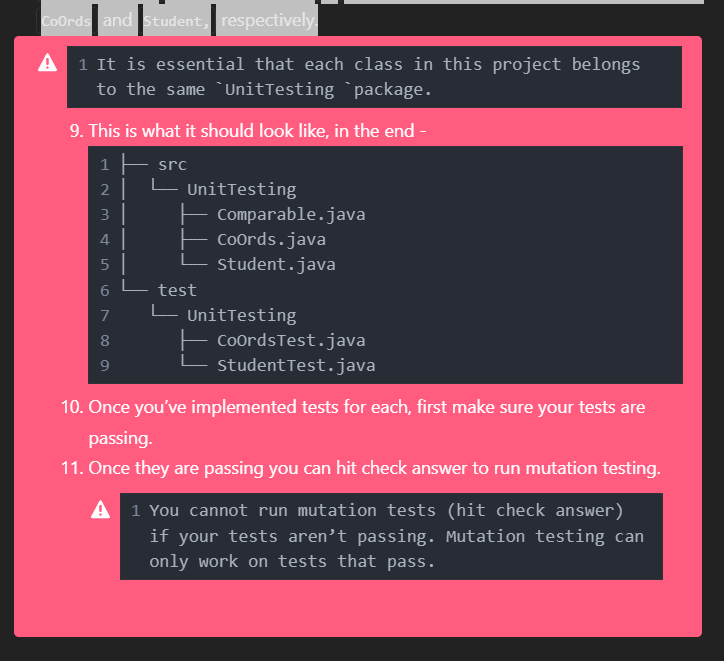
/**
* Calculator class
* @author
* @version 0.1
*/
public class Calculator {
int lhs, rhs;
/**
* Constructor for Calulator
* @param l Left hand side of the equation
* @param r Right hand side of the equation
*/
public Calculator(int l, int r) {
lhs = l;
rhs = r;
}
/**
* Add two numbers and return the result
* @return int
*/
public int add() {
return lhs + rhs;
}
/**
* Subtract two numbers and return the result
* @return int
*/
public int subtract() {
return lhs - rhs;
}
/**
* Multiply two numbers and return the result
* @return int
*/
public int multiply() {
return lhs * rhs;
}
/**
* Divide two numbers and return the result, or throws an exception if the divisor is 0
* @return int
* @throws ArithmeticException
*/
public int divide() throws ArithmeticException {
if (rhs == 0) {
throw new ArithmeticException("Cannot divide by zero");
}
return lhs / rhs;
}
}
1 It is essential that each class in this project belongs to the same 'UnitTesting 'package. 9. This is what it should look like, in the end - 10. Once you've implemented tests for each, first make sure your tests are passing. 11. Once they are passing you can hit check answer to run mutation testing. 1 You cannot run mutation tests (hit check answer) if your tests aren't passing. Mutation testing can only work on tests that pass
Step by Step Solution
There are 3 Steps involved in it

Get step-by-step solutions from verified subject matter experts
 Study Help