







Question: Programming Logic and Design, Comprehensive Program Life Cycle (Industry way) 1. Analyzing the problem 2. Design the Flowchart logic 3. Write the Code 4. Test
Programming Logic and Design, Comprehensive
Program Life Cycle (Industry way) 1. Analyzing the problem 2. Design the Flowchart logic 3. Write the Code 4. Test and debug the program
Your assignment will allow you to apply your knowledge of logic syntax, understanding a program problem, and its development cycle,
This PROBLEM is based on concepts for Data, Modules, and Designing a Program, and If statements.
Write a Simple Sequence program using only step #1 & #2 of the Program Development Life Cycle (Analyze the problem and Design Flowchart) to solve the following problem.
The user must pick three numbers.
Display the picked numbers using a format shown below. The # represents one of the three numbers.
Only submit step #1 - Analyze the problem and step #2 - Flowchart.
Bonus points will be given for all four steps based upon no errors on step #2.
Step #1:
State the problem as given
List the variables ......... and the description of the variable
Identify the Data File
Step #2:
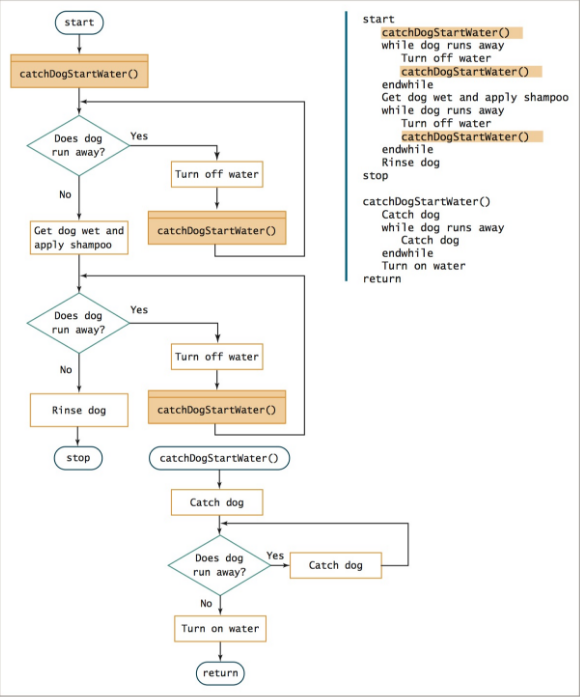
Use a minimum of three modules
Declare all variables
user must enter there three numbers
Test the user input to see if the numbers are winning numbers (i.e. use the IF statement)
Write appropriate message for winning and losing.
Do not use a loop,
When drawing the ball symbols, just treat the image as being drawn line-by-line. Example:
|* *| Line #1| _ | Line #2
This is a simple square robot happy face being displayed on screen or on a paper, then you will code the following
Write "| * * |"Write "| --- |"
Example of a problem and listing your variables:
The problem:
Design a logic to compute the average of Mr. Doe final grade after taking three exams. Use the four PDLC steps which the instructor has indicated.
studname ....... studname means the name of the student
smj ....... smj means the student major
fgrade ....... fgrade means the final grade. The fgrade is
calculated as (test1 + test2 + test3) / 3
test1 ....... test number 1
test2 ....... test number 2
test3 ....... test number 3
Develop your data file (if needed).
A. Go down each variable listed and ask yourself Does someone input variable value or Do I have to calculate/determine it?
a) If they provide it to you, then show it in the data file.
if you have to calculate it, then do not show it in the data file.
Draw a data file: Beginning in Chapter 1 through Chapter 3, the data file must goes across
Example of a data file: Date File
studname smj test1 test2 test3 Ted doe Computer Sci 75.00 80.00 90.00
Step # 2 Design the Flowchart
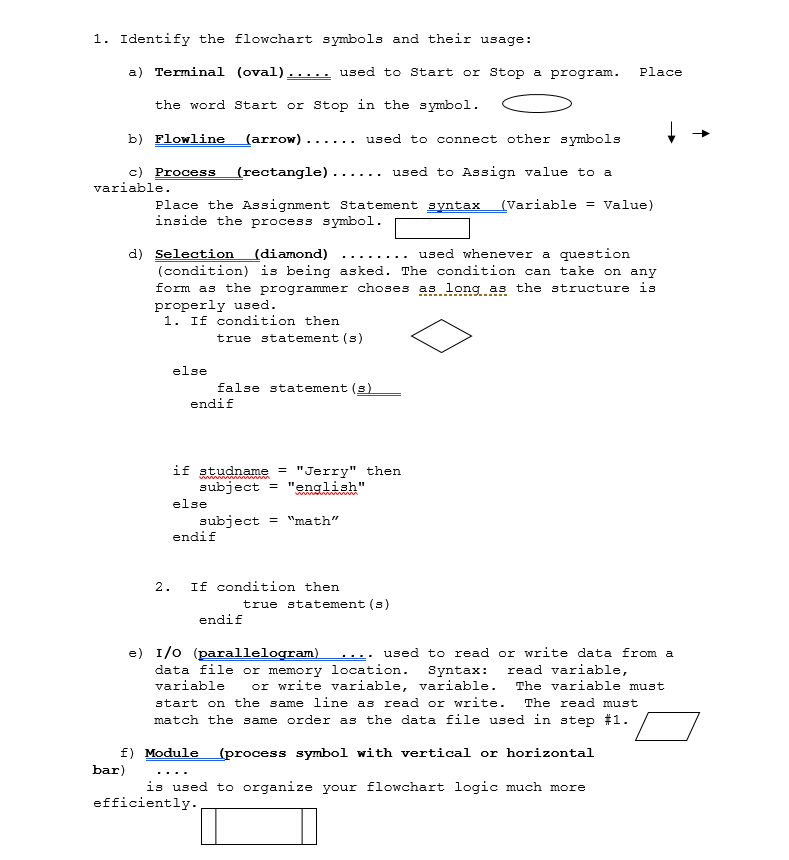
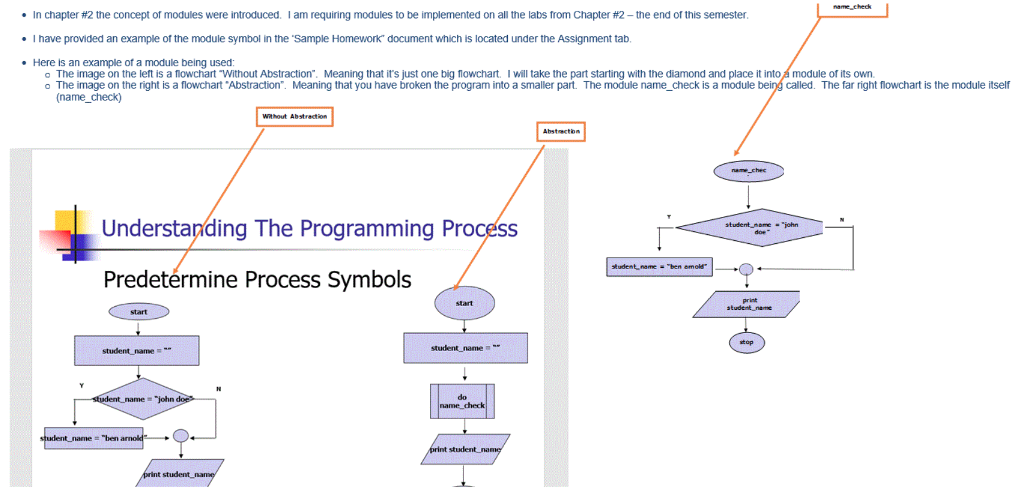
1. Identify the flowchart symbols and their usage: ( oval ) used t start or stop a program . Place the word Start or Stop in the symbol b) Flowline (arrow)-.... . used to connect other symbols c) Process (rectangle) . .. used to Assign value to a variable Place the Assignment Statement syntax (VariableValue) inside the process symbol (condition) is being asked. The condition can take on any frm as the programmer ch ses as long as the structure is properly used. 1. If condition then true statement (s) else false statement (s endif if studname"Jerry" then subject "enaaa else subject"math" 2. If condition then true statement (s) endif e) I/o (parallelogram) . used to read or write data from a data file or memory location. Syntax: read variable variable r write variable, variable. The variable must start on the same line as read or write. The read must match the same rder as the data file used in step #1. E) Module (process symbol with vertical or horizontal bar . .. . is used to organize your flowchart logic much more efficiently 1. Identify the flowchart symbols and their usage: ( oval ) used t start or stop a program . Place the word Start or Stop in the symbol b) Flowline (arrow)-.... . used to connect other symbols c) Process (rectangle) . .. used to Assign value to a variable Place the Assignment Statement syntax (VariableValue) inside the process symbol (condition) is being asked. The condition can take on any frm as the programmer ch ses as long as the structure is properly used. 1. If condition then true statement (s) else false statement (s endif if studname"Jerry" then subject "enaaa else subject"math" 2. If condition then true statement (s) endif e) I/o (parallelogram) . used to read or write data from a data file or memory location. Syntax: read variable variable r write variable, variable. The variable must start on the same line as read or write. The read must match the same rder as the data file used in step #1. E) Module (process symbol with vertical or horizontal bar . .. . is used to organize your flowchart logic much more efficiently
Step by Step Solution
There are 3 Steps involved in it

Get step-by-step solutions from verified subject matter experts
 Study Help