







Question: %In this program, you will learn how to write comment, a comment should communicate the intent of your code, not how to do it in
%In this program, you will learn how to write comment, a comment should communicate the intent of your code, not how to do it in MATLAB %Make sure to run this code using the MATLAB debugger step by step to understand the execution of the code.It will help you to understand loop. %What is the likely goal of the following program? write your once sentence comment. % What is x? what is r? Write your own comment
This program contains two logic errors to prevent it from achieve its likely goal. Correct them to help it acheve the goal.
Help me correct the two errors to make it work. Dont worry about the comments part.Thanks.
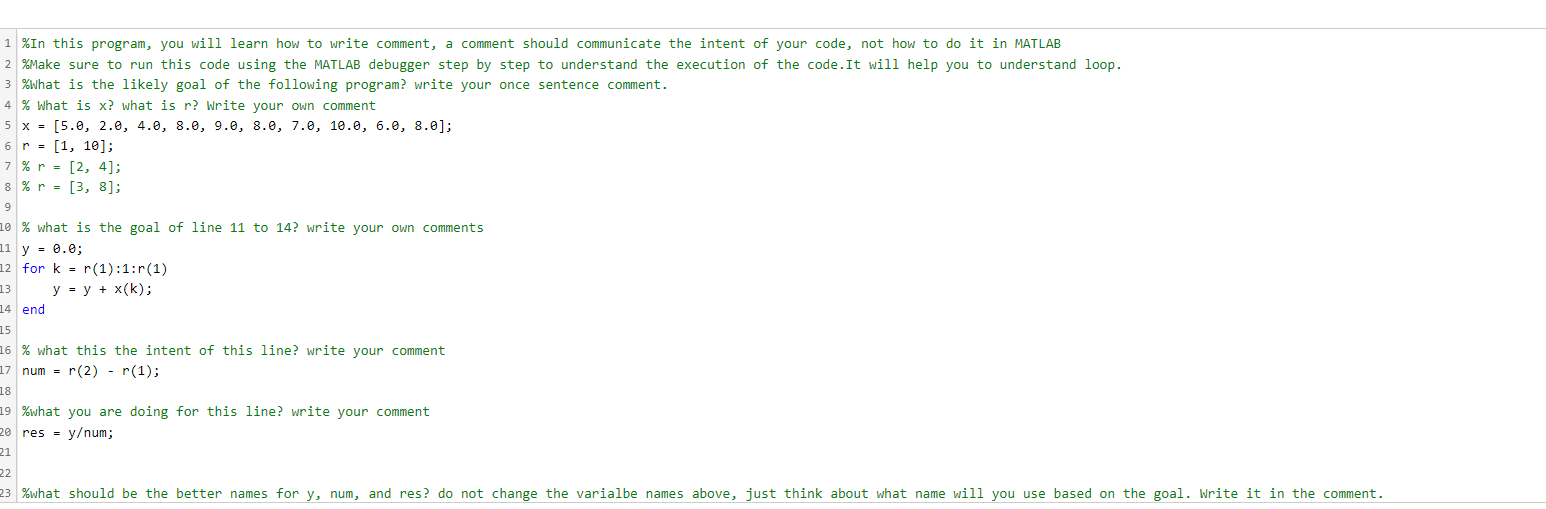
1 \%In this program, you will learn how to write comment, a comment should communicate the intent of your code, not how to do it in MATLAB 2 \%Make sure to run this code using the MATLAB debugger step by step to understand the execution of the code.It will help you to understand loop. \%What is the likely goal of the following program? write your once sentence comment. 4 \% What is x ? what is r ? Write your own comment 5x=[5.,2.,4.,8.,9.,8.,7.,10.,6.,8.] 6r=[1,10] 7%r=[2,4]; %r=[3,8] \% what is the goal of line 11 to 14 ? write your own comments y=0.0; for k=r(1):1:r(1) y=y+x(k) end % what this the intent of this line? write your comment num =r(2)r(1) \%what you are doing for this line? write your comment res =y/ num
Step by Step Solution
There are 3 Steps involved in it

Get step-by-step solutions from verified subject matter experts
 Study Help