







Question: Exercise 1 Description You will be writing a simple Java program that implements a few basic ArrayList manipulations. For the first exercise, you will modify
Exercise 1 Description
You will be writing a simple Java program that implements a few basic ArrayList manipulations. For the first exercise, you will modify some code from the course notes that reads a list of double values from a file into an ArrayList. Create a new Java program named ClosedLab01a.java and type the code below into the new program as a starting point. 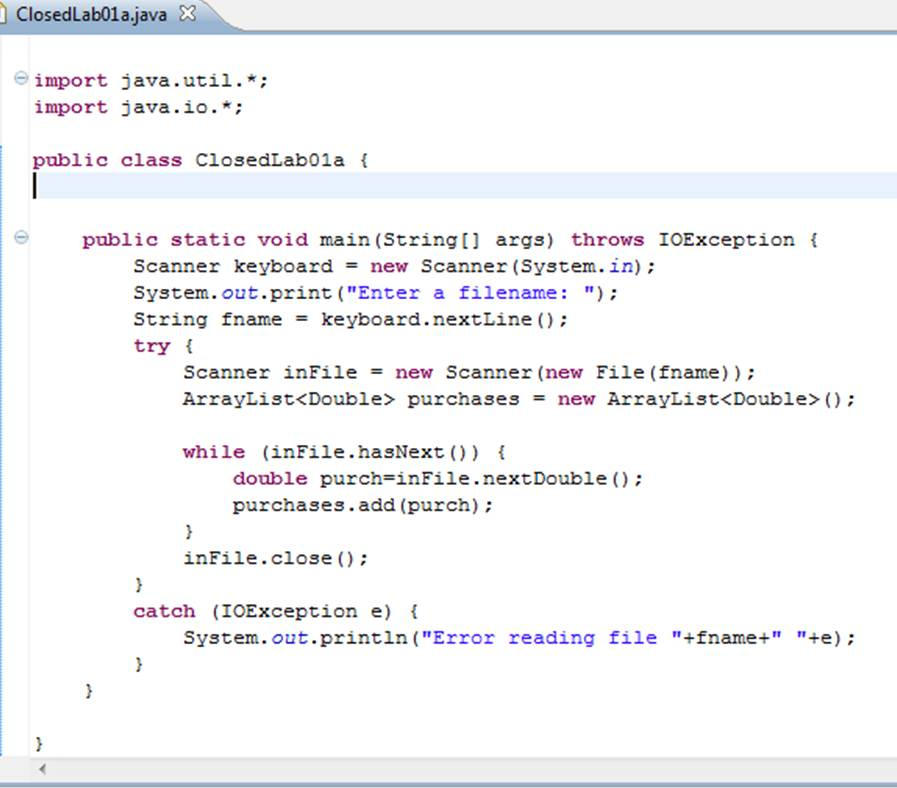 First run the above code to make sure it works. You will need to create an input file with a list of real-valued numbers in it - you can use Eclipse to create that file by selecting the File -> New -> Untitled Text File option. Save this text file in the ClosedLabs01 project folder. You should put a list of 10 - 20 positive real valued numbers into this file. How can you tell that the code above is working? The code above does not produce any output unless there's a problem reading the file, so how do you know that it is doing anything at all? Add some "debugging" statements to the code to produce output. Consult with your partner to discuss where the best places to put debugging statements in your code might be and add them. (You can always comment them out later once you are sure the code is working properly). Once you have the above code copied (and you know that it is working), modify it in the following ways:
Write a private static method named computeAverage that takes an ArrayList of Doubles as input and returns back a double that is the average of the elements of the ArrayList. Make sure you properly comment this method and choose good variable names for any variables you need for this method.
Modify your main method to call computeAverage and write a message to the console (System.out) that prints an informative "The average purchase value was X" message. Make sure your computeAverage method works properly before moving on to step 3.
Write a private static method named findMax that takes an ArrayList of Doubles as input and returns back an integer that is the index of the maximum value of the elements of the ArrayList. Make sure you properly comment this method and choose good variable names for any variables you need for this method.
Modify your main method to call findMax and write an informative message to the console to display the maximum value and its position in the ArrayList. Make sure your findMax method works properly before moving on to step 5.
Repeat steps 3 and 4 above for a findMin method that finds the index of the smallest value in the ArrayList.
Exercise 2 Description
Create a new Java program named ClosedLab01b.java in your ClosedLab01 project folder. For this exercise you will need to write a short program that creates an ArrayList of Strings by reading strings from the console one at a time until the user enters "XXX" as an input string. Once the array of strings is built, the program should display the length of the average string, the identity of the longest and shortest strings, and print the list of strings as a comma-separated list. You may use the code you wrote in Exercise 1 as a base for this Exercise. Feel free to copy it entirely and modify it for this assignment. You should have methods named computeAverage, findMax and findMin for this assignment that behave much like their counterparts above (except that they operate on String length instead of double values). Finally you should add a method named makeString. This method should take an ArrayList of Strings as input and return back a single String value that contains each element of the list, in order, separated by commas. For example, if the ArrayList contains: ["the", "quick", "brown", "fox"] the method should return the String: "the, quick, brown, fox" Note that there should not be any trailing commas or spaces on this final String. You may decide if you want them split with a single comma or a comma followed by a space. (HINT: think about loops)
ClosedLab01a.java 3 e import java.util.* import java.io.* public class ClosedLab01at public static void main (String[] args) throws IOException i Scanner keyboardnew Scanner (System.in); System. out.print ("Enter a filename: ") String fname = keyboard.nextLine(); try Scanner inFilenew Scanner (new File (fname) ArrayList
Step by Step Solution
There are 3 Steps involved in it

Get step-by-step solutions from verified subject matter experts
 Study Help