







Question: In this project, you will create a Web page that allows visitors to your site to sign a guest book that is saved to a
In this project, you will create a Web page that allows visitors to your site to sign a guest book that is saved to a text file. Ensure that the Projects directory has read and write permissions for everyone.
1. Create a new document in your text editor and type the declaration, element, document head, and
element. Use Guest Book as the content of the
2. Add the following text and elements to the document body:
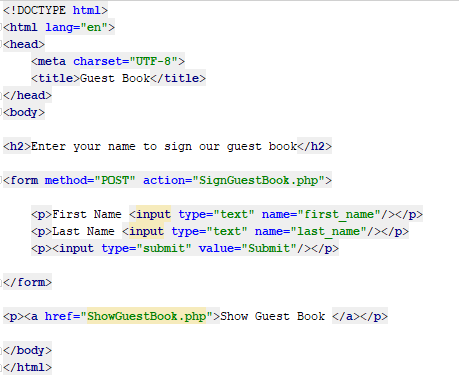
3. Save the document as GuestBook.html.
4. Create a new document in your text editor and type the declaration, element, document head, and
element. Use Sign Guest Book as the content of the
5. Add the following script section to the document body:
?>
6. Add the following if statement to the script section to check whether the user filled in the first name and last name fields:

7. Add the following else clause to the end of the script section. The statements in the else clause use the fwrite() function to add visitor names to a text file named guestbook.txt.
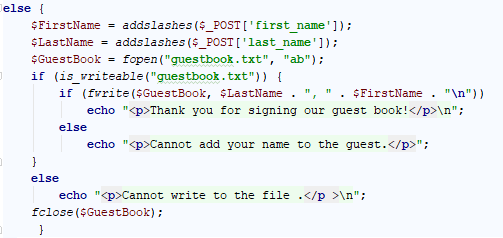
8. Save the document as SignGuestBook.php.
9. Create a document named ShowGuestBook.php that displays the names of visitors who have signed the guest book. Use the readfile() function to display the contents of the guestbook.txt file. Note that you will need to use the
element (https://www.w3schools.com/tags/tag_pre.asp) for Web browsers to recognize the line breaks.
! DOCTYPE html> html lang-"en"> ?head> title>Guest Bookk/title> body> h2>Enter your name to sign our guest book ?form method-"POST" action-"SignGuestBook.php">
First Name Kinput type-"text" name-"first name">X/p>
Show Guest Book
Step by Step Solution
There are 3 Steps involved in it

Get step-by-step solutions from verified subject matter experts
 Study Help