Question: In this project, you will write a cache simulator which takes an image of memory and a memory trace as input, simulates the hit/miss behavior
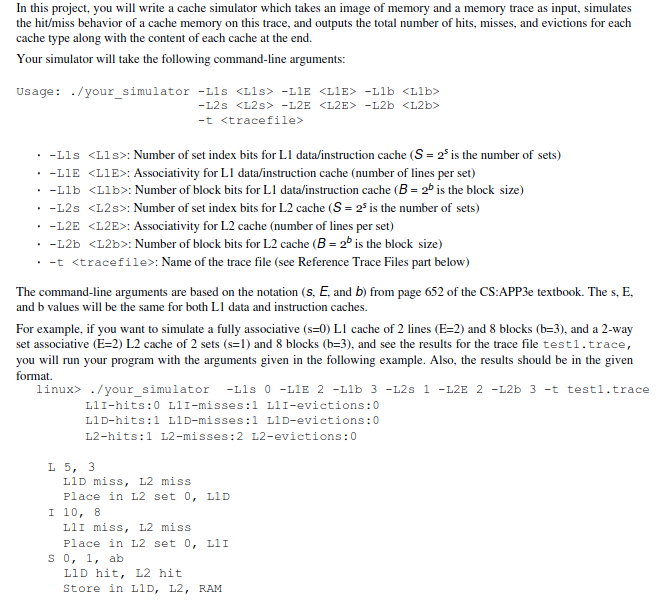
In this project, you will write a cache simulator which takes an image of memory and a memory trace as input, simulates the hit/miss behavior of a cache memory on this trace, and outputs the total number of hits, misses, and evictions for each cache type along with the content of each cache at the end. Your simulator will take the following command-line arguments: Usage: ./your_simulator -lls -LIE -L2S -L2E -L2b -t . . . -Lls : Number of set index bits for Ll data/instruction cache (S = 2 is the number of sets) -L1E : Associativity for Ll data/instruction cache (number of lines per set) -Llb : Number of block bits for Ll data/instruction cache (B = 26 is the block size) . -L2s : Number of set index bits for L2 cache (S = 2 is the number of sets) -L2E : Associativity for L2 cache (number of lines per set) -L2b : Number of block bits for L2 cache (B= 2 is the block size) . -t : Name of the trace file (see Reference Trace Files part below) The command-line arguments are based on the notation (s, E, and b) from page 652 of the CS:APP3e textbook. The s, E, and b values will be the same for both L1 data and instruction caches. For example, if you want to simulate a fully associative (s=0) L1 cache of 2 lines (E=2) and 8 blocks (b=3), and a 2-way set associative (E=2) L2 cache of 2 sets (srl) and 8 blocks (b=3), and see the results for the trace file testi.trace, you will run your program with the arguments given in the following example. Also, the results should be in the given format linux> ./your_simulator -L1s 0 -L1E 2 -Llb 3 -L2s 1 -L2E 2 -L2b 3 -t testi.trace LlI-hits:0 L11-misses:1 L1I-evictions:0 LlD-hits:1 L1D-misses:1 LID-evictions:0 L2-hits:1 L2-misses:2 L2-evictions: 0 L5, 3 LID miss, L2 miss Place in L2 set 0, LID I 10, 8 LlI miss, L2 miss Place in L2 set 0, LII S 0, 1, ab LiD hit, L2 hit Store in L1, L2, RAM









 Study Help