







Question: In this task you will write a python script that will prompt a user for a directory to archive, ask them if they want
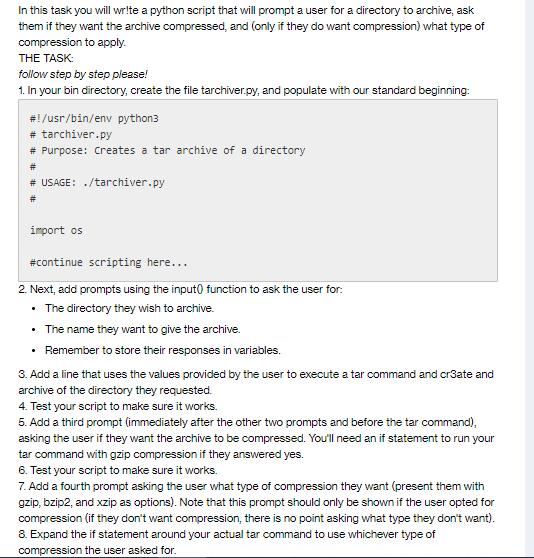
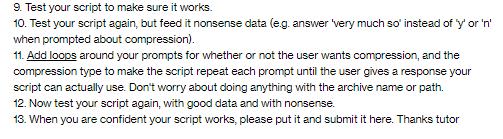
In this task you will write a python script that will prompt a user for a directory to archive, ask them if they want the archive compressed, and (only if they do want compression) what type of compression to apply. THE TASK: follow step by step please! 1. In your bin directory, create the file tarchiver.py, and populate with our standard beginning: # !/usr/bin/env python3 # tarchiver.py # Purpose: Creates a tar archive of a directory # # USAGE: ./tarchiver.py # import os #continue scripting here... 2. Next, add prompts using the input function to ask the user for: The directory they wish to archive. The name they want to give the archive. Remember to store their responses in variables. 3. Add a line that uses the values provided by the user to execute a tar command and cr3ate and archive of the directory they requested. 4. Test your script to make sure it works. 5. Add a third prompt (immediately after the other two prompts and before the tar command), asking the user if they want the archive to be compressed. You'll need an if statement to run your tar command with gzip compression if they answered yes. 6. Test your script to make sure it works. 7. Add a fourth prompt asking the user what type of compression they want (present them with gzip, bzip2, and xzip as options). Note that this prompt should only be shown if the user opted for compression (if they don't want compression, there is no point asking what type they don't want). 8. Expand the if statement around your actual tar command to use whichever type of compression the user asked for. 9. Test your script to make sure it works. 10. Test your script again, but feed it nonsense data (e.g. answer 'very much so' instead of 'y' or 'n' when prompted about compression). 11. Add loops around your prompts for whether or not the user wants compression, and the compression type to make the script repeat each prompt until the user gives a response your script can actually use. Don't worry about doing anything with the archive name or path. 12. Now test your script again, with good data and with nonsense. 13. When you are confident your script works, please put it and submit it here. Thanks tutor
Step by Step Solution
3.47 Rating (154 Votes )
There are 3 Steps involved in it
Step 1 Create the tarchiverpy script with the initial code structure usrbinenv python3 tarchiverpy Purpose Creates a tar archive of a directory USAGE tarchiverpy import os Continue scripting here This ... View full answer

Get step-by-step solutions from verified subject matter experts
 Study Help