Question: IN VISUAL BASIC LANGUAGE PLEASE!!!! Objectives . . Effectively create, use and type variables and constants. Gather input. Create mathematical statements to solve a problem.
IN VISUAL BASIC LANGUAGE PLEASE!!!!
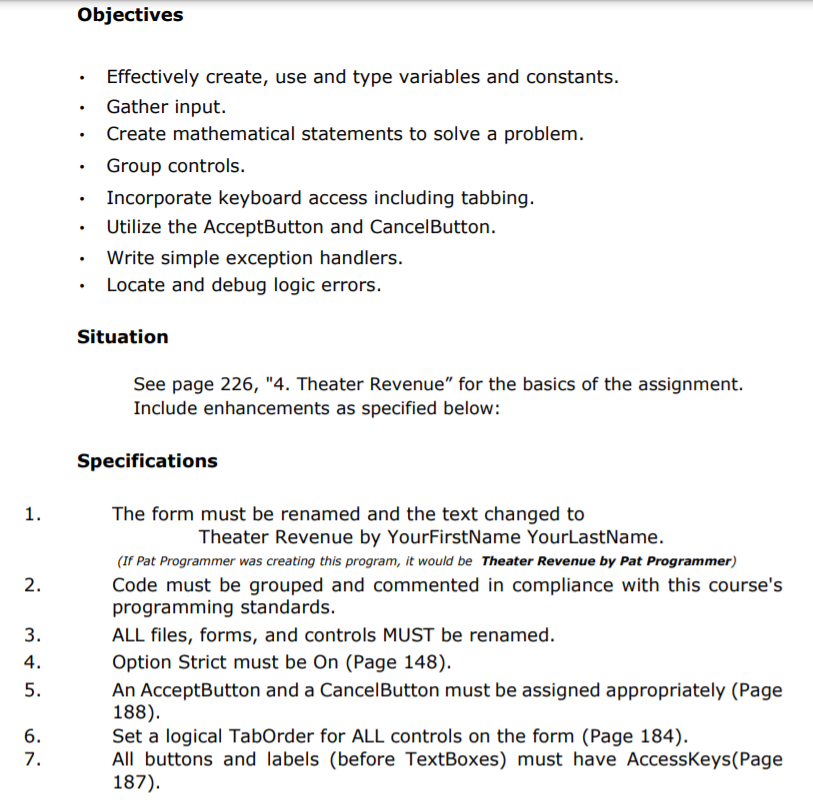
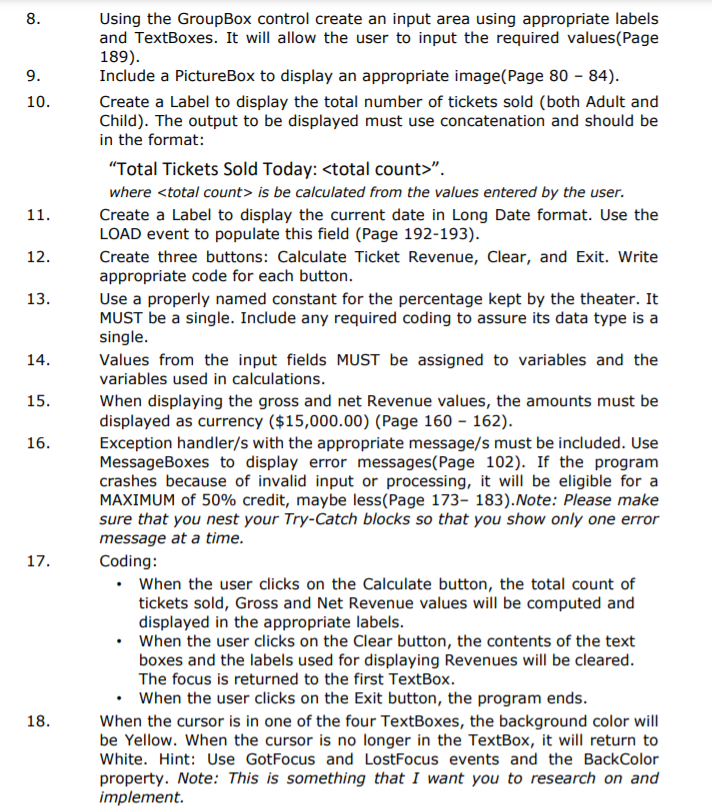
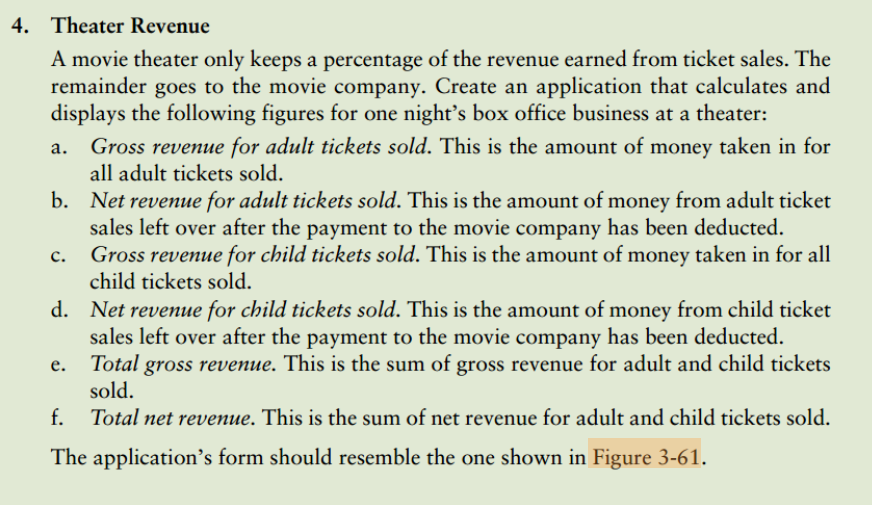
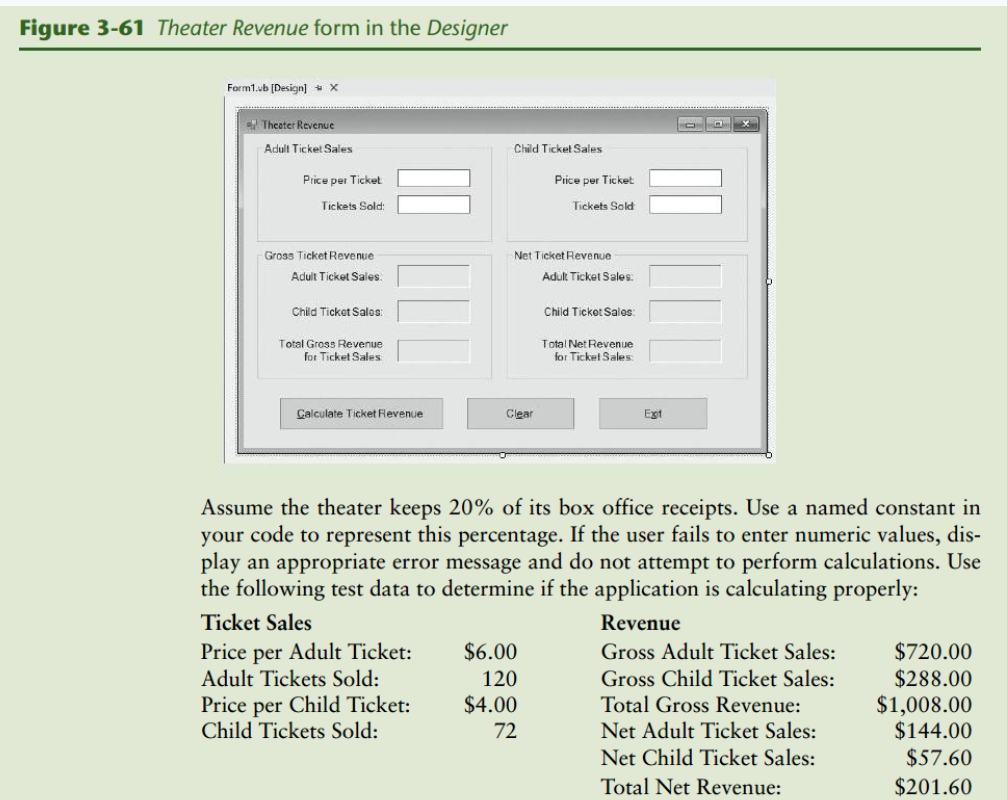
Objectives . . Effectively create, use and type variables and constants. Gather input. Create mathematical statements to solve a problem. Group controls. Incorporate keyboard access including tabbing. Utilize the AcceptButton and CancelButton. Write simple exception handlers. Locate and debug logic errors. . . Situation See page 226, "4. Theater Revenue" for the basics of the assignment. Include enhancements as specified below: Specifications 1. 2. 3. 4. 5. The form must be renamed and the text changed to Theater Revenue by YourFirstName YourLastName. (If Pat Programmer was creating this program, it would be Theater Revenue by Pat Programmer) Code must be grouped and commented in compliance with this course's programming standards. ALL files, forms, and controls MUST be renamed. Option Strict must be On (Page 148). An AcceptButton and a CancelButton must be assigned appropriately (Page 188). Set a logical TabOrder for ALL controls on the form (Page 184). All buttons and labels (before TextBoxes) must have AccessKeys(Page 187). 6. 7. 8. 9. 10. 11. 12. 13. 14. 15. Using the GroupBox control create an input area using appropriate labels and TextBoxes. It will allow the user to input the required values(Page 189). Include a pictureBox to display an appropriate image(Page 80 - 84). Create a Label to display the total number of tickets sold (both Adult and Child). The output to be displayed must use concatenation and should be in the format: Total Tickets Sold Today: ". where is be calculated from the values entered by the user. Create a Label to display the current date in Long Date format. Use the LOAD event to populate this field (Page 192-193). Create three buttons: Calculate Ticket Revenue, Clear, and Exit. Write appropriate code for each button. Use a properly named constant for the percentage kept by the theater. It MUST be a single. Include any required coding to assure its data type is a single. Values from the input fields MUST be assigned to variables and the variables used in calculations. When displaying the gross and net Revenue values, the amounts must be displayed as currency ($15,000.00) (Page 160 - 162). Exception handler/s with the appropriate message/s must be included. Use MessageBoxes to display error messages(Page 102). If the program crashes because of invalid input or processing, it will be eligible for a MAXIMUM of 50% credit, maybe less(Page 173-183). Note: Please make sure that you nest your Try-Catch blocks so that you show only one error message at a time. Coding: When the user clicks on the Calculate button, the total count of tickets sold, Gross and Net Revenue values will be computed and displayed in the appropriate labels. When the user clicks on the Clear button, the contents of the text boxes and the labels used for displaying Revenues will be cleared. The focus is returned to the first TextBox. When the user clicks on the Exit button, the program ends. When the cursor is in one of the four TextBoxes, the background color will be Yellow. When the cursor is no longer in the TextBox, it will return to White. Hint: Use GotFocus and LostFocus events and the BackColor property. Note: This is something that I want you to research on and implement 16. 17. 18. a. 4. Theater Revenue A movie theater only keeps a percentage of the revenue earned from ticket sales. The remainder goes to the movie company. Create an application that calculates and displays the following figures for one night's box office business at a theater: Gross revenue for adult tickets sold. This is the amount of money taken in for all adult tickets sold. b. Net revenue for adult tickets sold. This is the amount of money from adult ticket sales left over after the payment to the movie company has been deducted. Gross revenue for child tickets sold. This is the amount of money taken in for all child tickets sold. d. Net revenue for child tickets sold. This is the amount of money from child ticket sales left over after the payment to the movie company has been deducted. Total gross revenue. This is the sum of gross revenue for adult and child tickets sold. f. Total net revenue. This is the sum of net revenue for adult and child tickets sold. The application's form should resemble the one shown in Figure 3-61. c. e. Figure 3-61 Theater Revenue form in the Designer Form1.b Design + X - Theater Revenue Ox Adult Ticket Sales Child Ticket Sales Price per Ticket Price per Ticket Tickets Sold Tickets Sald Gross Ticket Revenue Net Ticket Revenue Adult Ticket Sales Adult Ticket Sales Child Ticket Sales Child Ticket Sales Total Gross Revenue for Ticket Sales Total Net Revenue for Ticket Sales Calculate Ticket Revenue Clear Ext Assume the theater keeps 20% of its box office receipts. Use a named constant in your code to represent this percentage. If the user fails to enter numeric values, dis- play an appropriate error message and do not attempt to perform calculations. Use the following test data to determine if the application is calculating properly: Ticket Sales Revenue Price per Adult Ticket: $6.00 Gross Adult Ticket Sales: $720.00 Adult Tickets Sold: 120 Gross Child Ticket Sales: $288.00 Price per Child Ticket: $4.00 Total Gross Revenue: $1,008.00 Child Tickets Sold: 72 Net Adult Ticket Sales: $144.00 Net Child Ticket Sales: $57.60 Total Net Revenue: $201.60









 Study Help