







Question: In Visual Studio, how do I fix this exception being thrown? I just got help with the first exception, but now I have more. Also,
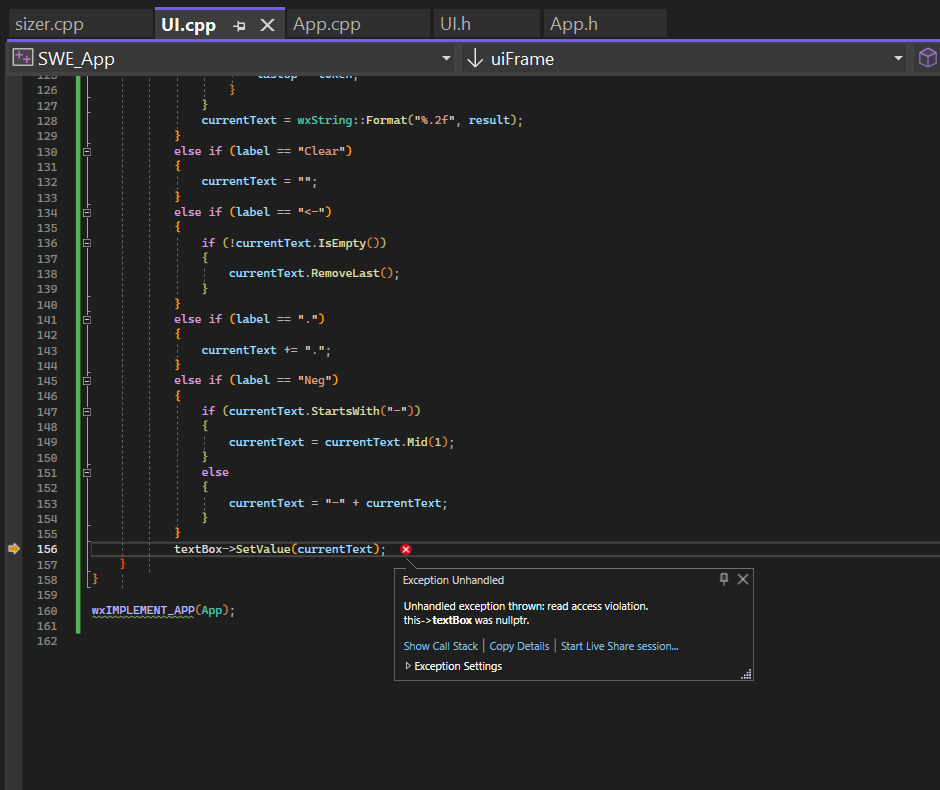
In Visual Studio, how do I fix this exception being thrown?
I just got help with the first exception, but now I have more. Also, would it be helpful to put breakpoints anywhere?
Here is my code so far..
App.h
#pragma once
#include UIh
#include
class App : public wxApp
public:
virtual bool OnInit override;
;
UIh
#pragma once
#include wxeventh
#include wxsizerh
#include
#include
#include
#include
class uiFrame : public wxFrame
public:
uiFrameconst wxString& title, const wxPoint& pos, const wxSize& size;
private:
wxTextCtrl textBox;
void buttonClickwxCommandEvent& event;
wxDECLAREEVENTTABLE;
;
App.cpp
#include "App.h
#include UIh
#include
bool App::OnInit
uiFrame frame new uiFrame Calculator wxDefaultPosition, wxSize;
frameShowtrue;
return true;
UIcpp
#include UIh
#include
#include "App.h
#include
#include
#include
wxBEGINEVENTTABLEuiFrame wxFrame
EVTBUTTONwxIDANY, uiFrame::buttonClick
wxENDEVENTTABLE
uiFrame::uiFrameconst wxString& title, const wxPoint& pos, const wxSize& size : wxFrameNULL wxIDANY, title, pos, size
wxBoxSizer calcSizer new wxBoxSizerwxVERTICAL;
textBox new wxTextCtrlthis wxIDANY, wxDefaultPosition, wxDefaultSize, wxTEPROCESSENTER;
calcSizerAddtextBox wxEXPAND wxALL, ;
wxGridSizer buttonGrid new wxGridSizer;
for int i ; i ; i
wxString label wxString::Formatd i;
wxButton numButton new wxButtonthis wxIDANY, label;
buttonGridAddnumButton wxEXPAND;
numButtonConnectwxIDANY, wxEVTBUTTON, wxCommandEventHandleruiFrame::buttonClick this;
wxArrayString operators;
operators.Add;
operators.Add;
operators.Add;
operators.Add;
operators.Add;
operators.Addsin;
operators.Addcos;
operators.Addtan;
operators.Add;
operators.Add;
operators.AddClear;
operators.Add;
operators.AddNeg;
for const wxString& oper : operators
wxButton operButton new wxButtonthis wxIDANY, oper;
buttonGridAddoperButton wxEXPAND;
operButtonConnectwxIDANY, wxEVTBUTTON, wxCommandEventHandleruiFrame::buttonClick this;
calcSizerAddbuttonGrid wxEXPAND wxALL, ;
SetSizercalcSizer;
void uiFrame::buttonClickwxCommandEvent & event
wxButton button wxDynamicCasteventGetEventObject wxButton;
if button return;
wxString label buttonGetLabel;
wxString currentText;
if textBox
currentText textBoxGetValue;
else
currentText "Error: textBox is null";
if labelIsNumber
currentText label;
else if label label label label label label "sin" label "cos" label "tan"
currentText label ;
else if label
wxStringTokenizer tokenizercurrentText;
double result ;
wxString lastOp;
while tokenizerHasMoreTokens
wxString token tokenizer.GetNextToken;
if tokenIsNumber
double number;
token.ToDouble&number;
if lastOp
result number;
else if lastOp
result number;
else if lastOp
result number;
else if lastOp
result number;
else if lastOp &
result fmodresult number;
else if lastOp "sin"
result sinnumber;
else if lastOp "cos"
result cosnumber;
else if lastOp "tan"
result tannumber;
else
lastOp token;
currentText wxString::Formatf result;
else if label "Clear"
currentText ;
else if label
if currentText.IsEmpty
currentText.RemoveLast;
else if label
currentText ;
else if label "Neg"
if currentTextStartsWith
currentText currentText.Mid;
else
currentText currentText;
textBoxSetValuecurrentText;
wxIMPLEMENTAPPApp;
Step by Step Solution
There are 3 Steps involved in it
1 Expert Approved Answer
Step: 1 Unlock

Question Has Been Solved by an Expert!
Get step-by-step solutions from verified subject matter experts
Step: 2 Unlock
Step: 3 Unlock
 Study Help