







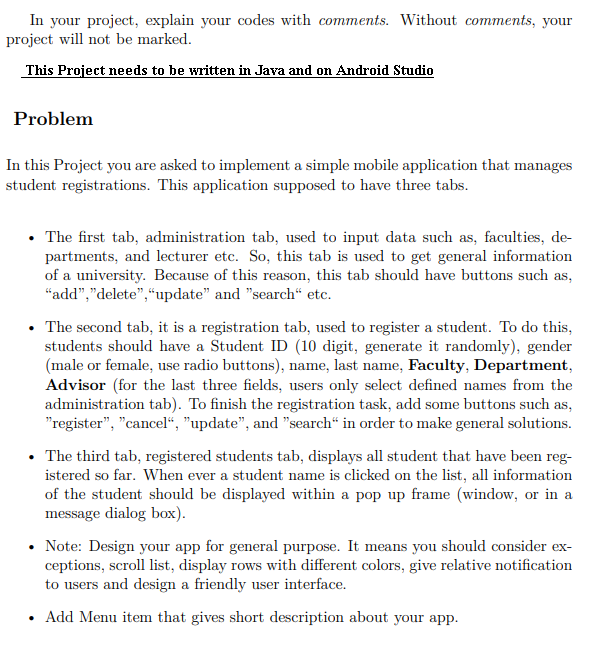
Question: In your project, explain your codes with comments. Without comments, your project will not be marked. This Project needs to be written in Java and
In your project, explain your codes with comments. Without comments, your
project will not be marked.
This Project needs to be written in Java and on Android Studio
Problem
In this Project you are asked to implement a simple mobile application that manages
student registrations. This application supposed to have three tabs
The first tab, administration tab, used to input data such as faculties, de
partments, and lecturer etc. So this tab is used to get general information
of a university. Because of this reason, this tab should have buttons such as
"add","delete","update" and "search" etc.
The second tab, it is a registration tab, used to register a student. To do this,
students should have a Student ID digit, generate it randomly gender
male or female, use radio buttons name, last name, Faculty, Department,
Advisor for the last three fields, users only select defined names from the
administration tab To finish the registration task, add some buttons such as
"register", "cancel", "update", and "search" in order to make general solutions.
The third tab, registered students tab, displays all student that have been reg
istered so far. When ever a student name is clicked on the list, all information
of the student should be displayed within a pop up frame window or in a
message dialog box
Note: Design your app for general purpose. It means you should consider ex
ceptions, scroll list, display rows with different colors, give relative notification
to users and design a friendly user interface.
Add Menu item that gives short description about your app.
Step by Step Solution
There are 3 Steps involved in it
1 Expert Approved Answer
Step: 1 Unlock

Question Has Been Solved by an Expert!
Get step-by-step solutions from verified subject matter experts
Step: 2 Unlock
Step: 3 Unlock
 Study Help