







Question: #include #include #include #include #define PI 3.14159 float n = 7; //Size of the image void drawGoldenTriangle() { float X = 50.0, Y = 68,
#include
#define PI 3.14159 float n = 7; //Size of the image
void drawGoldenTriangle() { float X = 50.0, Y = 68, Z = 0.0; // Center of the Triangle glColor3f(0.0, 0.0, 1.0); // Color of the Triange(Blue) glBegin(GL_TRIANGLES); //Use GL_POLYGON to draw the triangle glVertex3f(X, Y + n/2, Z); glVertex3f(X - n/2, Y - n/2, Z); // Movement of the Triangle(left and down) glVertex3f(X + n/2, Y - n/2, Z); // Movemnet of the Triangle(right and down)
glEnd(); }
void drawRedCross() { float X = 68.0, Y = 50.0, Z = 0.0; // Center of the Cross glColor3f(1.0, 0.0, 0.0); // Color of the Cross(Red)
glBegin(GL_POLYGON); //Use GL_POLYGON to draw the cross glVertex3f(X - (n/6), Y +(n/2), Z); // Movement of the Cross(left and up) glVertex3f(X - (n/6), Y -(n/2), Z); // Movement of the Cross(left and down) glVertex3f(X + (n/6), Y -(n/2), Z); // Movement of the Cross(right and down) glVertex3f(X + (n/6), Y +(n/2), Z); // Movement of the Cross(right and up) glEnd();
glBegin(GL_POLYGON); glVertex3f(X - (n/2), Y +(n/6), Z); // Movement of the Cross glVertex3f(X - (n/2), Y -(n/6), Z); // Movement of the Cross glVertex3f(X + (n/2), Y -(n/6), Z); // Movement of the Cross glVertex3f(X + (n/2), Y +(n/6), Z); // Movement of the Cross glEnd(); }
void drawShiningStar() {
float X = 32.0, Y = 47.0, Z = 0.0; //Center of the Star glColor3f(0.0, 1.0, 0.0); //Color of the Star(Green) glBegin(GL_TRIANGLES); glVertex3f(X, Y, Z); glVertex3f(X - n/2, Y + n/2, Z); // Movement of the Star(left and up) glVertex3f(X + n/2, Y + n/2, Z); // Movement of the Star(right and up) glEnd();
glBegin(GL_TRIANGLES); glVertex3f(X, Y, Z); glVertex3f(X - n/3, Y - n/4, Z); // Movement of the Star(left and down) glVertex3f(X, Y + n, Z); // Movement of the Star glEnd();
glBegin(GL_TRIANGLES); glVertex3f(X, Y, Z); glVertex3f(X + n/3, Y - n/4, Z); // Movement of the Star(right and down) glVertex3f(X, Y + n, Z); // Movement of the Star glEnd(); }
void drawBowingArrow() { float X = 50.0, Y = 47.0, Z = 0.0; //Center of the Arrow glColor3f(0.5, 0.35, 0.05); //Color of the Arrow(Orange) glBegin(GL_POLYGON); glVertex3f(X - (n/6), Y - n, Z); // Movement of the Arrow(left and down) glVertex3f(X + (n/6), Y - n, Z); // Movement of the Arrow(right and down) glVertex3f(X + (n/6), Y + n, Z); // Movement of the Arrow(right and up) glVertex3f(X - (n/6), Y + n, Z); // Movement of the Arrow(left and up) glEnd();
glBegin(GL_TRIANGLES); glVertex3f(X, Y + (3*n)/2, Z); glVertex3f(X - n/2, Y + n, Z); // Movement of the Arrow(left and up) glVertex3f(X + n/2, Y + n, Z); // Movement of the Arrow(right and up) glEnd(); }
void drawHugeDiamond() { float X = 50.0, Y = 32.0, Z = 0.0; //Center of the Diamond glColor3f(1.0, 1.0, 0.0); // Color of the Diamond(Yellow) glBegin(GL_POLYGON); glVertex3f(X - (n/2), Y, Z); // Movement of the Diamond(left) glVertex3f(X, Y + (n/2), Z); // Movement of the Diamond(up) glVertex3f(X + (n/2), Y, Z); // Movement of the Diamond(right) glVertex3f(X, Y - (n/2), Z); // Movement of the Diamond(down) glEnd(); }
void drawSpiningCircle() { float outercircle = (7*n)/2; //Radius of the whole circle float innercircle = (19*n)/6; // Radius of the inner circle float X = 50.0, Y = 50.0, Z = 0.0; // Coordinates of the center of the circle int numVertices = 90; // Number of vertices on circle float t = 0; // Angle parameter
glColor3f(0.5, 0.5, 0.5);//Color of the circle(grey) glBegin(GL_TRIANGLE_STRIP); for (int i = 0; i
glEnd(); }
void setup(void) {
glClearColor(1.0, 1.0, 1.0, 0.0); }
void resize(int w, int h) {
glViewport(0, 0, w, h); glMatrixMode(GL_PROJECTION); glLoadIdentity(); glOrtho(0.0, 100.0, 0.0, 100.0, -1.0, 1.0);
glMatrixMode(GL_MODELVIEW); glLoadIdentity(); }
void drawScene(void) //This will draw all shapes { glClear(GL_COLOR_BUFFER_BIT); drawGoldenTriangle(); drawRedCross(); drawShiningStar(); drawHugeDiamond(); drawBowingArrow(); drawSpiningCircle(); glFlush(); }
// Keyboard input processing routine. void keyInput(unsigned char key, int x, int y) { switch (key) { case 30: exit(0); break; default: break; } }
// Main routine. int main(int argc, char **argv) { glutInit(&argc, argv);
glutInitContextVersion(3, 1); glutInitContextProfile(GLUT_COMPATIBILITY_PROFILE);
glutInitDisplayMode(GLUT_SINGLE | GLUT_RGBA | GLUT_DEPTH); glutInitWindowSize(500, 500); glutInitWindowPosition(100, 100); glutCreateWindow("static.cpp"); glutDisplayFunc(drawScene); glutReshapeFunc(resize); glutKeyboardFunc(keyInput);
setup();
glutMainLoop(); }
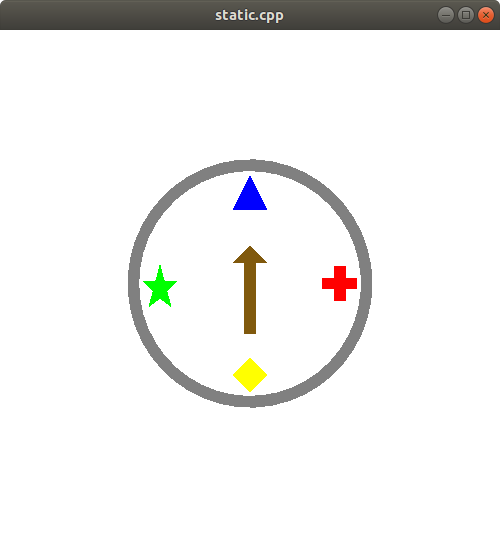
-
When the user presses the ESC key, program stops running and exits.
-
When the user left clicks the mouse on any of four shapes objects (triangle, cross, diamond, or star) on the screen, a black frame will be drawn around the shape, and a text message will appear at the bottom of the screen stating that the object is selected and press SPACE to spin. For example, if user clicks on the green star following image will be generated:
The thickness of the frame and the font type are up to the programmer. Only one shape can be selected at a time. The mouse selection region does not have to be precise. A circular region at shape center with diameter n can be used as the selection region of that shape.
-
After the selection of a shape, the user presses the SPACE key. The brown arrow starts spinning clockwise around its center (black point) and randomly stops at a shape (after passing at least 3 and at most 15 shapes). The rotation is expected to be smooth, so the user will see a transition from one shape to another shape. Please set your FPS (frames per second) as 30. There will be 5-degree rotation change between each frame. And each time the user presses the key, arrow will point a random shape. The arrow will never stop between shapes. SPACE key will not work if a shape is not selected.
If the arrow stops at the selected shape, a You win! message appears at the bottom of the screen. If arrow stops at a different shape, the message will print You lose!. For example:
-
When the user right clicks the mouse on one of the four shape objects (triangle, cross, diamond, and star) a pop-up color menu will appear. The user will see four color options: purple, orange, cyan, and pink. When he/she selects a color, the color of that shape is replaced with the new color.
-
When the user presses R/r key, all four shape objects will be translated (or shifted) counter-clockwise. For instance, one key press will move triangle to the west, star to the south, diamond to the east, and cross to the north (as shown in following figure).
Similar to the item 3, this transition will be smooth. The user will see all shapes are moving from their initial positions to their new positions.
this is an open gl code that produced the results of this image that is shown. Now the steps in this project are adding animations in this code to produce the results what is asked for
static.cpp static.cpp
Step by Step Solution
There are 3 Steps involved in it
To achieve the desired functionalities with animations in OpenGL follow these steps Step 1 Setup Basic Environment Ensure that you have included neces... View full answer

Get step-by-step solutions from verified subject matter experts
 Study Help