







Question: #include #include #include #include #include using namespace std; int main() { ifstream file; string filename, str, word; int Lcount=0, Wcount=0, Icount=0, BLcount=0, i=0; bool isInt
#include
using namespace std;
int main() { ifstream file; string filename, str, word; int Lcount=0, Wcount=0, Icount=0, BLcount=0, i=0; bool isInt = false; cout > filename; file.open(filename.c_str()); if(!file) { cerr > word; while(ss.good()){ Wcount++; i=0; if(i==0 && (isdigit(word.at(0) || word[0]== '-' || word[0] == '+'))){ isInt = true; i++; } while(i
return 0; } cout
THAT IS MY CODE BUT IT IS NOT WORKING CAN SOMEONE PLEASE HELP ME?
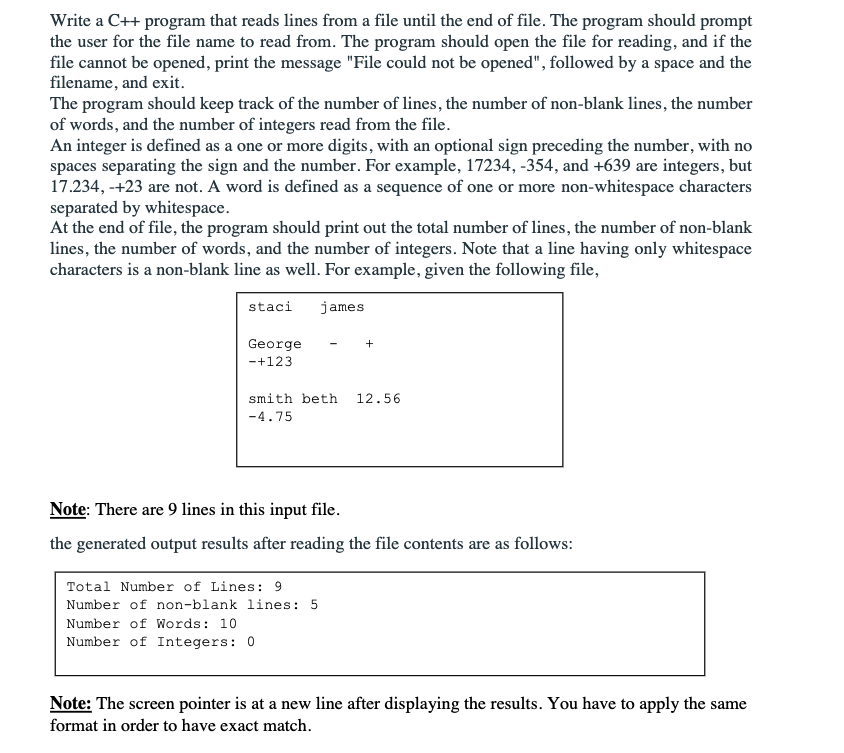
Write a C++ program that reads lines from a file until the end of file. The program should prompt the user for the file name to read from. The program should open the file for reading, and if the file cannot be opened, print the message "File could not be opened", followed by a space and the filename, and exit. The program should keep track of the number of lines, the number of non-blank lines, the number of words, and the number of integers read from the file. An integer is defined as a one or more digits, with an optional sign preceding the number, with no spaces separating the sign and the number. For example, 17234, -354, and +639 are integers, but 17.234, -+23 are not. A word is defined as a sequence of one or more non-whitespace characters separated by whitespace. At the end of file, the program should print out the total number of lines, the number of non-blank lines, the number of words, and the number of integers. Note that a line having only whitespace characters is a non-blank line as well. For example, given the following file, staci james + George - +123 12.56 smith beth -4.75 Note: There are 9 lines in this input file. the generated output results after reading the file contents are as follows: Total Number of Lines: 9 Number of non-blank lines: 5 Number of Words: 10 Number of Integers: 0 Note: The screen pointer is at a new line after displaying the results. You have to apply the same format in order to have exact match
Step by Step Solution
There are 3 Steps involved in it

Get step-by-step solutions from verified subject matter experts
 Study Help