







Question: #include #include #include using namespace std; long compares; // for counting compares long swaps; // for counting swaps bool counted_less(int n1, int n2) { ++compares;
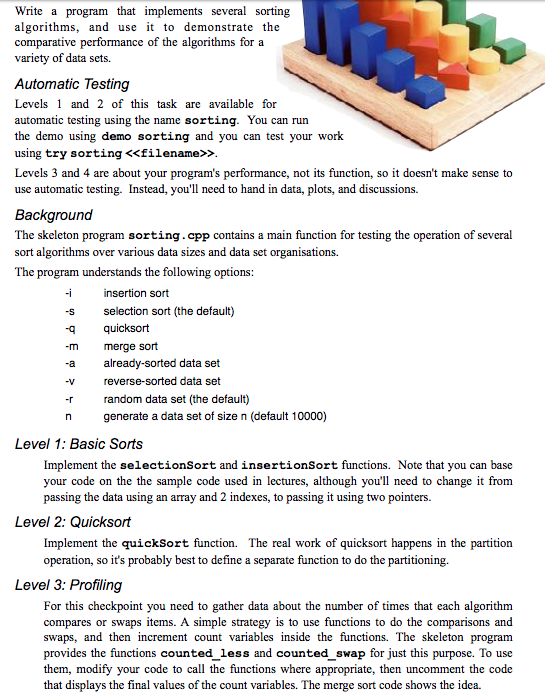
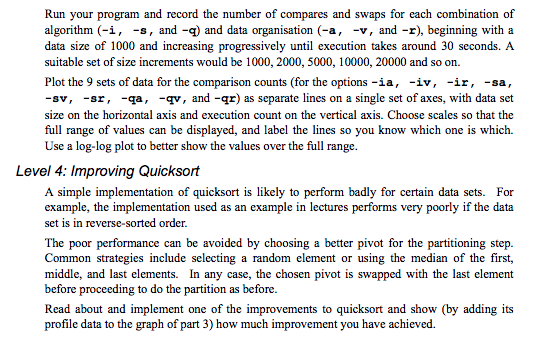
#include#include #include using namespace std; long compares; // for counting compares long swaps; // for counting swaps bool counted_less(int n1, int n2) { ++compares; return n1 0) size = atoi(argv[0]); int* data = new int[size]; if (dataset == "already sorted") { for (int i = 0; i Write a program that implements several sorting algorithms, and use to demonstrate the comparative performance of the algorithms for a variety of data sets. Automatic Testing Levels and 2 of this task are available for automatic testing using the name sorting. You can run the demo using demo sorting and you can test your work using try sorting > Levels 3 and 4 are about your program's performance, not its function, so it doesn't make sense to use automatic testing. Instead, you'll need to hand in data, plots, and discussions. Background The skeleton program sorting.cpp contains a main function for testing the operation of several sort algorithms over various data sizes and data set organisations. The program understands the following options: insertion sort -s selection sort (the default) qquicksort -m merge sort -a already-sorted data set -V rrandom data set (the default) n generate a data set of size n (default 10000) reverse-sorted data set Level 1: Basic Sorts Implement the selectionSort and insertionSort functions. Note that you can base your code on the the sample code used in lectures, although you'll need to change it from passing the data using an array and 2 indexes, to passing it using two pointers. Level 2: Quicksot Implement the quicksort function. The real work of quicksort happens in the partition operation, so it's probably best to define a separate function to do the partitioning. Level 3: Profiling For this checkpoint you need to gather data about the number of times that each algorithm compares or swaps items. A simple strategy is to use functions to do the comparisons and swaps, and then increment count variables inside the functions. The skeleton program provides the functions counted less and counted swap for just this purpose. To use them, modify your code to call the functions where appropriate, then uncomment the code that displays the final values of the count variables. The merge sort code shows the idea. Write a program that implements several sorting algorithms, and use to demonstrate the comparative performance of the algorithms for a variety of data sets. Automatic Testing Levels and 2 of this task are available for automatic testing using the name sorting. You can run the demo using demo sorting and you can test your work using try sorting > Levels 3 and 4 are about your program's performance, not its function, so it doesn't make sense to use automatic testing. Instead, you'll need to hand in data, plots, and discussions. Background The skeleton program sorting.cpp contains a main function for testing the operation of several sort algorithms over various data sizes and data set organisations. The program understands the following options: insertion sort -s selection sort (the default) qquicksort -m merge sort -a already-sorted data set -V rrandom data set (the default) n generate a data set of size n (default 10000) reverse-sorted data set Level 1: Basic Sorts Implement the selectionSort and insertionSort functions. Note that you can base your code on the the sample code used in lectures, although you'll need to change it from passing the data using an array and 2 indexes, to passing it using two pointers. Level 2: Quicksot Implement the quicksort function. The real work of quicksort happens in the partition operation, so it's probably best to define a separate function to do the partitioning. Level 3: Profiling For this checkpoint you need to gather data about the number of times that each algorithm compares or swaps items. A simple strategy is to use functions to do the comparisons and swaps, and then increment count variables inside the functions. The skeleton program provides the functions counted less and counted swap for just this purpose. To use them, modify your code to call the functions where appropriate, then uncomment the code that displays the final values of the count variables. The merge sort code shows the idea
Step by Step Solution
There are 3 Steps involved in it
1 Expert Approved Answer
Step: 1 Unlock

Question Has Been Solved by an Expert!
Get step-by-step solutions from verified subject matter experts
Step: 2 Unlock
Step: 3 Unlock
 Study Help