







Question: #include #include using namespace std; class Order { public: void SetFoodAndQuantity(string newFood, int newQuantity); int GetQuantity() const; private: string food; int quantity; }; void Order::SetFoodAndQuantity(string
#include
class Order { public: void SetFoodAndQuantity(string newFood, int newQuantity); int GetQuantity() const; private: string food; int quantity; };
void Order::SetFoodAndQuantity(string newFood, int newQuantity) { food = newFood; quantity = newQuantity; }
int Order::GetQuantity() const { return quantity; }
class Ledger { public: void InputOrders(); int FindHighestOrderQuantity(); private: vector
void Ledger::InputOrders() { int orderCount; unsigned int i; Order currOrder; string currFood; int currQuantity; cin >> orderCount; for (i = 0; i > currFood; cin >> currQuantity; currOrder.SetFoodAndQuantity(currFood, currQuantity); orderList.push_back(currOrder); } }
// ENTER THE MISSING PIECE OF CODE HERE AND TEST IT IN C++. DO NOT MODIFY THE REST OF THE CODE. (THANK YOU!)
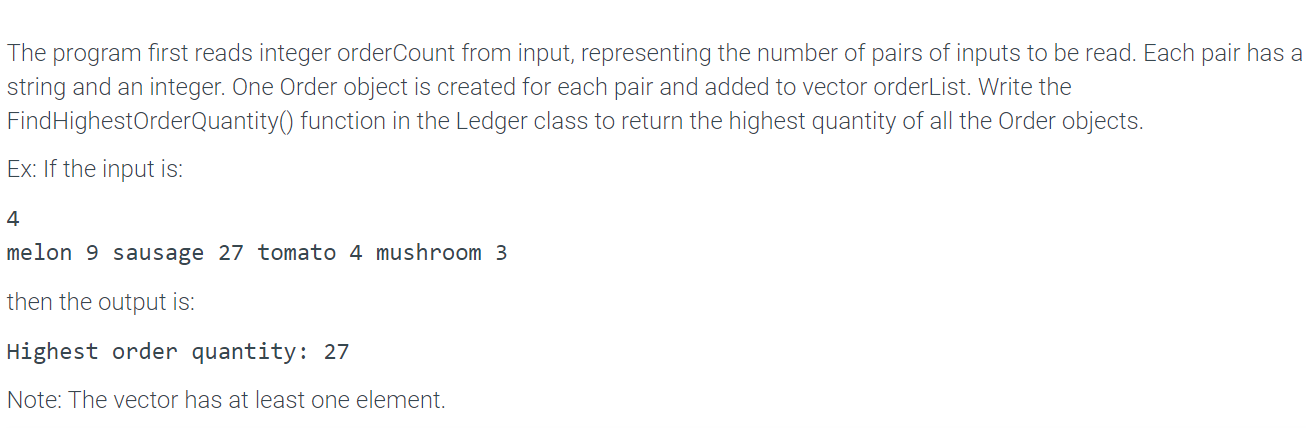
int main() { Ledger ledger; ledger.InputOrders(); cout The program first reads integer orderCount from input, representing the number of pairs of inputs to be read. Each pair has a string and an integer. One Order object is created for each pair and added to vector orderList. Write the FindHighestOrderQuantity() function in the Ledger class to return the highest quantity of all the Order objects. Ex: If the input is: 4 melon 9 sausage 27 tomato 4 mushroom 3 then the output is: Highest order quantity: 27 Note: The vector has at least one element
Step by Step Solution
There are 3 Steps involved in it

Get step-by-step solutions from verified subject matter experts
 Study Help