







Question: #include using namespace std; //------------------------ class node -------------------------- class node { friend class stack; private: int key = 0; node * next = NULL; };
#includeusing namespace std; //------------------------ class node -------------------------- class node { friend class stack; private: int key = 0; node * next = NULL; }; //----------------------- class stack --------------------------- class stack { public: void print(); void push(int newkey); int pop(); private: node * top = NULL; }; //----------------------- stack::print --------------------------- void stack::print() { cout "; cin >> opt; switch (opt) { case 1: cout > key; s.push(key); s.print(); break; case 2: key = s.pop(); cout Specifications:
All of the project is complete, except for the coding of the print(), pop() and push() methods. Complete the push() and pop() by writing one line of code for each comment as instructed in the comments. NOTE: the following count as one line of code, though you might count them as two. You may write them as two (or more) if you wish:
if (n==NULL) return 1; if (n==NULL) return 1;
node * n = new node; node * n; n = new node;
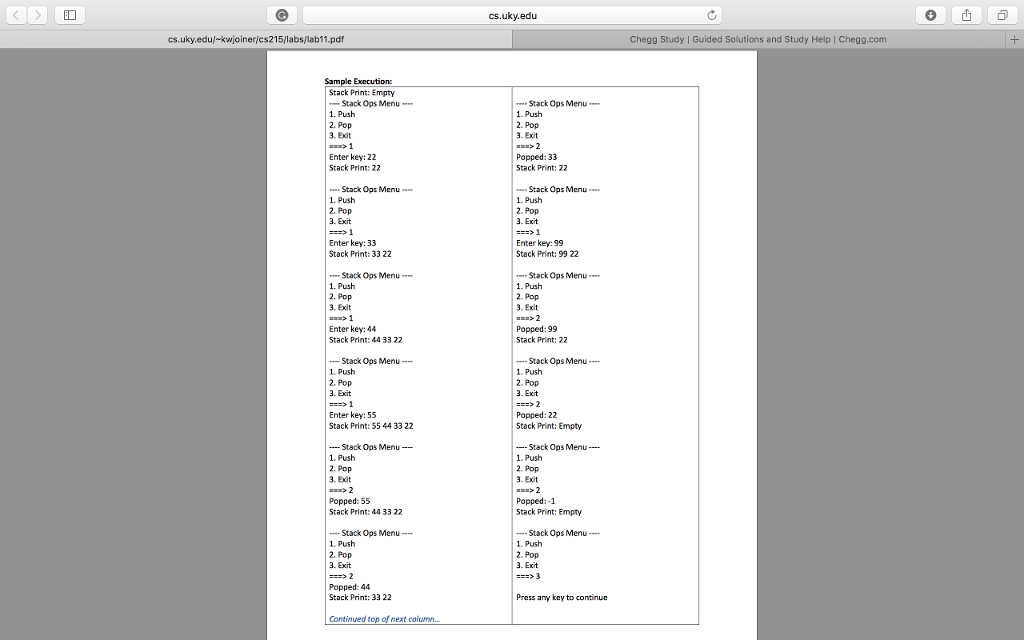
Look at the code for print() for Linked Lists in the course notes to complete the print() method. It should print Stack Print: Empty when the stack is empty, or Stack Print: followed by the keys of all nodes in the stack, top-to-bottom printed left-to-right.
The code should be like the following example:
Thanks
cs.uky.edu cs.uky.edu/-kwjoiner/cs215/labs/lab11.pdf Chegg Study | Guided Solutions and Study Help | Chegg.com Sample Execution: Stack Print: Empty Stack Ops Menu 1. Push 2. Pop 3. Exit Stack Ops Menu 1. Push 2. Pop 3. Exit Enter key: 22 Stack Print: 22 Popped: 33 Stack Print: 22 Stack Ops Menu 1. Push 2. Pop 3. Exit Stack Ops Menu 1. Push 2. Pop 3. Exit Enter key: 33 Stack Print: 33 22 Enter key: 99 Stack Print: 99 22 Stack Ops Menu 1. Push 2. Pop 3. Exit Stack Ops Menu 1. Push 2. Pop 3. Exit Enter key: 44 Stack Print:44 33 22 Popped:99 Stack Print: 22 Stack Ops Menu 1. Push 2. Pop 3. Exit Stack Ops Menu 1. Push 2. Pop . Exit Enter key: 55 Stack Print: 55 4433 22 Popped: 22 Stack Print: Empty -Stack Ops Menu- 1. Push 2. Pop 3. Exit 2 Popped: 55 Stack Print:44 33 22 Stack Ops Menu- Push 2. Pop 3. Exit Popped:-1 Stack Print: Empty Stack Ops Menu 1. Push 2. Pop 3. Exit Stack Ops Menu 1. Push 2. Pop . Exit Popped: 44 Stack Print: 33 22 Press any key to continuc Continued t next colu
Step by Step Solution
There are 3 Steps involved in it

Get step-by-step solutions from verified subject matter experts
 Study Help