







Question: Index.php: number_tester.php: Number Tester Number Tester Number 1:
Index.php:
//process $action = filter_input(INPUT_POST, 'action'); switch ($action) { case 'process_data': $number1 = filter_input(INPUT_POST, 'number1'); $number2 = filter_input(INPUT_POST, 'number2'); $number3 = filter_input(INPUT_POST, 'number3');
// make sure the user enters three numbers
// make sure the numbers are valid
// get the ceiling and floor for $number2
// round $number3 to 3 decimal places
// get the max and min values of all three numbers
// generate a random integer between 1 and 100
// format the message $message = "This page is under construction. " . "Please write the code that processes the data."; //$message = // "Number 1: $number1 " . // "Number 2: $number2 " . // "Number 3: $number3 " . // " " . // "Number 2 ceiling: $number2_ceil " . // "Number 2 floor: $number2_floor " . // "Number 3 rounded: $number3_rounded " . // " " . // "Min: $min " . // "Max: $max " . // " " . // "Random: $random ";
break; } include 'number_tester.php'; ?>
number_tester.php:
Number Tester
Message:
main.css:
body { font-family: Arial, Helvetica, sans-serif; } main { width: 450px; margin: 0 auto; padding: 1em; background: white; border: 2px solid navy; } h1 { margin-top: 0; color: navy; } label { display: block; width: 8em; text-align: right; margin: 0 0 .5em; padding: 0 1em; float: left; } input, select { display: block; float: left; margin-bottom: .5em; margin-top: 0; } br { clear: left; }
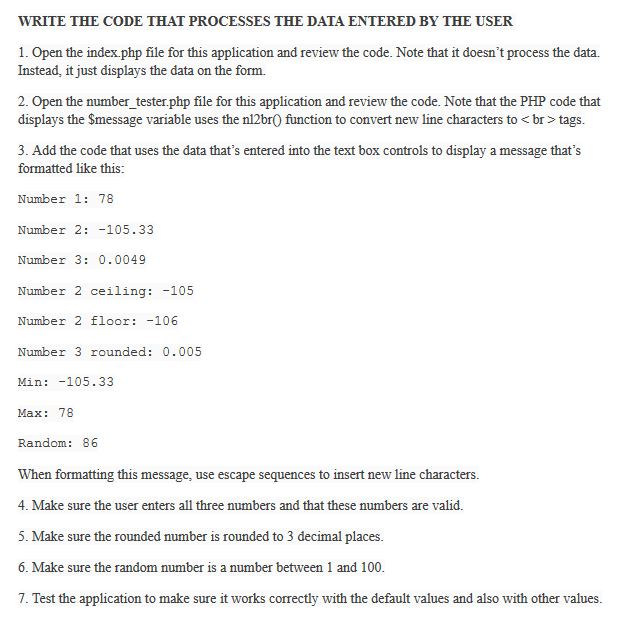
WRITE THE CODE THAT PROCESSES THE DATA ENTERED BY THE USER 1. Open the index.php file for this application and review the code. Note that it doesn't process the data. Instead, it just displays the data on the form. 2. Open the number tester.php file for this application and review the code. Note that the PHP code that displays the Smessage variable uses the nl2br0 function to convert new line characters to tags. 3. Add the code that uses the data that's entered into the text box controls to display a message that's formatted like this: Number 1: 78 Number 2: -105.33 Number 3: 0.0049 Number 2 ceiling: -105 Number 2 floor -106 Number 3 rounded: 0.005 Min: -105.33 Max: 78 Random: 86 When formatting this message, use escape sequences to insert new line characters. 4. Make sure the user enters all three numbers and that these numbers are valid. 5. Make sure the rounded number is rounded to 3 decimal places. 6. Make sure the random number is a number between 1 and 100 7. Test the application to make sure it works correctly with the default values and also with other values
Step by Step Solution
There are 3 Steps involved in it

Get step-by-step solutions from verified subject matter experts
 Study Help