







Question: ineed a short simple java code :) Assertions in java. Exercise 1 Questions: 1. Type the program above and compile. Run and enter an integer
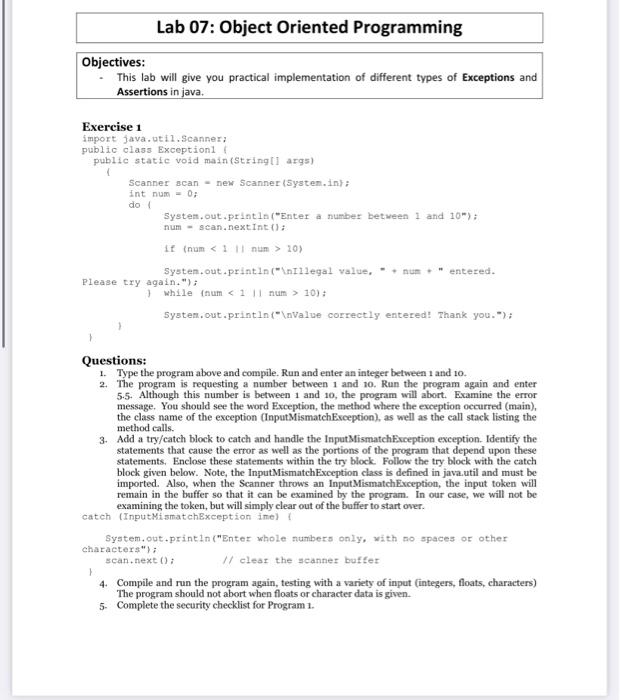
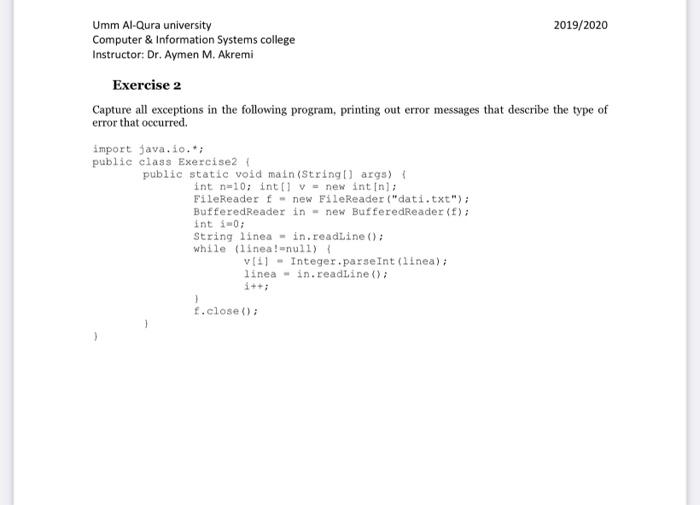
Assertions in java. Exercise 1 Questions: 1. Type the program above and compile. Run and enter an integer between 1 and 10. 2. The program is requesting a number between 1 and 10. Run the program again and enter 5.5. Although this number is between 1 and 10 , the program will abort. Examine the error message. You should see the word Exception, the method where the exception occurred (main), the class name of the exception (InputMismatchException), as well as the call stack listing the method calls. 3. Add a try/catch block to catch and handle the InputMismatchException exception. Identify the statements that cause the error as well as the portions of the program that depend upon these statements. Enclose these statements within the try block. Follow the try block with the catch block given below. Note, the InputMismatchException class is defined in java.util and must be imported. Also, when the Scanner throws an InputMismatchException, the input token will remain in the buffer so that it can be examined by the program. In our case, we will not be examining the token, but will simply clear out of the buffer to start over. catch (InputMiamatchBxception ime) i System,out.printin("Enter whole numbers only, with no spaces or other characters"); scan,next(); /1 clear the scanner buffer 1 4. Compile and run the program again, testing with a variety of input (integers, floats, characters) The program should not abort when floats or character data is given. 5. Complete the security checklist for Program 1. Umm Al-Qura university Computer \& Information Systems college Instructor: Dr. Aymen M. Akremi Exercise 2 Capture all exceptions in the following program, printing out error messages that describe the type of error that occurred
Step by Step Solution
There are 3 Steps involved in it

Get step-by-step solutions from verified subject matter experts
 Study Help