







Question: ; Initialize the LCD and then ; send the string STR to the it ; RS EQU P1.3 E EQU P1.2 D7 EQU P1.7 D6
; Initialize the LCD and then
; send the string STR to the it
;
RS EQU P1.3
E EQU P1.2
D7 EQU P1.7
D6 EQU P1.6
D5 EQU P1.5
D4 EQU P1.4
ORG 0100H
STR: DB "First Last"
NULL: DB 0
ORG 0000H
ACALL INIT_DISPLAY ; initialize LCD
MOV DPTR, #STR
LOOP:
CLR A
MOVC A, @A+DPTR
JZ DONE
ACALL SEND_DATA
INC DPTR
SJMP LOOP
DONE:
SJMP $
; ---- procedure send_cmd -------
SEND_CMD:
CLR RS ; RS = 0 => command
ACALL SEND
RET
; --- end procedure send_cmd ----
; ---- procedure send_data ------
SEND_DATA:
SETB RS ; RS = 1 => data
ACALL SEND
RET
; --- end procedure send_data ---
; ---- procedure init_display ---
INIT_DISPLAY:
; RS = 0 => command
CLR RS
; high nibble = 0010 = 001(DL)
; DL = 0 => 4-bit mode
CLR D7
CLR D6
SETB D5
CLR D4 ; DL = 0 => 4-bit
; negative Edge on E
; send data
SETB E
CLR E
ACALL DELAY
; send the same high nibble again
; then send the lower nibble
; high nibble = 0010
; low nibble = 1000 = N F - -
; N = 1 ==> 2 lines
; F = 0 ==> 5 x 7 dots per font
MOV A,#00101000B
ACALL SEND
; Display ON command
; high nibble = 0000
; low nibble = 1DCB = 1000
; D = 1 ==> display on
; C = 1 ==> Cursor on
; B = 1 ==> Cursor blinking
MOV A,#0FH
ACALL SEND
; Entry Mode set command
; high nibble = 0000
; low nibble = 01(1/D)S = 0110
; 1/D = 1 ==> increment cursor
; S = 0 ==> Don't shift display
MOV A,#06H
ACALL SEND
RET
; -- end procedure init_display -
; --- procedure send -----
SEND:
MOV C, ACC.7
MOV D7, C
MOV C, ACC.6
MOV D6, C
MOV C, ACC.5
MOV D5, C
MOV C, ACC.4
MOV D4, C
SETB E
CLR E
ACALL DELAY
MOV C, ACC.3
MOV D7, C
MOV C, ACC.2
MOV D6, C
MOV C, ACC.1
MOV D5, C
MOV C, ACC.0
MOV D4, C
SETB E
CLR E
ACALL DELAY
RET
; -- end procedure send --
; ------- procedure delay -------
DELAY:
MOV R0, #100
DJNZ R0, $
RET
; ----- procedure delay end ------
; ---- procedure long delay -----
LDELAY:
MOV R1, #10
LL: MOV R0, #100
DJNZ R0, $
DJNZ R1, LL
RET
; --- procedure long delay end ---
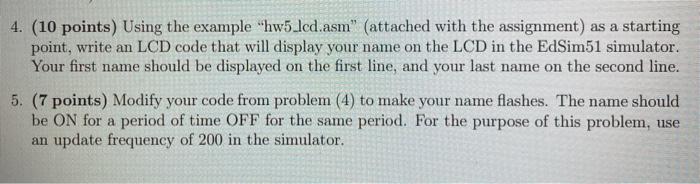
4. (10 points) Using the example "hw5.lcd.asm" (attached with the assignment) as a starting point, write an LCD code that will display your name on the LCD in the EdSim51 simulator. Your first name should be displayed on the first line, and your last name on the second line. 5. (7 points) Modify your code from problem (4) to make your name flashes. The name should be ON for a period of time OFF for the same period. For the purpose of this problem, use an update frequency of 200 in the simulator
Step by Step Solution
There are 3 Steps involved in it
1 Expert Approved Answer
Step: 1 Unlock

Question Has Been Solved by an Expert!
Get step-by-step solutions from verified subject matter experts
Step: 2 Unlock
Step: 3 Unlock
 Study Help