







Question: PART B: Programming Section a C project in CodeWarrior: HCS129 HCS12D Family MCS12DG256B A. . Build a program th This t completes the following objectives
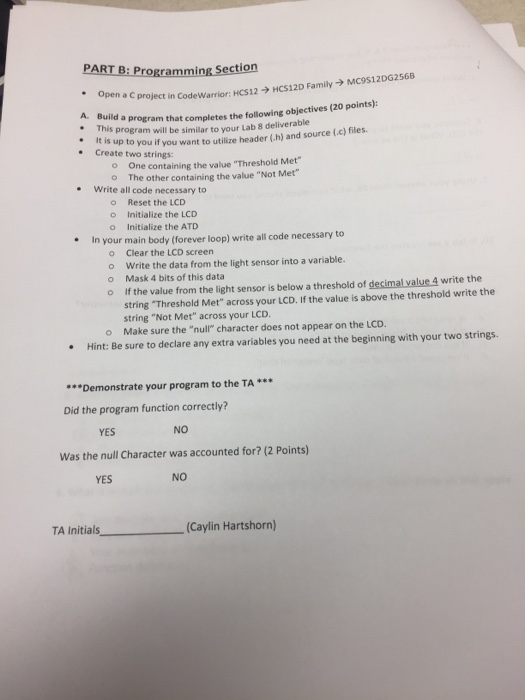
PART B: Programming Section a C project in CodeWarrior: HCS129 HCS12D Family MCS12DG256B A. . Build a program th This t completes the following objectives (20 points): s program will be similar to your Lab 8 deliverable s up to you if you want to utilize header (h) and source (c) files. It i . Create two string5 o One containing the value "Threshold Met" o The other containing the value "Not Met" Write all code necessary to Reset the LCD o o Initialize the LCD o Initialize the ATD .In your main body (forever loop) write all code necessary to o o o o Clear the LCD screen Write the data from the light sensor into a variable. Mask 4 bits of this data If the value from the light sensor is below a threshold of decimal value 4 write the string "Threshold Met" across your LCD. If the value is above the threshold write the string "Not Met" across your LCD. o Make sure the "null" character does not appear on the LCD. Hint: Be sure to declare any extra variables you need at the beginning with your two strings. ***Demonstrate your program to the TA ** Did the program function correctly? NO Was the null Character was accounted for? (2 Points) NO YES YES TA Initials- (Caylin Hartshorn) PART B: Programming Section a C project in CodeWarrior: HCS129 HCS12D Family MCS12DG256B A. . Build a program th This t completes the following objectives (20 points): s program will be similar to your Lab 8 deliverable s up to you if you want to utilize header (h) and source (c) files. It i . Create two string5 o One containing the value "Threshold Met" o The other containing the value "Not Met" Write all code necessary to Reset the LCD o o Initialize the LCD o Initialize the ATD .In your main body (forever loop) write all code necessary to o o o o Clear the LCD screen Write the data from the light sensor into a variable. Mask 4 bits of this data If the value from the light sensor is below a threshold of decimal value 4 write the string "Threshold Met" across your LCD. If the value is above the threshold write the string "Not Met" across your LCD. o Make sure the "null" character does not appear on the LCD. Hint: Be sure to declare any extra variables you need at the beginning with your two strings. ***Demonstrate your program to the TA ** Did the program function correctly? NO Was the null Character was accounted for? (2 Points) NO YES YES TA Initials- (Caylin Hartshorn)
Step by Step Solution
There are 3 Steps involved in it

Get step-by-step solutions from verified subject matter experts
 Study Help