Question: input files: https://www.dropbox.com/s/6k69wsc2lf4r6pz/Frankenstein.txt?dl=0 https://www.dropbox.com/s/4txh2asc0nogqqp/CatInTheHat.txt?dl=0 Write a program that reads a text file and counts the number of times each English word appears. Display the 25
input files: https://www.dropbox.com/s/6k69wsc2lf4r6pz/Frankenstein.txt?dl=0
https://www.dropbox.com/s/4txh2asc0nogqqp/CatInTheHat.txt?dl=0
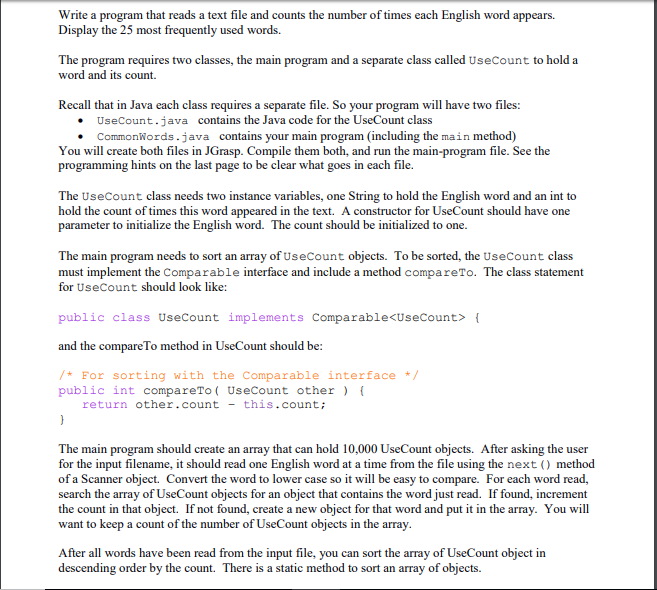
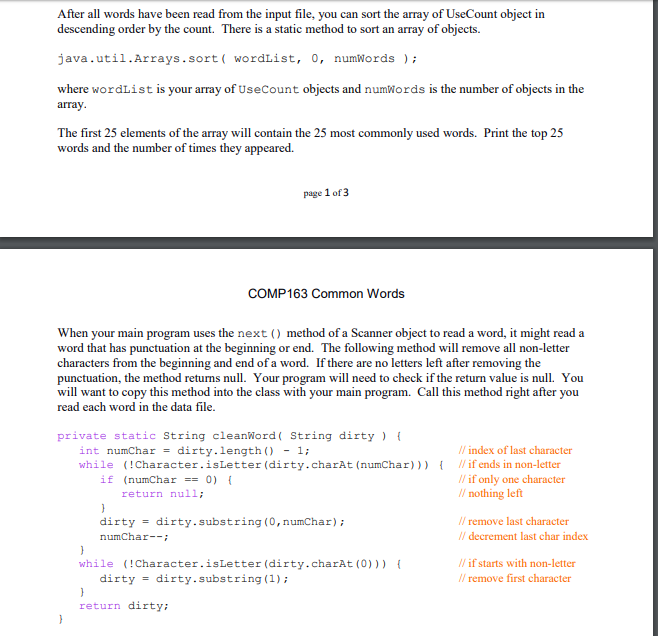
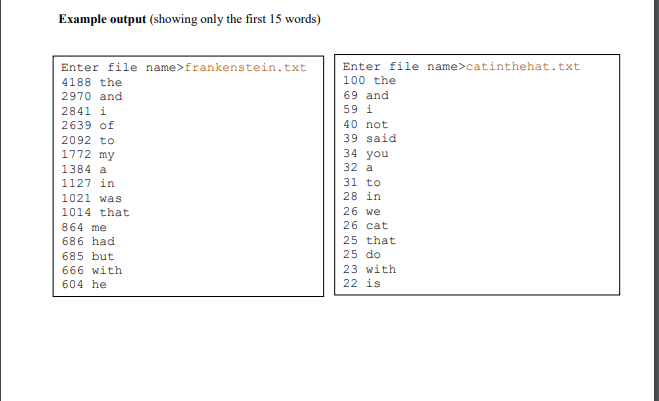
Write a program that reads a text file and counts the number of times each English word appears. Display the 25 most frequently used words. The program requires two classes, the main program and a separate class called UseCount to hold a word and its count. Recall that in Java each class requires a separate file. So your program will have two files: UseCount.java contains the Java code for the UseCount class CommonWords.java contains your main program (including the main method) You will create both files in JGrasp. Compile them both, and run the main-program file. See the g hints on the last pag e to be clear what goes in each file. The UseCount class needs two instance variables, one String to hold the English word and an int to hold the count of times this word appeared in the text. A constructor for UseCount should have one parameter to initialize the English word. The count should be initialized to one The main program needs to sort an array of UseCount objects. To be sorted, the UseCount class must implement the Comparable interface and include a method compareTo. The class statement for UseCount should look like: public class Usecount implements Comparable { and the compare To method in UseCount should be: For sorting with the Comparable interface public int compareTo ( UseCount other return other.count- this.count The main program should create an array that can hold 10,000 UseCount objects. After asking the user for the input filename, it should read one English word at a time from the file using the next) method of a Scanner object. Convert the word to lower case so it will be easy to compare. For each word read, search the array of UseCount objects for an object that contains the word just read. If found, increment the count in that object. If not found, create a new object for that word and put it in the array. You will want to keep a count of the number of UseCount objects in the array After all words have been read from the input file, you can sort the array of UseCount object in descending order by the count. There is a static method to sort an array of objects. Write a program that reads a text file and counts the number of times each English word appears. Display the 25 most frequently used words. The program requires two classes, the main program and a separate class called UseCount to hold a word and its count. Recall that in Java each class requires a separate file. So your program will have two files: UseCount.java contains the Java code for the UseCount class CommonWords.java contains your main program (including the main method) You will create both files in JGrasp. Compile them both, and run the main-program file. See the g hints on the last pag e to be clear what goes in each file. The UseCount class needs two instance variables, one String to hold the English word and an int to hold the count of times this word appeared in the text. A constructor for UseCount should have one parameter to initialize the English word. The count should be initialized to one The main program needs to sort an array of UseCount objects. To be sorted, the UseCount class must implement the Comparable interface and include a method compareTo. The class statement for UseCount should look like: public class Usecount implements Comparable { and the compare To method in UseCount should be: For sorting with the Comparable interface public int compareTo ( UseCount other return other.count- this.count The main program should create an array that can hold 10,000 UseCount objects. After asking the user for the input filename, it should read one English word at a time from the file using the next) method of a Scanner object. Convert the word to lower case so it will be easy to compare. For each word read, search the array of UseCount objects for an object that contains the word just read. If found, increment the count in that object. If not found, create a new object for that word and put it in the array. You will want to keep a count of the number of UseCount objects in the array After all words have been read from the input file, you can sort the array of UseCount object in descending order by the count. There is a static method to sort an array of objects









 Study Help