







Question: Insert data in Green Highlighted Cells and formulas in Yellow Highlighted Cells. The cell to the right of the Yellow Highlighted Cell where you insert
Insert data in "Green Highlighted Cells" and formulas in "Yellow Highlighted Cells". The cell to the right of the "Yellow Highlighted Cell" where you insert your formula
Answers for problems 1-4 needed, find PV, FV, I = Rate, and N = Number of Periods
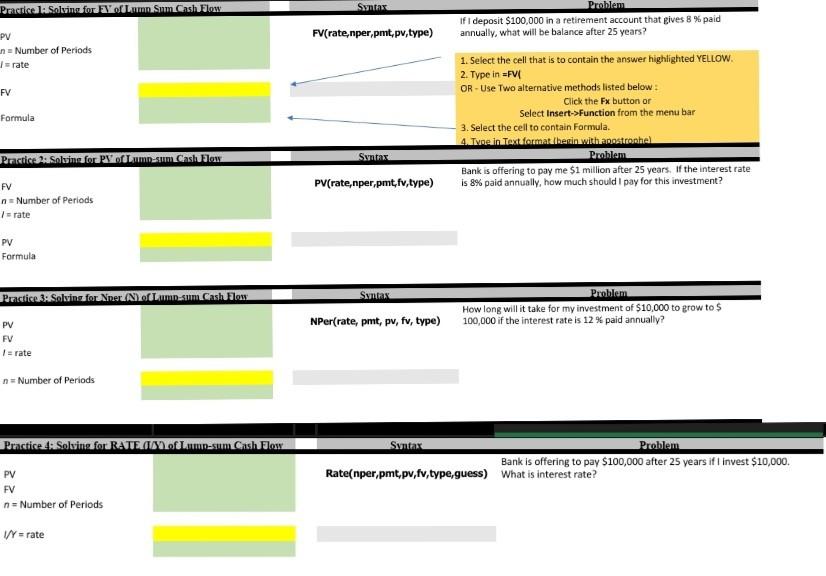
Pracrice 1: Solvine for EV of Lomm. Sinm. Cash Jlow Syntax Rroblem FV(rate,nper,pmt,pv,type) annually, what will be balance after 25 years? 1. Select the cell that is to contain the answer highlighted YELLOW. 2. Type in =FV| OR - Use Two alternative methods listed below : Click the Fx button or Formula Select insert->function from the menu bar 3. Select the cell to contain Formula. 4. Tivoe in Text format:/herin with anostronahel. Syntax Problem. PV FV n= Number of Periods 4Y= rate Rate(nper,pmt,pv,fv,type,guess) What is interest rate
Step by Step Solution
There are 3 Steps involved in it

Get step-by-step solutions from verified subject matter experts
 Study Help