







Question: Insert key '14' as a root for the following binary search tree. Use left and right rotations as needed. (First, you need to add key
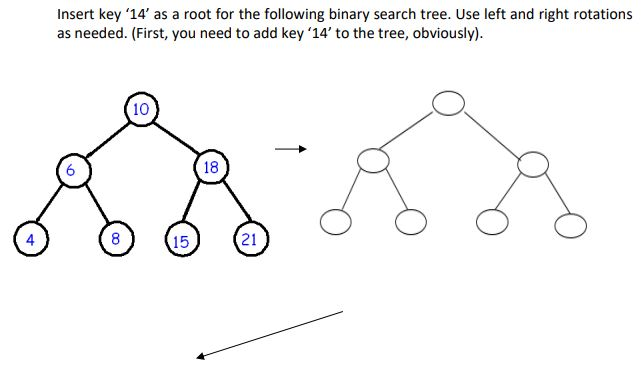
Insert key '14' as a root for the following binary search tree. Use left and right rotations as needed. (First, you need to add key 14' to the tree, obviously) 10 6 18 4 8 15 21
Step by Step Solution
There are 3 Steps involved in it
1 Expert Approved Answer
Step: 1 Unlock

Question Has Been Solved by an Expert!
Get step-by-step solutions from verified subject matter experts
Step: 2 Unlock
Step: 3 Unlock
 Study Help