







Question: Insert the data (provided in the excel file below) using INSERT INTO commands to the respective database table 2 - - Home Insert Draw Page
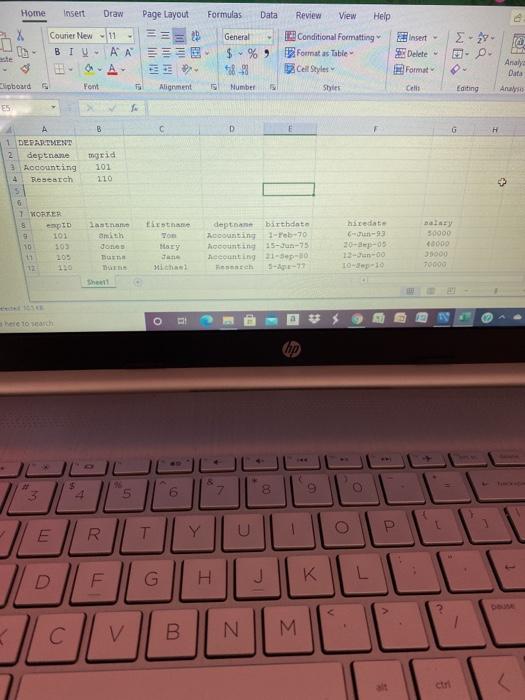
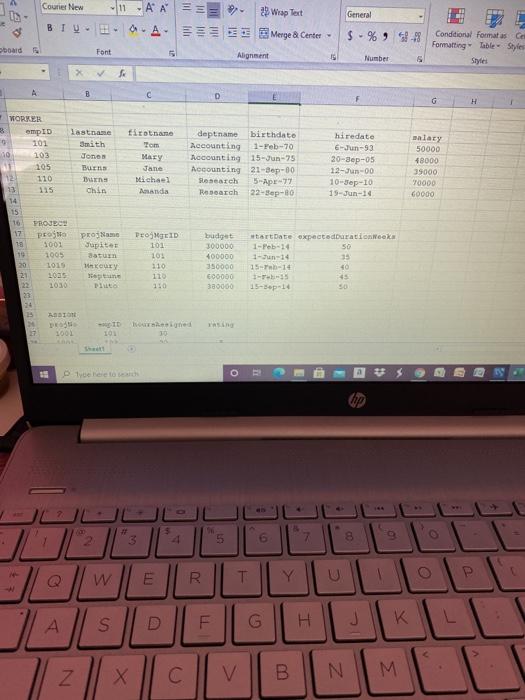
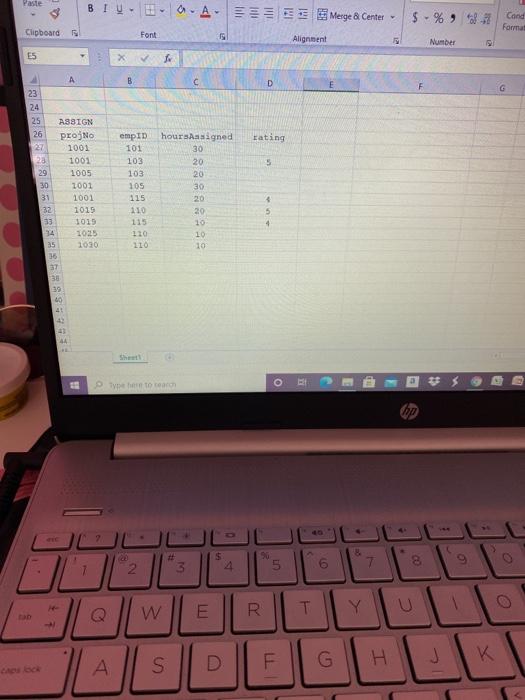
2 - - Home Insert Draw Page Layout Formulas Data Review View Help Courier New - 11 General Conditional Formatting Insert - BIVAA EE $ - %, format a Table Delete ste A 18-23 2 Cell Style Format Clipboard Font Alignment 15 Number Shes Cell Analy Data Anas Editing ES A B D G 1 DEPARTMENT 2 depthane 2. Accounting 4 Research togrid 101 110 5 1 VORTER 3 pID 9 103 10 11 209 110 lastan Smith Jones To Firstnane To EY Jane Michael depth birthdata Accounting 1-reb-70 Accounting 15-Jun-75 eeeunting 21-30 anch redate Can-23 20-ep-05 13-Jun-00 10-10 50000 0000 39000 70000 - been march 3 $ 4 in 6 7. E P Y R U - G H J K L ? B 1 N M Courier New General 11 AA== 0.A. 2 Wrap Text *Merge Center - Doad Font $ -% 95-98 Conditional format as em Formatting Table Style Styles Alignment Number 5 B D H firstnane Mary Jante Michael Ananda deptname birthdato Accounting 1-Feb-70 Accounting 15-Jun-75 Accounting 21-Bop-10 Sesearch 5-Apr-77 Research 22-Sep-20 hiredate 6Jun-93 20-Sep-05 12-Jun-00 10-Sep-10 15-Jun-14 salary 50000 18000 39000 TO000 60000 WORKER 3 empID Lastname 9 101 Smith 103 Jones 105 BERS 12 110 TS 13 Chin 14 15 16 PROJEON PES ProName 18 1001 Jupiter 19 1005 Saturn 20 1015 21 1025 Bite 1050 DIA Progen 101 10: budget 300000 400000 350000 E00000 3a0000 119 startDate expectadurationka 1-Feb-14 50 1-Jun-14 15--14 40 45 15-B 14 so 120 130 24 1001 Ded ION 30 o tyto here to sentito O # 3. 2 5 8 W @ R T U A S G H K Z V B N M M Paste BIV- Merge & Center $% Cand Format Clipboard Font Alignment Number ES B D rating 23 24 25 ASSIGN 26 Proj 27 1001 28 1001 29 1005 30 2001 31 1001 32 1015 33 1015 14 1025 15 1030 5 empID 101 103 103 105 115 110 115 110 110 hours signed 30 20 20 30 $ 5 29 10 10 10 38 40 4 41 The tota 2 90 8 $ 4 8 3 6 2 Ou Q W ITI R T Y U K A S H G D
Step by Step Solution
There are 3 Steps involved in it

Get step-by-step solutions from verified subject matter experts
 Study Help