







Question: inserting.java : import java.util.Arrays; public class inserting { public static void main(String[] args) { // TODO Auto-generated method stub int [] number = new int[5];
inserting.java :
import java.util.Arrays; public class inserting { public static void main(String[] args) { // TODO Auto-generated method stub int [] number = new int[5]; number[0]= 10; number[1]= 15; number[2]= 0; number[3]= 9; number[4]= 150; int n = number.length; int newArr[] = new int[n+1]; int value = 6; System.out.println(Arrays.toString(number)); for(int i = 0; i
removing.java :
import java.util.Arrays; public class removing { public static void main(String[] args) { int[] arr = new int[]{1,2,3,4,5}; int[] arr_new = new int[arr.length-1]; int j=3; for(int i=0, k=0;i
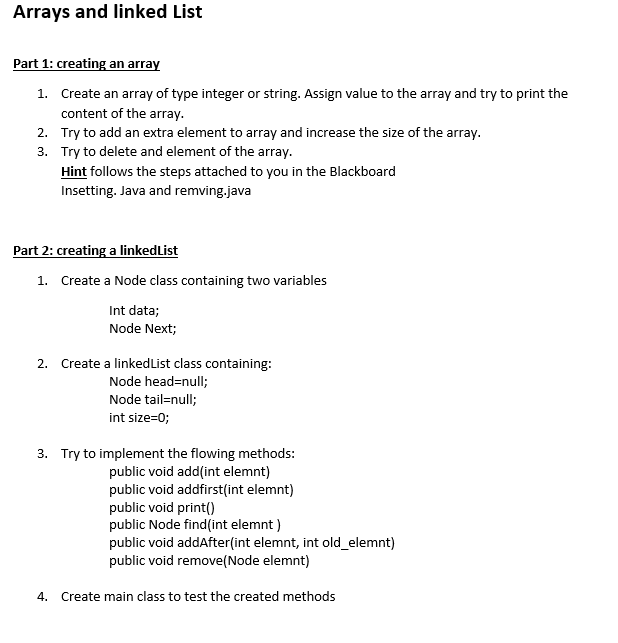
Part 1: creating an array 1. Create an array of type integer or string. Assign value to the array and try to print the content of the array. 2. Try to add an extra element to array and increase the size of the array. 3. Try to delete and element of the array. Hint follows the steps attached to you in the Blackboard Insetting. Java and remving.java Part 2: creating a linkedList 1. Create a Node class containing two variables Int data; Node Next; 2. Create a linkedList class containing: Node head=null; Node tail=null; int size =0; 3. Try to implement the flowing methods: public void add(int elemnt) public void addfirst(int elemnt) public void print() public Node find(int elemnt ) public void addAfter(int elemnt, int old_elemnt) public void remove(Node elemnt) 4. Create main class to test the created methods Step by Step Solution
There are 3 Steps involved in it
1 Expert Approved Answer
Step: 1 Unlock

Question Has Been Solved by an Expert!
Get step-by-step solutions from verified subject matter experts
Step: 2 Unlock
Step: 3 Unlock
 Study Help